What is CLAW3D? The Open-Source 3D Virtual Office for AI Agents
Managing multiple AI agents at once traditionally means staring at dashboards full of logs, terminal outputs, and cryptic numbers. CLAW3D is here to change that experience entirely.
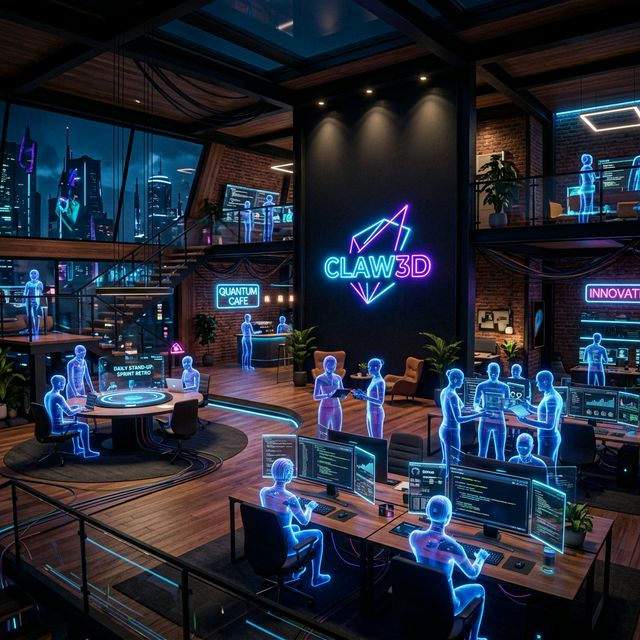
What is CLAW3D?
CLAW3D is an open-source 3D virtual office designed to let you see and interact with your AI agents in a completely new way. Instead of reading through endless logs, you walk into a virtual “office” and see exactly what each AI agent is doing — in real time.
The project serves as the Visualization and Interaction Layer that works alongside OpenClaw, the Intelligence and Task-Execution Layer of the system.
🎬 Watch It In Action: CLAW3D Demo | GitHub Repository
Why CLAW3D Matters
The classic problem with AI agents is opacity — you never really know what the AI is doing unless you dig through long logs. CLAW3D solves this by creating a “space” that makes AI systems understandable through space, motion, and presence.
🏢 What You Can Do in CLAW3D
- Watch AI agents work in real time — see what every agent is doing at any moment
- Run standups with agents connected to GitHub and Jira that report their own status
- Review pull requests from inside the office — examine code and approve work in the 3D environment
- Monitor QA pipelines and logs — track test pipelines in an immersive interface
- Train agents in the gym — develop new skills for your AI agents
- Reset sessions — clean context with the Janitor System
CLAW3D Architecture
The system is split into two main layers:
| Layer | Name | Role |
|---|---|---|
| Intelligence Layer | OpenClaw (Gateway) | Controls and executes AI Agent tasks |
| Visualization Layer | CLAW3D (Studio) | Displays results and enables user interaction in 3D |
Connection works in two hops:
- Browser → Studio over HTTP and WebSocket (
/api/gateway/ws) - Studio → OpenClaw Gateway over a second WebSocket
This design keeps gateway settings persisted on the Studio host and opens the upstream connection server-side, keeping the architecture secure.
Key Features
🌐 3D Retro Office Environment
A retro-style 3D office complete with desks, rooms, navigation, animations, and event-driven activity cues — it feels like walking through a real office.
🤖 Fleet Management
Manage AI agents as a fleet, view statuses, chat with agents, and receive real-time streaming updates from the gateway.
⚙️ Agent Configuration
Create new agents, adjust settings, control sessions, approve tasks, and edit configurations — all from the UI.
🏗️ Office Builder
Design and modify the office layout to your needs at /office/builder.
📊 Immersive Operational Spaces
Dedicated immersive areas for standups, GitHub review flows, analytics, and system monitoring.
Quick Start Guide
Requirements
- Node.js 20+ and npm 10+
- A running OpenClaw Gateway installation with a reachable URL and token
Install and Run
git clone <your-public-repo-url> claw3d
cd claw3d
npm install
cp .env.example .env
npm run dev
Then open http://localhost:3000 and configure the Gateway URL and token in Studio.
Deployment Options
1. Self-Hosted (Forever Free)
- Clone the repo and run it on your own infrastructure
- Supports Docker, Vercel, and more
- Full source code access
- Community support via GitHub
2. Hosted by CLAW3D (Coming Soon)
- Custom subdomain (
team.claw3d.ai) in 2 minutes - Automatic updates and backups
- Priority support with SLA
Who is CLAW3D For?
CLAW3D is ideal for:
- AI developers who want to visualize multi-agent system behavior
- DevOps teams who need immersive AI pipeline monitoring
- AI-first startups who want to demonstrate AI workflows to clients visually
- AI researchers who need tools to debug and inspect agent behavior
Links & Resources
- 🌐 Website: claw3d.ai
- 💻 GitHub: github.com/iamlukethedev/Claw3D
- 📖 VISION.md: Future direction of the project
- 📐 ARCHITECTURE.md: Technical blueprint
- 🎓 TUTORIAL.md: Cross-machine setup guide
Related Projects From Our Collection
If you’re interested in AI, IoT, and automation, check out similar projects from our catalog:
Summary
CLAW3D is one of the most exciting projects in the AI tooling space for 2025–2026. Its core idea — “instead of managing automation through dashboards and logs, you walk through your AI workplace” — represents a genuinely fresh vision for human-AI collaboration.
If you’re building AI agent systems and need guidance on architecture or visualization strategies, ProjectSupporter is ready to help.
Contact us today to turn your ideas into reality!
- Line ID: @oqk3359x
- Tel: 090-987-9566
อยากทำโปรเจคแบบนี้?
รับทำโปรเจค Arduino / IoT จบงานไว ส่งงานครบ พร้อมสอน
If you need Arduino project service or urgent IoT development, see full service details on the home page
ทักไลน์ @oqk3359x