Expert
โปรเจกต์ ระบบ Security System โดยใช้ PIR Sensor
นี่คือระบบ Security System โดยใช้ PIR
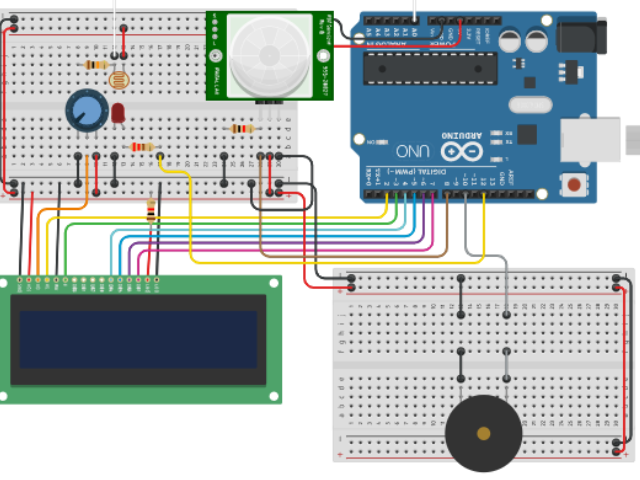
นี่คือระบบ Security System โดยใช้ PIR
โปรเจกต์นี้เป็นโปรเจกต์หนึ่งที่ฉันสร้างขึ้นสำหรับคลาส Robotics
นี่คือลิงก์สำหรับแบบจำลองใน Tinkercad
https://www.tinkercad.com/things/bjrHzMEOw6j
มาดูในส่วนของ Code กันครับ:
LiquidCrystallcd(2,3,4,5,6,7); ใช้สำหรับกำหนดค่าเริ่มต้นให้กับ Instance ของ LiquidCyrstal Class
int ledPin = 12;
const int PIRPin = 8;
int pirState = LOW;
int val = 0;
int photoCellPin = A0;
int photoCellReading;
int speakerPin = 10;
การประกาศ Variable ต่างๆ
void setup()
{
 lcd.begin(16,2);
 pinMode(ledPin, OUTPUT);
 pinMode(PIRPin, INPUT);
 pinMode(photoCellPin, INPUT);
 pinMode(speakerPin, INPUT);
 Serial.begin(9600);
 lcd.setCursor(0,0);
 lcd.print("P.I.R Motion And");
 lcd.setCursor(0,1);
 lcd.print("light sensors");
 delay(2000);
 lcd.clear();
 lcd.setCursor(0,0);
 lcd.print("Processing Data.");
 playTone(300,300);
 delay(150);
 playTone(0,0);
 delay(3000);
 lcd.clear();
 lcd.setCursor(3,0);
 lcd.print("Waiting For");
 lcd.setCursor(3,1);
 lcd.print("Motion...");
}
ตั้งค่าการทำงานของ Sensor และแสดงข้อความสั้นๆ บนหน้าจอ รวมถึงมีการเล่นเสียงด้วย
void loop()
{
 val = digitalRead(PIRPin);
 photoCellReading = analogRead(photoCellPin);
 if(val == HIGH)
 {
   digitalWrite(ledPin, HIGH);
   if(pirState == LOW)
   {
     Serial.println("Motion Detected");
     lcd.clear();
     lcd.setCursor(0,0);
     lcd.print("Motion Detected");
     lcd.setCursor(0,1);
     lcd.print(photoCellReading);
     playTone(300,300);
     delay(150);
     playTone(0,0);
     pirState = HIGH;
   }
 } else
 {
   digitalWrite(ledPin, LOW);
   delay(300);
   scrollScreenSaver();
   if(pirState == HIGH)
   {
     Serial.println("Motion Ended");
     pirState = LOW;
   }
 }
}
ตรวจสอบว่ามีการเคลื่อนไหวหรือไม่ หากมีจะส่งเสียงแจ้งเตือน แต่ถ้าไม่มีจะแสดงข้อความที่กำหนดไว้
void playTone(long duration, int freq)
{
 duration *= 1000;
 int period = (1.0/freq)*100000;
 long elapsed_time = 0;
 while(elapsed_time < duration)
 {
   digitalWrite(13, HIGH);
   digitalWrite(speakerPin, HIGH);
   delayMicroseconds(period/2);
   digitalWrite(13, LOW);
   digitalWrite(speakerPin, LOW);
   delayMicroseconds(period/2);
   elapsed_time += (period);
 }
}
Function สำหรับการเล่นเสียงแจ้งเตือน (Alarm)
void scrollScreenSaver()
{
 lcd.clear();
 lcd.setCursor(15,0);
 lcd.print("No Motion");
 lcd.setCursor(15,1);
 lcd.print("Waiting");
 for(int i = 0; i < 22; i++)
 {
   lcd.scrollDisplayLeft();
   delay(150);
 }
}
Function สำหรับการเลื่อนข้อความ Screen Saver
สนับสนุนเพื่อรับ Source Code หรือแอปพลิเคชันสำหรับโปรเจกต์นี้