Introduction and Significance of the Project
This project demonstrates the application of an Arduino microcontroller board to solve a 2D Flow Problem. Typically, CFD (Computational Fluid Dynamics) tasks require high-performance computing resources. However, in this project, we challenge the limits of Embedded Systems to see how we can simulate this physical phenomenon on a small board.
The recommended board is the Arduino MEGA 2560, as it has more SRAM than smaller boards like the Uno or Nano. If you choose a board with less memory, you will need to significantly reduce the number of Grid Points in the calculation, which will affect the resolution and accuracy of the results.
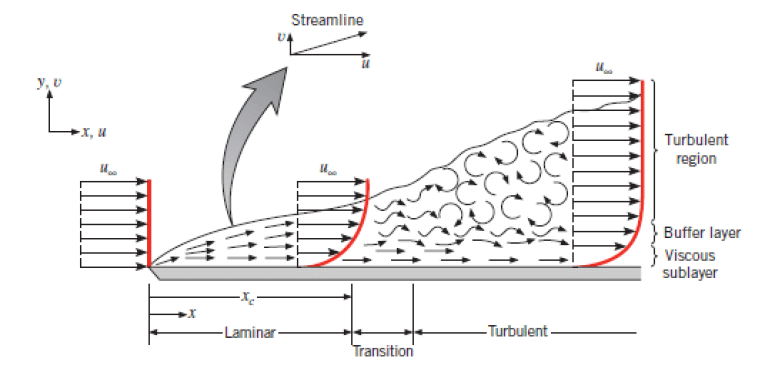
Specifically, this code is designed to solve a 2D flow problem that demonstrates Boundary Layer Development on a Flat Plate, which is a fundamental concept in fluid dynamics and aerodynamics.
Implementation on Arduino Board
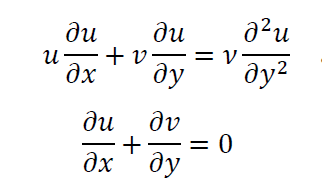
This program was developed using C++ on the Arduino IDE, primarily considering the board's data storage memory limitations. The fundamental equations used in the calculation can be seen in the image below:
Engineering Details and Program Logic
Non-dimensionalization: Complex Navier-Stokes equations are transformed into non-dimensional variables, referencing the Flow Velocity, Length of the plate, and Reynolds Number ($Re$), allowing the program to calculate without concern for various units of measurement and maintaining computational stability in Floating Point systems.
Discretization: The algorithm uses the Finite Difference Method to transform Partial Differential Equations into algebraic equations that the microcontroller board can process iteratively. It employs an Implicit Solver technique, which has the advantage of greater numerical stability than Explicit methods, even with wider Time steps or Grid spacing.
Boundary Conditions: The program sets a No-slip condition at the interface between the fluid and the Flat Plate. This means the fluid velocity at the points adjacent to the plate will be zero and will gradually increase with distance from the plate until it reaches the Free stream velocity.
Memory Management: Since the Arduino MEGA only has 8KB of SRAM, managing the Array of Grid points requires special care. The code efficiently manages storage for X-axis ($u$) and Y-axis ($v$) velocity values to the extent that the AVR architecture allows.
Visualizing the Results
To visualize the Boundary Layer Development, we need tools to Plot the data transmitted from the Serial Port:
- Library: You must install the "Plotter.h" library, which can be found and installed directly via the Library Manager in the Arduino IDE.
- Listener Application: For Real-time viewing of results on a computer, you need to download an auxiliary application to receive data from Arduino and Plot the graph. It can be downloaded here: Plotting tool (GitHub)
Conclusions and Technical Remarks
The choice of Arduino MEGA in this project is a significant demonstrator, because even though the MEGA has more memory than other models, when dealing with CFD tasks, we find that it still has clear limitations regarding the number of Grid points that can be calculated in each direction.
Running this type of program on an 8-bit microcontroller board is not the "best" method in terms of performance, but it is an excellent lesson in studying Numerical Methods and resource management in Embedded Systems. It proves that with correct logic and well-tuned equations, even hardware with limited processing power can solve complex engineering problems to a certain extent.