FFT or Fast Fourier transform is one of the most important tools in the world of signal processing, allowing us to quickly analyze frequency components from raw signals in the time domain. This can be used to detect frequencies with good speed. However, it is a computationally-intensive process and takes a good amount of processing power as well as memory (RAM) especially on resource-limited microcontroller boards like Arduino. This makes it difficult to use for real-time applications where multiple FFT results are required every second.
In this tutorial, the fastest program to perform FFT on Arduino is presented. I am naming it ApproxFFT as there are so many approximations taken at multiple stages. However, with very little compromise in accuracy, I was able to achieve around 3 times speed.
If you want to only know how to use it directly go to 5.
The complete project was also explained in a half-hour long explanation video. you may choose to go through that or read this tutorial.
I have prepared two code previously for the same application that can be accessed here: EasyFFT: this code gives accurate output for FFT, however, it is relatively slow and consumes high memory. It is recommended to go through this tutorial for background on FFT prior to this tutorial. QuickFFT: This code gives a very fast output. However, amplitudes are far off and not usable for most of the applications. It also gives multiple peaks that might mislead the results.
1: Need of the ApproxFFT Function
If you refer to the attached image, it is very clear that QuickFFT has some significant advantages over conventional approaches (speed calculated with inbuilt sine/cosine functions for EasyFFT). It is almost 4 times faster but lacks accuracy. As can be seen in the second image, the amplitude is way off. The main reason behind this the fact that we have used the square wave (Approximate sine wave!!!) that consists of multiple frequencies (harmonics). there are multiple waves present in the result that makes it difficult for various applications.
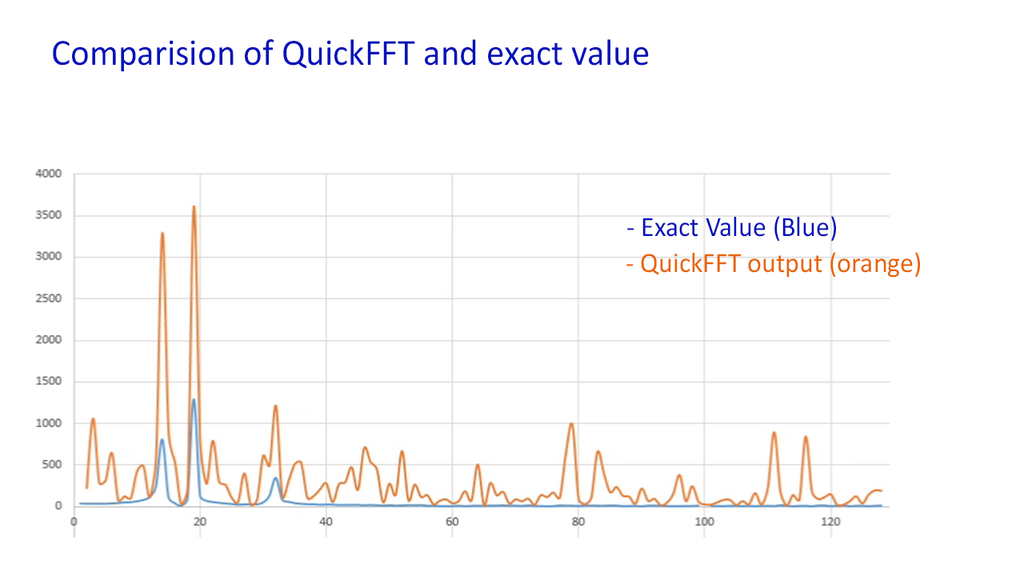

Here we have assumed the sine/cosine wave as a square wave. If we take some better approximation for these waves we can reach close to the exact output. In this code better approximations were considered for these waves. we also have some provisions to control the accuracy of these waves. By tweaking this setting we can also play with various accuracy/speed relations.
2: Fast Sine and Cosine Function
If you refer to the previous EasyFFT function, we had two options available. One of those was accurate one to make use of inbuilt sine/cosine function which are accurate but slow. If we go with another method where we have used a lookup table, speed was improved slightly with a small loss inaccuracy.
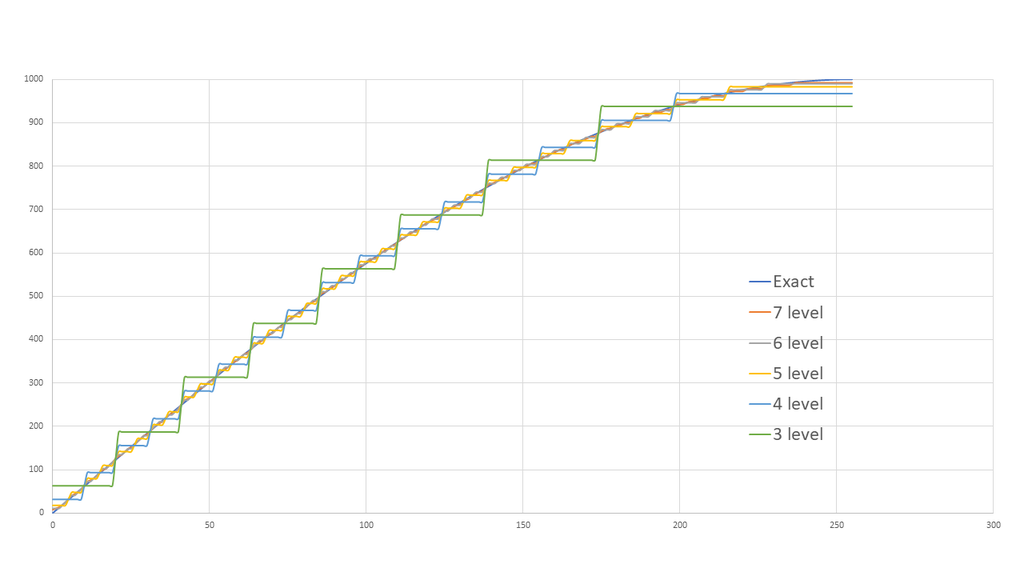
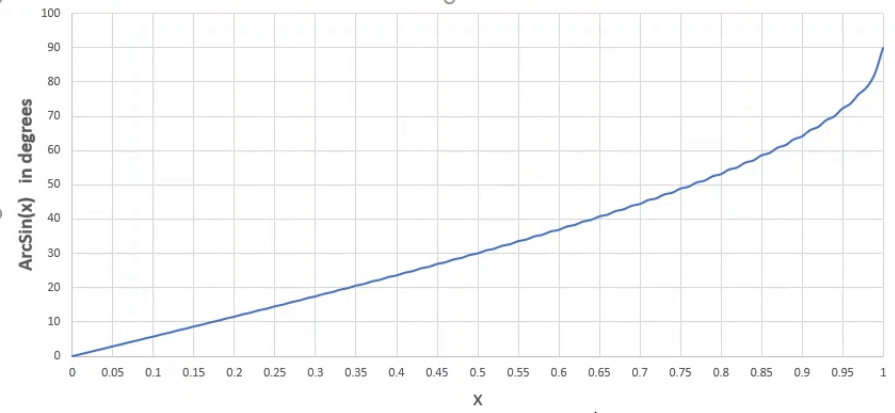
Here completely different approach was used to calculate this value, which is around 10-12 times faster than conventional ones. These function intensively make use of only bitshift operation for multiplication and (approximate) division. These operations are significantly fast than normal division or multiplication. however, these may cause a precision loss that we need to somehow take care of.
In typical FFT functions, the most time-consuming calculation is multiplying floating-point numbers (Float) by Sine/Cosine values of various angles in a step called "Butterfly Calculation" as shown in the code lines below. Both of these processes are slow and take too much time.
tr=c*out_r[i10+n1]-s*out_im[i10+n1];
ti=s*out_r[i10+n1]+c*out_im[i10+n1];  // c is cosine and s is sine of some value
In ApproxFFT, I use a different method that is 10-12 times faster by employing Bitshift Operations along with a Binary Search algorithm to directly find the value of $A \cdot \sin(\theta)$ without performing any floating-point multiplication.
Working Principle of Binary Search Sine:
We store the isin_data table, which maps angles to Sine values in Integer format (0-1024 representing 0-360 degrees), and use a halving range method to find the amplitude. Here we have used something similar to the binary shoring algorithm. It will directly give Approximate output for A*sin(θ) and we do not need to do multiplication. In the first plot, ArcsinX vs X plot is shown. a similar plot is a store as the table in Arduino. where angles are mapped from 0-1024 which are equivalent to 0-360 degrees. Arcsine values are also considered as multiple of 128.
This is how the flow of calculation works: here we are ignoring negative values and will only consider for 0-90. (i.e. 500*sin 50 (in degree))
For any value (i.e. 500) sine multiple can be 0 (for 0 degrees) to that value (for 90 degrees) (i.e.0-500). we will check angle value for midpoint. we will half the value of the input (500) and check the angle for 0.5. based on that we can check out output will be 0-mid point or midpoint-max (in our case angle for 0.5 will be 30 degrees which is lower than 50, so we can conclude that the output will be somewhere in between 250-500). At this point of time, we have halved the size of the possible range. (previous 0-500 to 250-500 )
newly defined range we will again do a similar step repeated. In our example, the midpoint will be 375, where we will check the angle for.75 that will be 48 degrees. so our answer will lie in between 375 to 500.
Similar steps need to be repeated multiple times for accurate output. As can be shown in the second image (graph). The more level we go to, the output will be more close to the exact value. The more iterations we add, the closer the result will be to the true value, without relying on the Arduino's Floating Point Unit (FPU) at all.
Here we can perform all operations by only a bit shift and we also eliminated the floating multiplication.
3: Fast Root of Squared Sum (FastRSS)
This function makes some approximation for the RSS value. its impact on overall speed is not very significant. However, it saves a few Milliseconds of time.
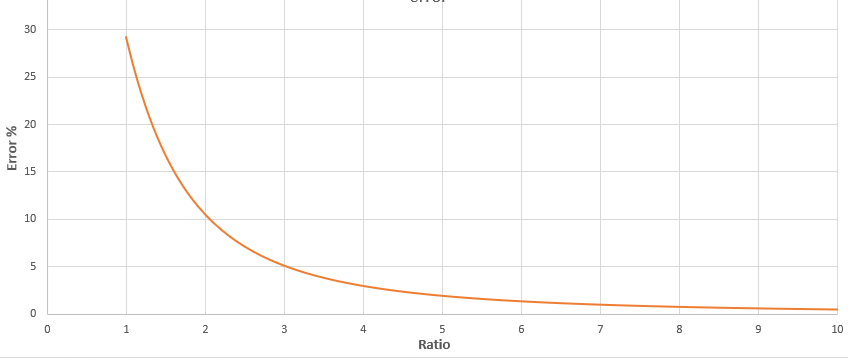
After obtaining the Real and Imaginary values from the FFT, the next step is to find the magnitude of the signal using the formula $\sqrt{R^2 + I^2}$, which the standard sqrt() function performs very slowly.
The attached plot shows the value of error if we assume root off squared sum output same as bigger value. The Error associated with this assumption decreases as the ratio increases. I therefore created the fastRSS function to approximate this value by leveraging the relationship of the ratio between larger and smaller values. If one value is much greater than the other, we can use the larger value as the answer immediately with only a small error. However, if the values are similar, we use the RSSdata table and scaling to compensate the value to be as close to the truth as possible, which saves several milliseconds. In this code, if the ratio exceeds it simply assumes a larger value as output that saves time. If the ratio is lower than that, based on the value some predefined scaling is set that is applied by doing some repetitions. All these values are stored as the RSSdata.
4: Overall Calculation Flow:
Flow for overall calculation will be as follow. The program operates in the following sequential steps for maximum efficiency:
- Input data is scaled to +512 to -512: this step is important to preserve the precision of data. as we are using bit shift operation, there will be precision loss in case of an odd number. The bigger the number lower the loss.
- Bit reversed order is generated,
- Input data is ordered as per generated bit reverse order.
- Frequency transformed is performed. fast sine and cosine were used wherever required. after every loop, the value of all integer checks if the amplitude is higher than 15000, both real and imaginary arrays are divided by 2. If array values tend to exceed 15,000 (to prevent 16-bit integer overflow), the system immediately divides all data by 2 and records the scaling value.
- Root of the squared sum is calculated using the FastRSS function.
- Max value is detected and returned as output.
5: Application
- Lookup data needs to be declared as a global variable. we need to simply paste the below data at the top of the code.
//---------------------------------lookup data------------------------------------//
byte isin_data[128]=
{0,  1,   3,   4,   5,   6,   8,   9,   10,  11,  13,  14,  15,  17,  18,  19,  20,
22,  23,  24,  26,  27,  28,  29,  31,  32,  33,  35,  36,  37,  39,  40,  41,  42,
44,  45,  46,  48,  49,  50,  52,  53,  54,  56,  57,  59,  60,  61,  63,  64,  65,
67,  68,  70,  71,  72,  74,  75,  77,  78,  80,  81,  82,  84,  85,  87,  88,  90,
91,  93,  94,  96,  97,  99,  100, 102, 104, 105, 107, 108, 110, 112, 113, 115, 117,
118, 120, 122, 124, 125, 127, 129, 131, 133, 134, 136, 138, 140, 142, 144, 146, 148,
150, 152, 155, 157, 159, 161, 164, 166, 169, 171, 174, 176, 179, 182, 185, 188, 191,
195, 198, 202, 206, 210, 215, 221, 227, 236};
unsigned int Pow2[14]={1,2,4,8,16,32,64,128,256,512,1024,2048,4096};
byte RSSdata[20]={7,6,6,5,5,5,4,4,4,4,3,3,3,3,3,3,3,2,2,2};
//---------------------------------------------------------------------------------//
ApproxFFT, fast_sine, fast_cosine, and fastRSS function need to be pasted at the end of the code.
Using function:
float f=Approx_FFT(data,sample,sampling_rate);
This function will return the value of frequency with max amplitude by default. This is exactly the same as EasyFFT and QuickFFT function.
- first is the array of which we need to perform FFT,
- second is the number of samples: ideally, it should be 2^n, which can be 2, 4, 8, 16, 32, 64, 128,..here the max number of sample is limited by the memory available
- the third input is the sampling rate.
- Accuracy setting:
this value can be set from 1 to 7. higher the number better accuracy. here improving the accuracy will improve the fit of our approximate sine wave. By default, the accuracy value is set to 5. In most cases, this value works well. All result and speed claims are based on this value. Speed and accuracy can be tweaked by changing this value.
int fast_sine(int Amp, int th)
{
int temp3,m1,m2;
byte temp1,temp2, test,quad,accuracy;
accuracy=5;    // set it value from 1 to 7, where 7 being most accurate but slowest
               // accuracy value of 5 recommended for typical applicaiton
while(th>1024){th=th-1024;}   // here 1024 = 2*pi or 360 deg
while(th<0){th=th+1024;}
.
.
.
- This code can be modified to display (and use) Raw output or amplitude of various frequencies. the output will as multiple of 2^n. As integer can only hold up to +-32000 values, the output is represented as multiple.
6: Conclusion
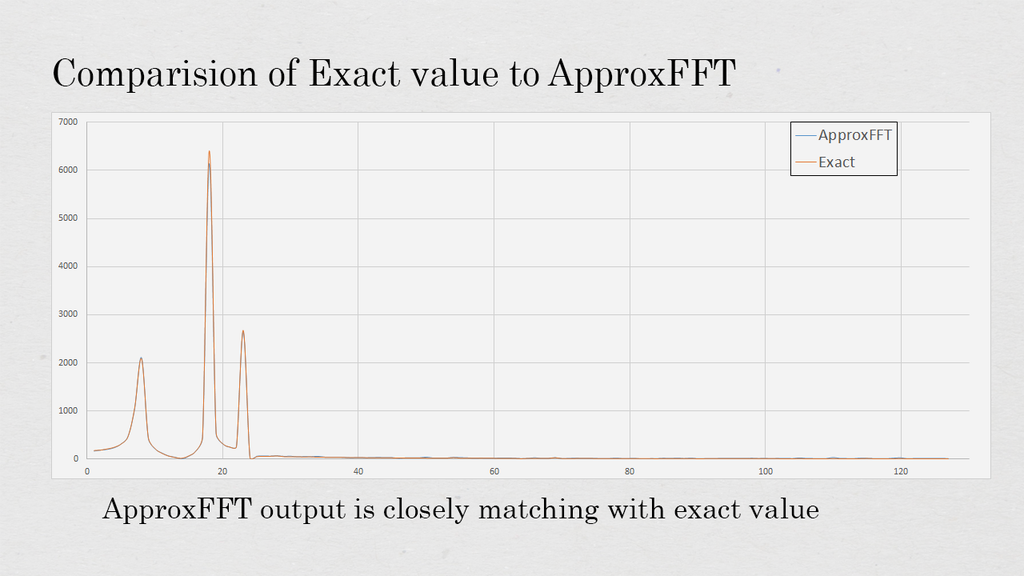
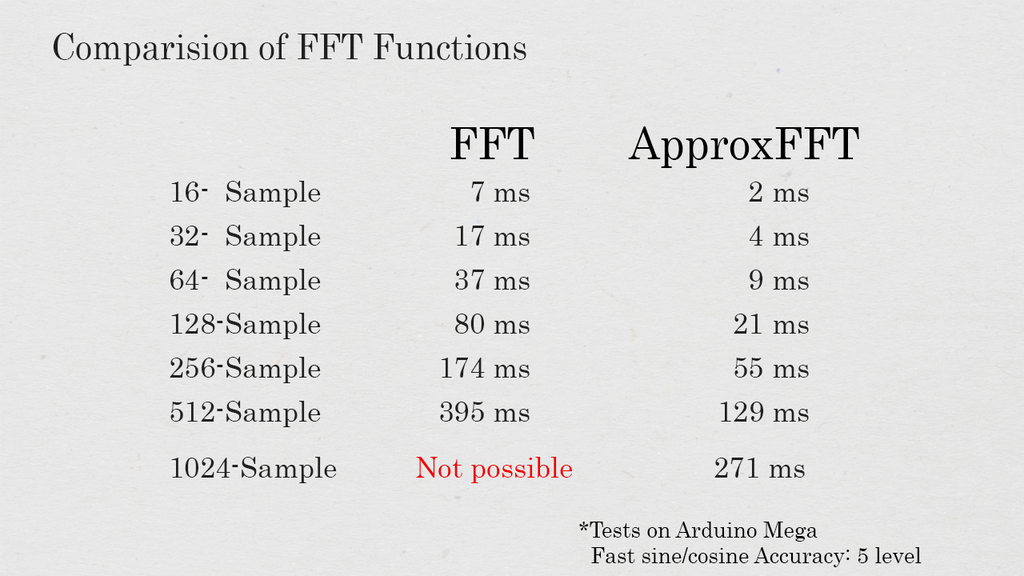
All the test shown on the above image is done on Arduino mega with an accuracy level of 5. below are some of the significant observation on the test:
From tests on an Arduino Mega at accuracy level 5, it was found that:
- Processing speed is more than 3 times faster than typical FFT.
- Memory usage is reduced by almost 50%.
- Results are surprisingly close to the true values (Low Error), making it suitable for real-world embedded projects.
Hope this code will useful for projects. In case of any query or feedback, do let me know by comment or Email.