The Arduienemin is an instrument inspired by the theremin, but plays differently than the real instrument. The theremin is a type of musical instrument that can be played completely without physical touch. The theremin produces the correct pitch and volume of a note according to the position of your hand based on an electromagnetic field around two antennas. The Arduinemin will operate differently than the original instrument, using an ultrasonic sensor to determine the position of your hand. The Arduinemin also has several additions to make it easier to play in tune, including a potentiometer for range, and two IR object detectors for semitones. While different from an actual theremin, the Arduinemin can still be played mostly without physical touch.
Parts:
Piezo: A piezo will be used to produce sounds at an appropriate pitch.
Ultrasonic sensor: This sensor will be used to measure the distance that your right hand is from the sensor, which will be translated to an appropriate pitch. There will be a range where notes are playable (16 inches from the sensor). Anything beyond that range will not create a note. If your hand is within the range of the sensor, it will calculate the exact position of your hand, and assign that to a note in the C major scale (0-2in = C, 2-4in = D, 4-6in = E … 14-16in = C’).
IR Object Detectors: Two of these sensors will be used by your left hand. Instead of detecting the position of your hands they will simply detect if your hand is or isn’t there. When your hand is detected, the pitch of the note played by your right hand will either be raised or lowered a semitone, depending on which sensor you trigger. This makes the note either flat or sharp.
Potentiometer: The potentiometer can be twisted to one of three areas (left, middle, and right), which each correspond to a low, middle, or high range. When twisted, the frequency of the piezo will be adjusted accordingly. Each range is a full octave, and they are all an octave apart from each other. The left area will produce a C3 to C4, middle a C4 to C5, and right and C5 to C6.
EXPANDED TECHNICAL DETAILS
Arduinemin is an innovative electronic musical instrument inspired by the Theremin, a legendary instrument known for being difficult to play and for its magical quality where players don't need to touch the instrument at all. The real Theremin operates by processing the interference of electromagnetic fields around two antennas to control pitch and volume.
However, Arduinemin is redesigned using different engineering principles to make it easier to build and control with an Arduino microcontroller system. Instead of using electromagnetic fields, it utilizes an Ultrasonic Sensor to detect hand distance, which replaces the frequency position. Additionally, auxiliary functions have been added to help players stay more in tune, such as using a Potentiometer to change Octaves and two IR Object Detectors for Semitone adjustments. This transforms Arduinemin into a digital instrument that blends the charm of contactless playing with the precision of a computer system.
Hardware Components and Operating Principles
To build Arduinemin, we selected components that respond to Real-time control as follows:
- Piezo Buzzer: The main output device that converts various electrical frequencies into sound waves by vibrating its internal ceramic disc according to the frequency sent from the Arduino's PWM pin to produce the desired musical note.
- Ultrasonic Sensor (HC-SR04): The core component for pitch control. This sensor operates by emitting high-frequency sound waves (40kHz) and measuring the Time of Flight of the reflected waves to calculate the distance between the player's right hand and the instrument. The system is set with an operating range of 16 inches, divided into segments according to the C Major scale, for example: 0-2 inches is note C, 2-4 inches is note D, up to 14-16 inches is note C' (next Octave). If the hand is outside this range, the system will automatically Mute the sound.
- IR Object Detectors: Two sets of infrared sensors are installed for the left hand, acting as "contactless switches." They operate by emitting infrared light and detecting its reflection. When the system detects an object (hand) at close range, it immediately recalculates the frequency. One detector will adjust the note down by a Semitone (Flat), and the other will adjust it up by a Semitone (Sharp), allowing players to freely play notes in the Chromatic Scale.
- Potentiometer: A variable resistor that acts as an Octave Selector. It divides the voltage range from its rotation into three sections (Low, Middle, High), which will set the fundamental frequency of the scale from C3-C4, C4-C5, up to C5-C6. This gives this small instrument a wide pitch range of 3 Octaves.
Code:
The project finds the distance of your hand above the ultrasonic sensor, and then converts it into a note. It then finds the exact frequency of the note by checking the state of the IR object detectors, and the potentiometer. Finally, it plays the note with the piezo.
Software Logic (Code Logic)
The core of the Code in this project is processing data from multiple sensors simultaneously to determine the final frequency to be sent to the Piezo Buzzer. The process begins by reading the distance value from the Ultrasonic Sensor and then mapping it to an array of note frequencies (Frequency Table).
An interesting aspect is how we address the problem of "Note Flickering" or sound wavering when the hand is positioned at the boundary between two notes. We implemented the principle of Hysteresis (Overlap Logic). This means if you are playing note D and move your hand slightly down, almost reaching the range of note C, the system will maintain the D sound until the distance genuinely enters the C zone. This method enhances playing stability and fluidity, preventing rapid sound jumps (Jitter).
After determining the primary note, the program checks the status of the IR Detectors to see if the frequency needs to be added or subtracted for Semitone values. It also checks the Potentiometer value to multiply the frequency according to the selected Octave, before finally using the tone() function to send the signal to the Piezo.
There is an overlap between the different note ranges. Basically, if you are playing a D, and your hand drops slightly into the C range, the Arduienemin will still play a D. This prevents the intruement from alternating from two different notes if your hand is at the boundary of two different notes.
Wiring:
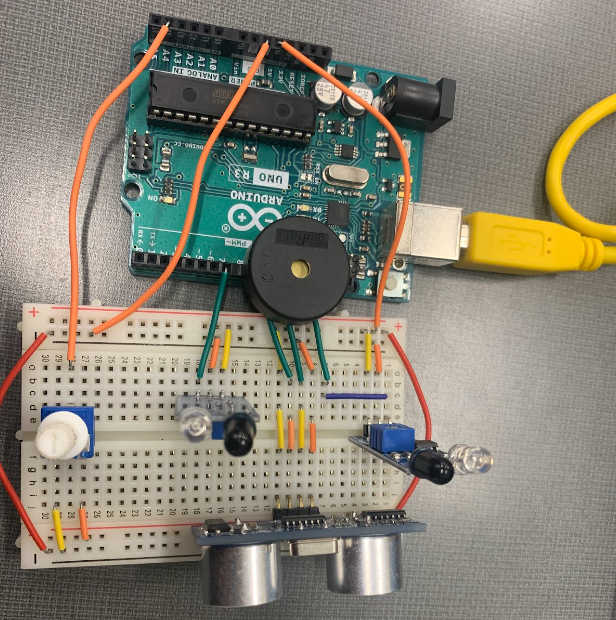
The connection of all components to the Arduino can be seen in the diagram below, which clearly separates the input signal section (Sensors) and the output signal section (Piezo).
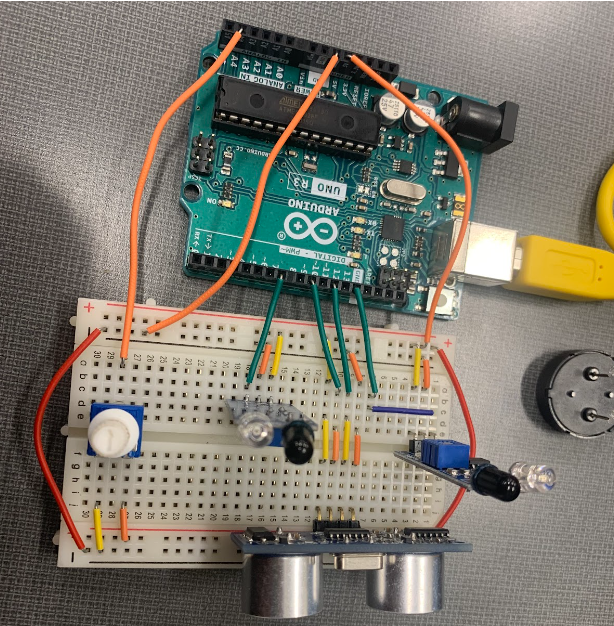
For circuit tracing to verify the Logic system's correctness without sound, you can refer to the diagram with the Piezo component removed, as follows:
Box:
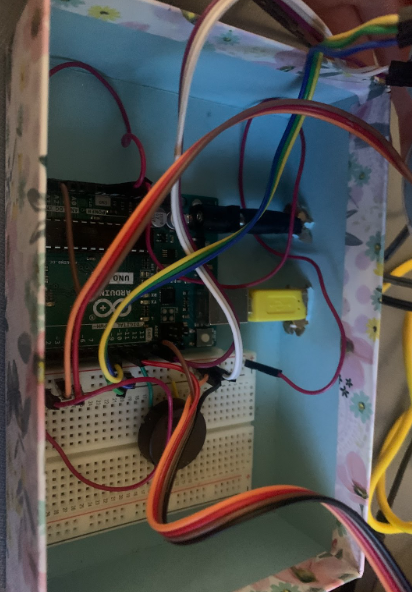
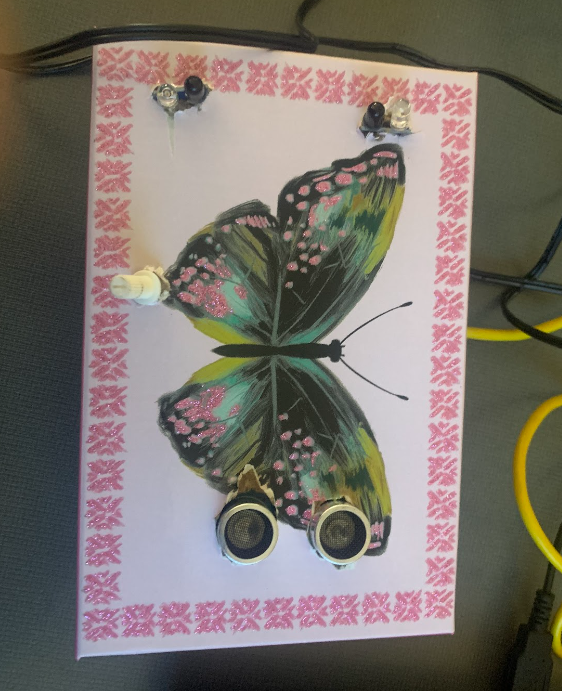
After building my project, I cased it in a carboard box, cutting out holes in the top for the ultrasonic sensor, 2 IR object detectors, and potentiometer, and a hole in the side for a power strip. I used jumper cables to wire the project within the box.
The Enclosure (The Enclosure)
To make Arduinemin ready for actual use and give it an aesthetic appearance, I created a Case from Cardboard. Holes were precisely cut on the top surface to position the Ultrasonic Sensor, IR Detectors, and Potentiometer in locations corresponding to the player's hand placement. Channels for wires and connection ports were cut on the sides.
Inside the box, Jumper wires were used for neat system routing. Using a cardboard box not only helps reduce costs but also facilitates easy adjustment of sensor positions during the initial experimentation phase, before potentially developing a more robust case, such as a 3D-printed one, in the future.