The TMP102 is an easy-to-use digital temperature sensor from Texas Instruments. While some temperature sensors use an analog voltage to represent the temperature, the TMP102 uses the I2C bus of the Arduino to communicate the temperature.
Board Overview
Let's go over the TMP102 Breakout in detail.
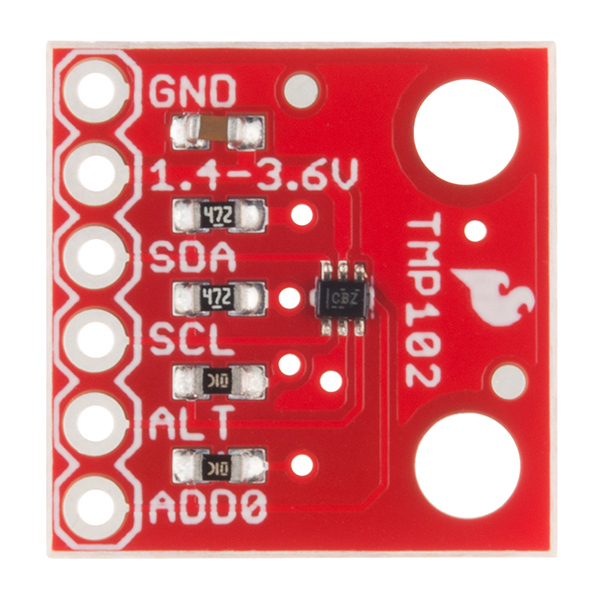
TMP102 Details:
- Uses the I2C interface
- 12-bit, 0.0625°C resolution
- Typical temperature accuracy of ±0.5°C
- Supports up to four TMP102 sensors on the I2C bus at a time
Pull-up Resistors
This breakout board has built-in 4.7 kΩ pull up resistors for I2C communications. If you're hooking up multiple I2C devices on the same bus, you may want to disable/enable the pull-up resistors for one or more boards. On the TMP102, the pull-ups are enabled by default. To disable them, simply use a hobby knife to cut the traces connecting the left and right pads of the jumper labeled I2C PU on the back of the board. This will disconnect the resistors from VCC and from the I2C bus.
Hardware Connections
Connecting the TMP102 to an Arduino
Wiring the TMP102 is very easy! We recommend soldering six male headers to the breakout board. You can also solder wires to fit your application's needs.
Power
This board runs from 1.4V to 3.6V. Be sure to power the board from the 3.3V pin! I2C uses an open drain signaling, so there is no need to use level shifting; the 3.3V signal will work to communicate with the Arduino and will not exceed the maximum voltage rating of the pins on the TMP102.
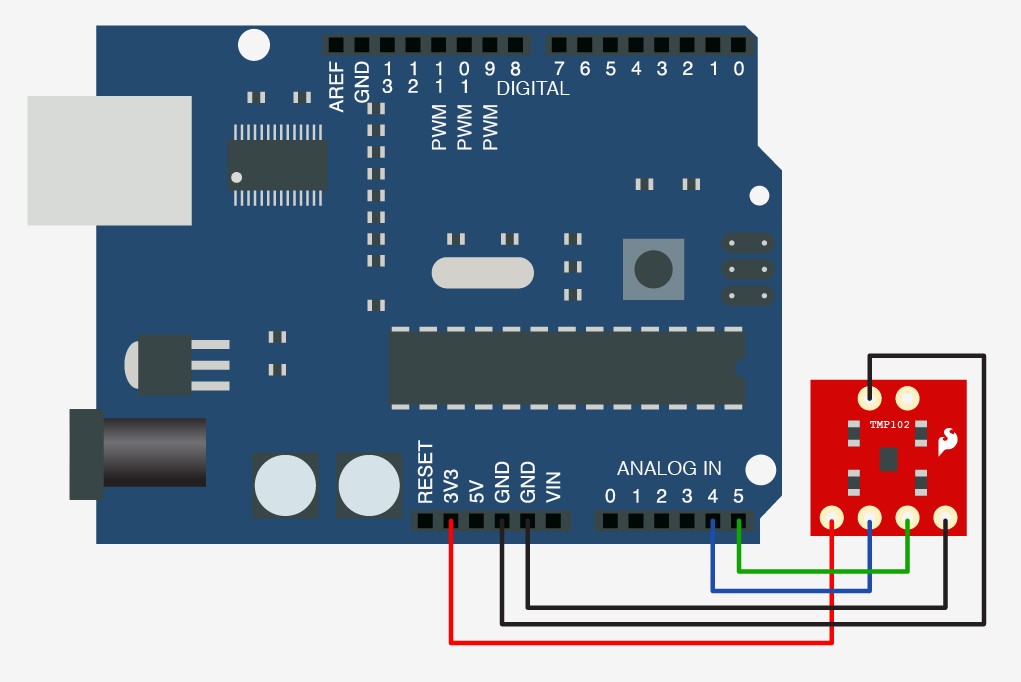
Connections to the Arduino
The TMP102 breakout board has six pins, however we'll only be using five of the pins in today's example. We'll be connecting VCC and GND to the normal power pins, two data lines for I2C communication, and one digital pin to see if there is an alert. If you're using a newer board that has SDA and SCL broken out, you can connect the SDA and SCL pins directly to those pins. If you're using an older board, SDA and SCL are pins A4 and A5 respectively.
- VCC → 3.3V
- GND → GND
- SDA → SDA/A4
- SCL → SCL/A5
- ALT → A3
This would looks something like this:
The only pin that we aren't using is ADD0, this pin is used to change the address of the TMP102. If you're using multiple TMP102s or another device that uses that address, you'll want to use this pin to change the address. The default address is 0x48. You can change the address by cutting the ADD0 jumper on the back of the board and connecting an external jumper wire to the following pins:
- VCC → 0x49
- SDA → 0x4A
- SCL → 0x4B
TMP102 Library and Example Code You can obtain this library through the Arduino Library Manager by searching for TMP102. If you prefer downloading libraries manually, you can grab it from the GitHub Repository
TMP102 Library Overview
Main functions
These are functions used to read settings and temperatures from the sensor.
bool begin( uint8_t deviceAddress, TwoWire &wirePort ) - Takes the device address and I2C bus as optional inputs. If left blank, this function uses the default address 0x48, and uses the Wire bus.
float readTempC( void ) - Returns the current temperature in Celsius.
float readTempF( void ) - Returns the current temperature in Fahrenheit.
float readLowTempC( void ) - Reads T_LOW register in Celsius.
float readHighTempC( void ) - Reads T_HIGH register in Celsius.
float readLowTempF( void ) - Reads T_LOW register in Fahrenheit.
float readHighTempC( void ) - Reads T_HIGH register in Fahrenheit.
void sleep( void ) - Put TMP102 in low power mode (<0.5 uA).
void wakeup( void ) - Return to normal power mode (~10 uA). When the sensor powers up, it is automatically running in normal power mode, and only needs to be used after sleep() is used.
bool alert( void ) - Returns the state of the Alert register. The state of the register is the same as the alert pin.
void setLowTempC(float temperature) - Sets T_LOW (in Celsius) alert threshold.
void setHighTempC(float temperature) - Sets T_HIGH (in Celsius) alert threshold.
void setLowTempF(float temperature) - Sets T_LOW (in Fahrenheit) alert threshold.
void setHighTempF(float temperature) - Sets T_HIGH (in Fahrenheit) alert threshold.
void setConversionRate(uint8_t rate) - Sets the temperature reading conversion rate. 0: 0.25Hz, 1: 1Hz, 2: 4Hz (default), 3: 8Hz.
void setExtendedMode(bool mode) - Enable or disable extended mode. 0: disabled (-55C to +128C), 1: enabled (-55C to +150C).
void setAlertPolarity(bool polarity) - Sets the polarity of the alert. 0: active LOW, 1: active HIGH
void setFault(uint8_t faultSetting) - Sets the number of consecutive faults before triggering alert. 0: 1 fault, 1: 2 faults, 2: 4 faults, 3: 6 faults.
void setAlertMode(bool mode) - Sets the type of alert. 0: Comparator Mode (Active from when temperature > T_HIGH until temperature < T_LOW), 1: Thermostat mode (Active from when temperature > T_HIGH until any read operation occurs.
Example Code
Once the library is installed, open the example code to get started! Make sure to select your board and COM port before hitting upload to begin experimenting with the temperature sensor.
#include  // Used to establied serial communication on the I2C bus
#include  // Used to send and recieve specific information from our sensor
// Connections
// VCC = 3.3V
// GND = GND
// SDA = A4
// SCL = A5
const int ALERT_PIN = A3;
TMP102 sensor0;
void setup() {
 Serial.begin(115200);
 Wire.begin(); //Join I2C Bus
 pinMode(ALERT_PIN,INPUT);  // Declare alertPin as an input
 /* The TMP102 uses the default settings with the address 0x48 using Wire.
    Optionally, if the address jumpers are modified, or using a different I2C bus,
    these parameters can be changed here. E.g. sensor0.begin(0x49,Wire1)
    It will return true on success or false on failure to communicate. */
 if(!sensor0.begin())
 {
   Serial.println("Cannot connect to TMP102.");
   Serial.println("Is the board connected? Is the device ID correct?");
   while(1);
 }
 Serial.println("Connected to TMP102!");
 delay(100);
 // Initialize sensor0 settings
 // These settings are saved in the sensor, even if it loses power
 // set the number of consecutive faults before triggering alarm.
 // 0-3: 0:1 fault, 1:2 faults, 2:4 faults, 3:6 faults.
 sensor0.setFault(0);  // Trigger alarm immediately
 // set the polarity of the Alarm. (0:Active LOW, 1:Active HIGH).
 sensor0.setAlertPolarity(1); // Active HIGH
 // set the sensor in Comparator Mode (0) or Interrupt Mode (1).
 sensor0.setAlertMode(0); // Comparator Mode.
 // set the Conversion Rate (how quickly the sensor gets a new reading)
 //0-3: 0:0.25Hz, 1:1Hz, 2:4Hz, 3:8Hz
 sensor0.setConversionRate(2);
 //set Extended Mode.
 //0:12-bit Temperature(-55C to +128C) 1:13-bit Temperature(-55C to +150C)
 sensor0.setExtendedMode(0);
 //set T_HIGH, the upper limit to trigger the alert on
 sensor0.setHighTempF(82.0);  // set T_HIGH in F
 //sensor0.setHighTempC(29.4); // set T_HIGH in C
 //set T_LOW, the lower limit to shut turn off the alert
 sensor0.setLowTempF(81.0);  // set T_LOW in F
 //sensor0.setLowTempC(26.67); // set T_LOW in C
}
void loop()
{
 float temperature;
 boolean alertPinState, alertRegisterState;
 // Turn sensor on to start temperature measurement.
 // Current consumtion typically ~10uA.
 sensor0.wakeup();
 // read temperature data
 temperature = sensor0.readTempF();
 //temperature = sensor0.readTempC();
 // Check for Alert
 alertPinState = digitalRead(ALERT_PIN); // read the Alert from pin
 alertRegisterState = sensor0.alert();   // read the Alert from register
 // Place sensor in sleep mode to save power.
 // Current consumtion typically <0.5uA.
 sensor0.sleep();
 // Print temperature and alarm state
 Serial.print("Temperature: ");
 Serial.print(temperature);
 Serial.print("\\tAlert Pin: ");
 Serial.print(alertPinState);
 Serial.print("\\tAlert Register: ");
 Serial.println(alertRegisterState);
 delay(1000);  // Wait 1000ms
}
EXPANDED TECHNICAL DETAILS
High-Resolution Digital Thermometry
This project explores the industrial application of the TMP102 digital temperature sensor, providing accurate climate data over the I2C bus.
- Digital Precision vs. Analog: Explains the advantage of the TMP102's 12nd-bit resolution (up to 0.0625°C accuracy) compared to traditional analog sensors like the LM35, making it ideal for laboratory or server room monitoring.
- Low-Power I2C Communication: The Arduino uses only two pins (SDA/SCL) to poll the sensor. The firmware includes an "Alert" pin configuration; when the temperature crosses a set threshold, the TMP102 can physically trigger an interrupt on the Arduino without constant polling.
Visualization
- Temporal Temperature Graph: (Advanced version) Streams the temperature data to a serial monitor or an external I2C OLED, showing the thermal trend over the last hour.