About:
The goal of this project is to lock and unlock your door through the convenience of your smart phone. This project requires beginner level programming skill. It is a fun and interesting project.
How It Works:
When the Bluetooth Module receives a certain value(0 or 90) from the smart phone the Arduino gives a signal to rotate so that the angle of the servo is equal to the respective value which opens or closes the latch.
Instructions:
first connect all the components as mentioned in the circuit diagram given bellow. Then using the paper clip attach the servo to the latch like so.
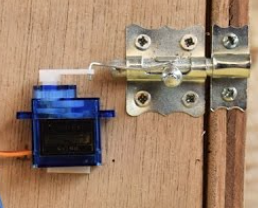
Disconnect the RX and TX pins and upload the sketch. Connect the RX and TX pins again.
Open the application mentioned below and connect the bluetooth module with your smart phone.Then go to the buttons and slider section and go to settings and change the values of any 2 button to '0' and '90' respectively. The 2 respective buttons will lock and unlock the latch.
Note:
For some reason I was not able to add the mobile application in the software section of the page required for the project. Enter play store and download this app for the project. (Arduino Bluetooth Control)
EXPANDED TECHNICAL DETAILS
Keyless Security Modernization
This project provides a robust, digital alternative to traditional physical keys, suitable for lockers, office doors, or smart-home prototypes.
- High-Torque Actuation: Uses a MG995 metal-gear servo to physically rotate a deadbolt or latch. The Arduino controls the positioning precisely (e.g., 0 degrees for locked, 90 degrees for unlocked).
- Multi-Credential Hub: The system can be triggered by several inputs: a 4x4 matrix keypad, a Bluetooth smartphone app, or an RFID tag reader, providing a flexible "Access Control" layer for any door.
Fail-Safe Features
- Emergency Power Backup: Includes a guide on using a dual-power circuit (9V battery + AC wall adapter), ensuring the door remains operable even during a localized power failure.