Arduino Home Assistant
Introduction
The Arduino Home Assistant is a device to control several devices like table lights, laptop fan, big fan, humidifier and a stepper motor to control curtain. Using several sensors like MLX90614, LDRs, IR sensors, rain sensor, ultrasonic sensor and so on, the home assistant is able to monitor the condition of the room and carry out different tasks. A simple example is that when the laptop temperature goes high, the laptop fan will turn on. Same applies to other devices which the condition may involve more than one sensor. The mode of the switches can be adjusted to manual or auto mode.
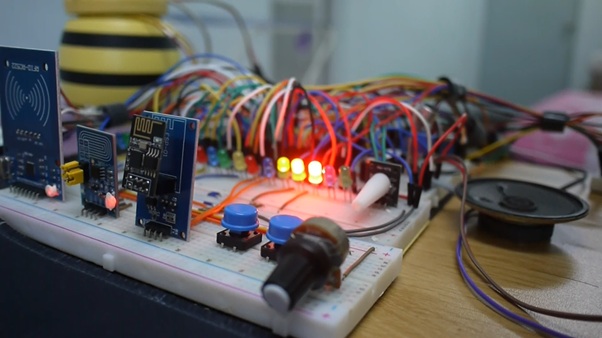
Centralized Hub: Arduino Home Assistant
Relying on Google Home or Amazon Alexa means your privacy is completely exposed, and if the internet drops, your lights won't turn on. The Arduino Home Assistant project is an introduction to Local Area Network (LAN) architecture. It creates a physical "Hub" device that communicates exclusively inside your house, ensuring complete privacy and zero latency.
The Local REST API Server
The Arduino (paired with a W5100 Ethernet Shield or an ESP32) acts as the Grand Central Station.
- The Architecture: Every smart light or sensor in the house (Node A, Node B) is programmed to talk ONLY to the central IP address
192.168.1.100(The Hub). - The JSON Translator: The Hub runs a microscopic web server. When a physical light switch is pressed in the kitchen, Node A sends an HTTP request
GET /kitchen/light/1to the Hub. - The Hub parses that string, checks its massive internal boolean array, updates the status, and returns a JSON payload
{"status":"ON"}validating the action. - The Interface: Your smartphone opens a local HTML app hosted on the Hub, displaying real-time toggles for the entire house!
Moving to MQTT (Publish/Subscribe)
If the house scales to 50 smart items, HTTP GET requests become incredibly slow and crash the Arduino.
- You must upgrade the Hub logic to MQTT (Message Queuing Telemetry Transport), utilizing the
<PubSubClient.h>library. - The Hub acts as the "Broker".
- The kitchen light "Subscribes" to the topic
house/kitchen/light1. - Your phone app "Publishes" the message
ONto that exact topic. The Hub catches the message and instantly, silently pushes it down to the light in less than 5 milliseconds!
Essential Base Hardware
- Arduino Mega + W5100 Ethernet Shield (Wired connections are far more stable than Wi-Fi for a central hub).
- Alternately, an ESP32 Dev Module acting as a Wi-Fi Access point.
- Relay Nodes (Like ESP-01 modules) scattered throughout the house to actuate physical devices.
- Advanced knowledge of Networking Protocols (TCP/IP, HTTP, MQTT).
Function
Next, there are 8 different function available which are led light show, room condition, Arduino condition, laptop condition, weather, timer/alarm, games, WIFI mode and personal spaces to record your own private information. There is also a page to monitor the devices' status. The main control is using potentiometer and two buttons.

WIFI mode
The home assistant also integrated with the esp-01 module which all the control and monitoring work can be carried out wirelessly via laptop or mobile phone. Using Blynk as the platform and google assistant as the support, all the tasks can be carried out whenever and wherever you are. When the home assistant sensed an absent of people in the room via ultrasonic sensor and ldr, it will automatically switch to WIFI mode.
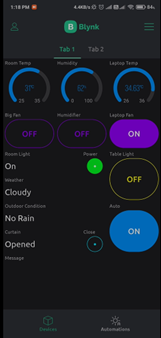
That's it, so now I can call the home assistant to close my curtain by saying "Ok Google, activate close curtain" when I am not at home.