Introduction: Bringing Toys to Life with Arduino
In this project, I'll guide everyone through transforming an ordinary doll into an intelligent, interactive toy that responds to touch. It will be able to play MP3 audio files and nod its head adorably. This project not only results in a cool toy but also serves as an excellent lesson in learning how to use the DFPlayer Mini with Arduino, as well as applying simple force-sensing sensors.
You can apply the fundamentals from this article to develop many other projects, such as smart alarm clocks, status-announcing MP3 speakers, or voice alert systems in Home Automation.
Concept and Working Principle (The Concept)
The concept of this project is simple yet highly effective:
- Input: When we squeeze the doll's hand, a Piezoelectric plate hidden inside detects the pressure and sends an electrical signal to the Arduino.
- Processing: The Arduino processes the signal and instructs the DFPlayer Mini module to start playing audio files stored on the MicroSD Card.
- Output: While the audio is playing, the Arduino commands the Servo Motor to move up and down to simulate nodding, and it will stop moving immediately when the audio finishes.
Detecting Squeeze Force with a Piezoelectric Sensor
To make the doll responsive to touch, I chose to insert a Piezoelectric plate into the doll's hand.
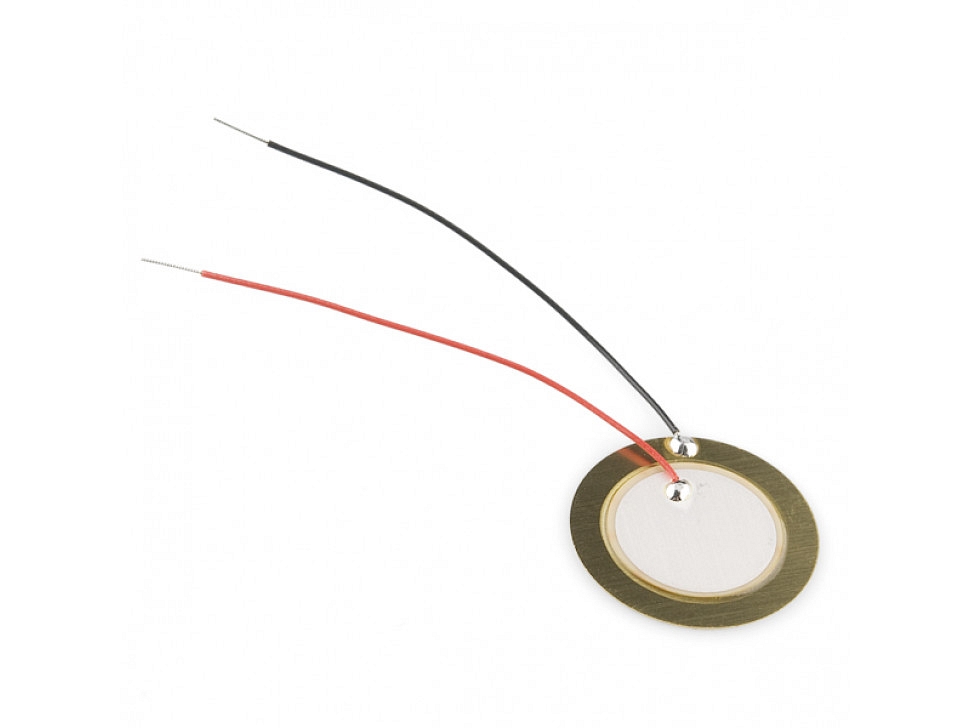
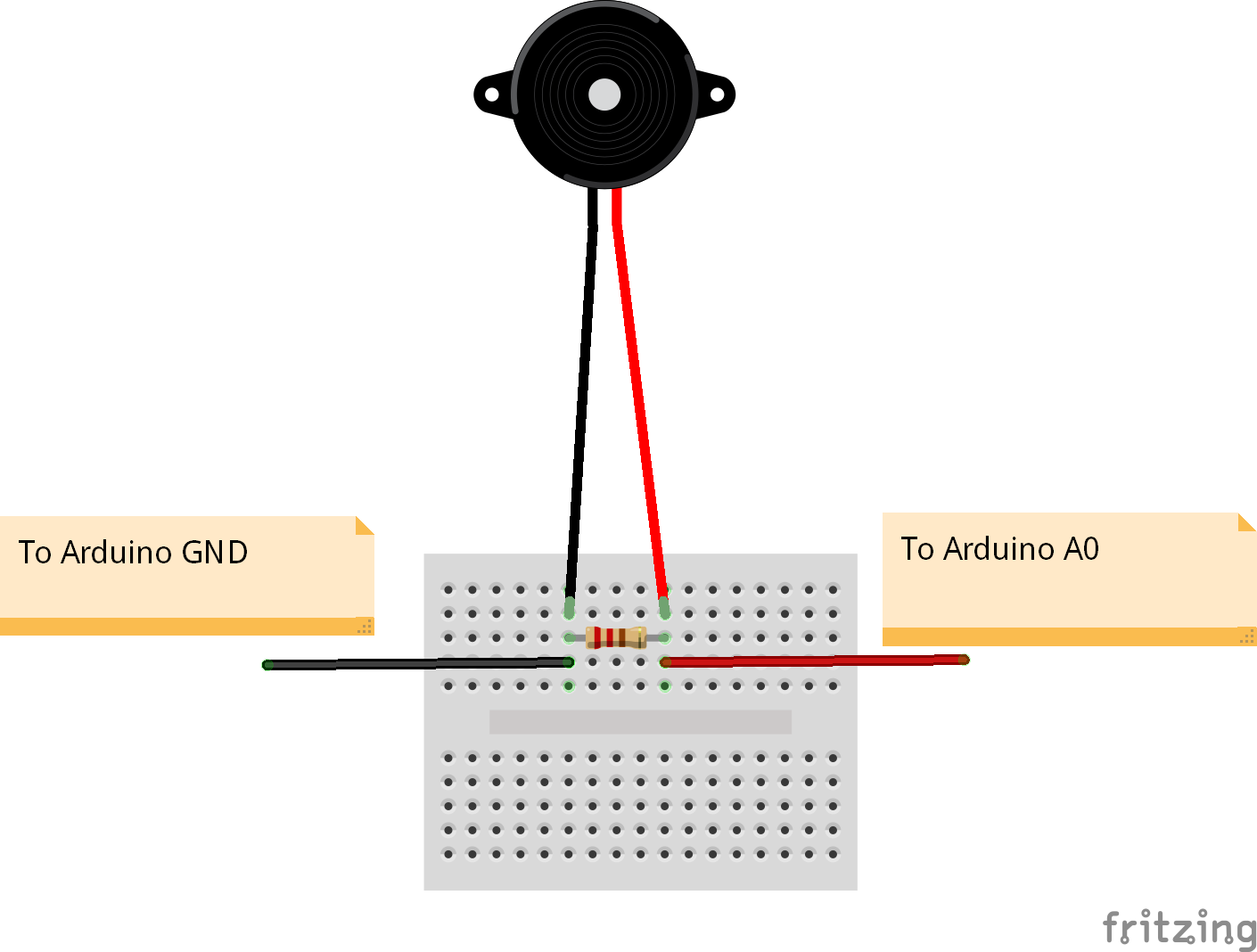
From an engineering perspective: A Piezo plate generates Voltage when subjected to Mechanical Stress, but the resulting signal often has high Noise. Therefore, it is necessary to connect a 1M Ohm resistor in parallel with the signal wire to help discharge and make the signal sent to the Arduino more stable and accurate (preventing False Triggers).
Nodding Mechanism (Nodding Mechanism)
The heart of the movement is the Servo Motor installed inside the doll's neck. The most crucial part is creating a stable "Holder," because if the Servo is not firmly fixed, the torque will cause the motor itself to rotate instead of moving the doll's head.
I adapted a plastic bottle to create the internal mounting structure, which is an economical and highly effective method.
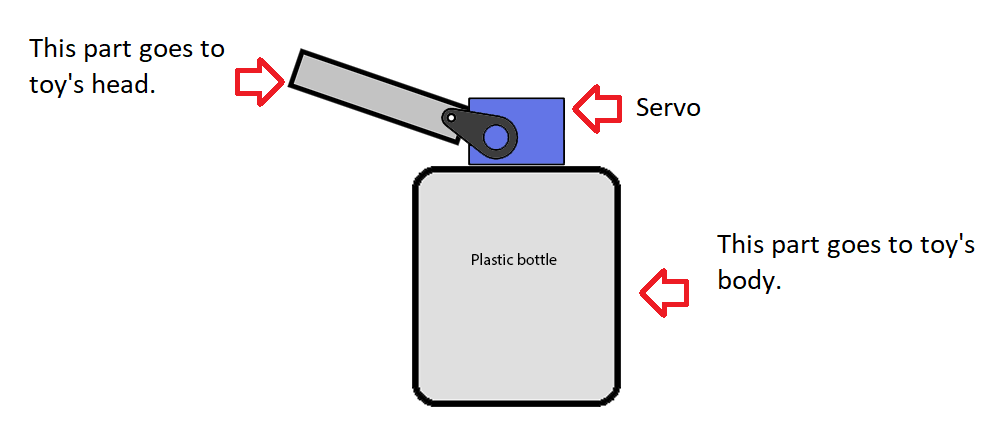
Control via Code: We will use a function to control the Servo's angle, alternating between the initial angle and the desired nodding angle.
void nodd()
{
   servo1.write(SERVO_NODD);    // Command to rotate to the nodding angle
   delay(300);                  // Wait for the mechanism to move
   servo1.write(SERVO_INITIAL); // Return to the upright position
}
Audio System with DFPlayer Mini
The DFPlayer Mini is a very powerful miniature MP3 module. It supports Serial (UART) communication, allowing us to control music playback freely.
1. MicroSD Card Preparation
- The card must be formatted as FAT or FAT32 only.
- File Naming: This is the most crucial part.
- Create folders named
mp3andadvert. - Files in these folders must start with 4 digits (e.g.,
0001.mp3,0002.mp3). - If creating other folders (named 01-99), files must start with 3 digits (e.g.,
001.mp3).
- Create folders named
2. Circuit Connection
For use with Arduino, connection will be via Software Serial, with a total of 7 main points:
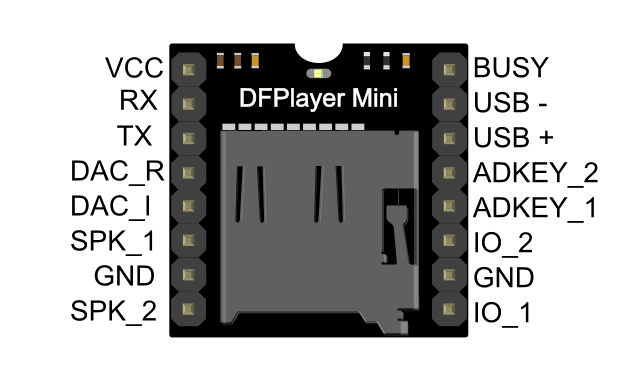
Connection Table:
- Arduino TX (D5) <---> DFPlayer RX (Should be connected via a 1K resistor to reduce noise)
- Arduino RX (D4) <---> DFPlayer TX
- Arduino 5V <---> VCC
- Speaker Pin 1 & 2 <---> SPK_1, SPK_2 (Can be connected directly to a speaker)
- Digital Pin (D2) <---> BUSY pin (Used to check if music is currently playing)
3. Library Usage and Code Logic
For development, I recommend using the Library from RobotsForFun, which offers high stability with this module.
- Download Library: Here (DFPlayer.zip)
- Getting Started: In the
setup()section, we need to set the Volume and initialize the Serial communication.
 // Initialize MP3 module
 mp3.begin();
 mp3.setVolume(VOLUME_INITIAL); // Set desired volume level (0-30)
Controlling music playback is simple via these commands:
mp3.playMP3Folder(1);- Plays file 0001.mp3 in the mp3 foldermp3.playing(BUSYPIN)- This function is very important. It's used to check the status from the BUSY pin. If the value is 1, it indicates that music is playing. We will use this value as a condition to command the Servo to nod along with the music.
Project Demonstration Video (Project Demonstration)
Let's see the result when everything is assembled. The doll will be able to respond to a squeeze naturally.
Future Extensions (Future Extensions)
This project serves as a foundation that you can extend significantly:
- Add more touch points: Install additional Piezo Plates on the feet or other hand to play different songs.
- Realistic movement: Add another Servo Motor to allow the neck to tilt left-right or control arm movements.
- Smart interactive system: Incorporate a Passive Infrared (PIR) motion sensor for the doll to greet people as they pass by.
Building this doll is a fun way to learn about Sensor Fusion, or the perfect coordination between Input (Piezo), Logic (Arduino), and Output (Sound & Motion)!