Industrial Dosing: Automated Powder Dispenser
- Hello everyone in this project we thought one of the problem we had in the lab. Getting exact amount of powder is some time can be difficult but with this project not anymore.
- We used a loadcell for the scale the weight a display to show the weight and the input. For putting input we used simple button and potentiometer. Lastly servo motor used for dispense function.
The Load Cell Feedback Loop (HX711)
After loadcell is fixated to his platform we used code from Hrisko, J for calibrating the loadcell.
The system cannot rely purely on time ("run auger for 3 seconds"). Depending on humidity, powder clumping causes variable flow rates. The system must weigh the payload in real time.
- The receiving cup sits on a physical aluminum beam called a Load Cell (Strain Gauge).
- When the cup fills with powder, the aluminum beam microscopically bends.
- This bending produces an incredibly tiny electrical voltage change (a few millivolts).
- The HX711 Amplifier Chip boosts this tiny voltage so the Arduino can read it.
- In the code, using the
<HX711.h>library, the Arduino continuously checks the weight.
#include <Q2HX711.h>
const byte hx711_data_pin = 3;
const byte hx711_clock_pin = 4;
float y1 = 20.0; // calibrated mass to be added
long x1 = 0L;
long x0 = 0L;
float avg_size = 10.0; // amount of averages for each mass measurement
Q2HX711 hx711(hx711_data_pin, hx711_clock_pin); // prep hx711
void setup() {
 Serial.begin(9600); // prepare serial port
 delay(1000); // allow load cell and hx711 to settle
 // tare procedure
 for (int ii=0;ii<int(avg_size);ii++){
   delay(10);
   x0+=hx711.read();
 }
 x0/=long(avg_size);
 Serial.println("Add Calibrated Mass");
 // calibration procedure (mass should be added equal to y1)
 int ii = 1;
 while(true){
   if (hx711.read()<x0+10000){
   } else {
     ii++;
     delay(2000);
     for (int jj=0;jj<int(avg_size);jj++){
       x1+=hx711.read();
     }
     x1/=long(avg_size);
     break;
   }
 }
 Serial.println("Calibration Complete");
}
void loop() {
 // averaging reading
 long reading = 0;
 for (int jj=0;jj<int(avg_size);jj++){
   reading+=hx711.read();
 }
 reading/=long(avg_size);
 // calculating mass based on calibration and linear fit
 float ratio_1 = (float) (reading-x0);
 float ratio_2 = (float) (x1-x0);
 float ratio = ratio_1/ratio_2;
 float mass = y1*ratio;
 Serial.print("Raw: ");
 Serial.print(reading);
 Serial.print(", ");
 Serial.println(mass);
}
Engineering the Motor Action
After calibrating the loadcell we started to build part for input function. We wanted this project to work without a computer. Installed a button a potentiometer and a display.
Used potentiometer take input and with map function we converted potentiometer input to single digit number then button was used for confirmation with while loop.
You input the target: Target: 40 Grams.
- Bulk Dispense Rate: The Arduino powers the servo motor attached to a dispensing mechanism. Because it's 40 grams, the motor spins at full speed, aggressively pushing powder out of the chute.
- The Dynamic Slowdown: The load cell constantly yells back the weight.
Weight: 20g... 30g... 35g... - The instant the weight gets close to the target, the Arduino enters the "Precision Finish" loop. It drastically slows the servo motor down to a crawl.
- When the scale hits the target weight, the Arduino commands the servo to stop.
After input received a while loop constantly checks if the weight reeded from loadcell is matched or not and when the desired weight reached it stops.
In the process weight constantly showed in the display. We used a round function and basic math to show the weight in display.
We also did built 3 different speed so it is going slower when the desired weight is close.
For dispense a servo motor was used. We used a basic servo.write function with different degrees for different speeds.
Lastly we added a tare function which measure weight when button pressed in the beginning so it can ignore containers weight.
Necessary System Build
- Arduino Mega/Uno: Real-time interrupt processors.
- Aluminum Load Cell (e.g., 1kg max limit) and the HX711 24-Bit ADC Module.
- Servo Motor for dispensing.
- A 3D Printer or other materials to fabricate the custom dispensing mechanism and storage hopper.
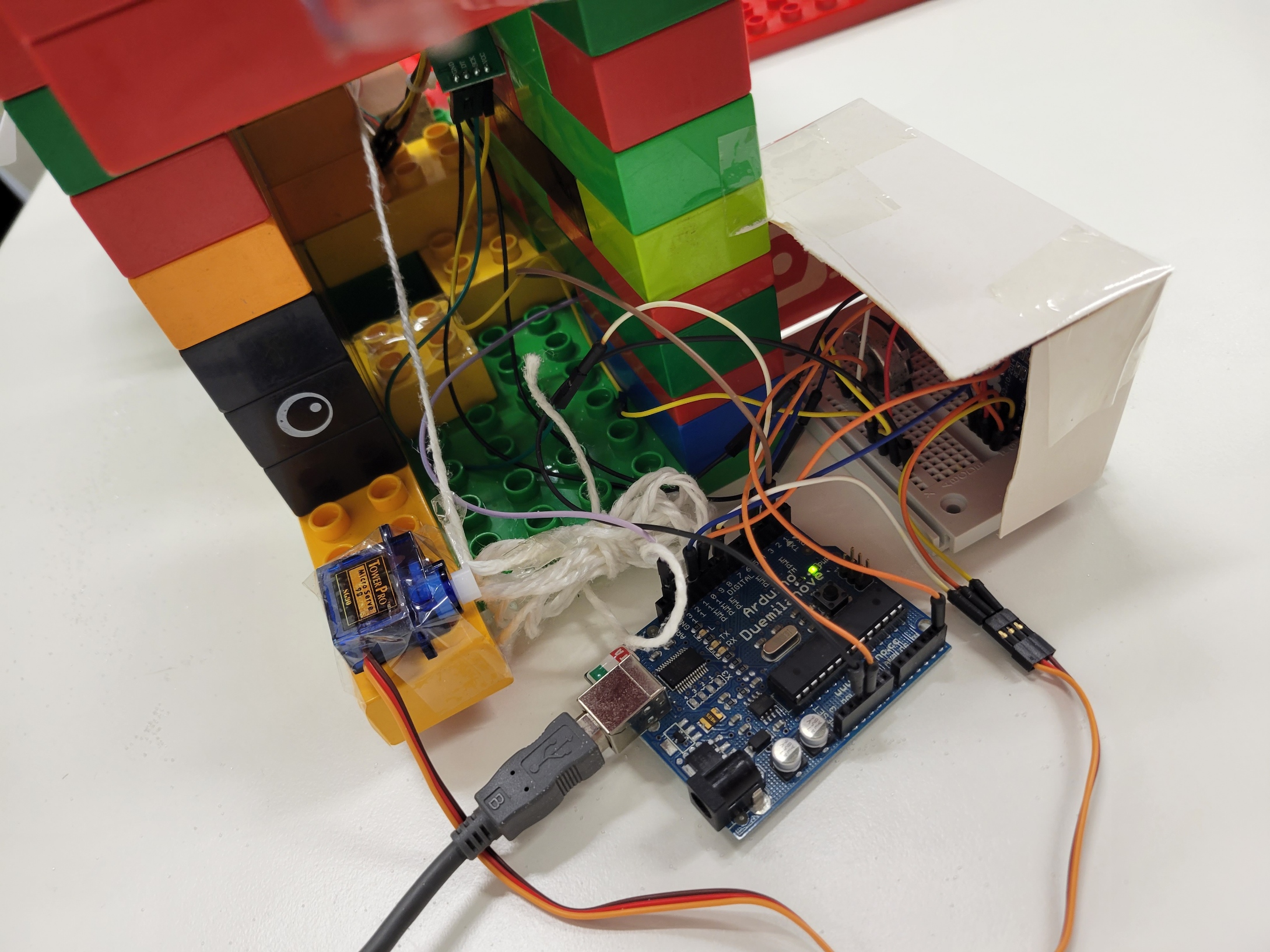
After the coding part is over we started to assembly our powder dispenser, we used duplo blocks but you can use different materials of course.