What is your project about?
This is a ball-balancing robot. It will try to balance the ball in the middle with Object Detection & Image Recognition through Arduino & Python. We have used distance sensors and image recognition techniques to keep it balanced.
Why did you decide to make it?
I wanted to balance a ping-pong ball in the middle of a plane, to do so I made this robot.
How does it work?
The concept of the ball-balancing robot is simple. The ball must remain in the middle of the box. If it rolls towards the left, the box is raised from the left. So, that it rolls down the other end. This process repeats until the ball gets in the middle.
Image Recognition
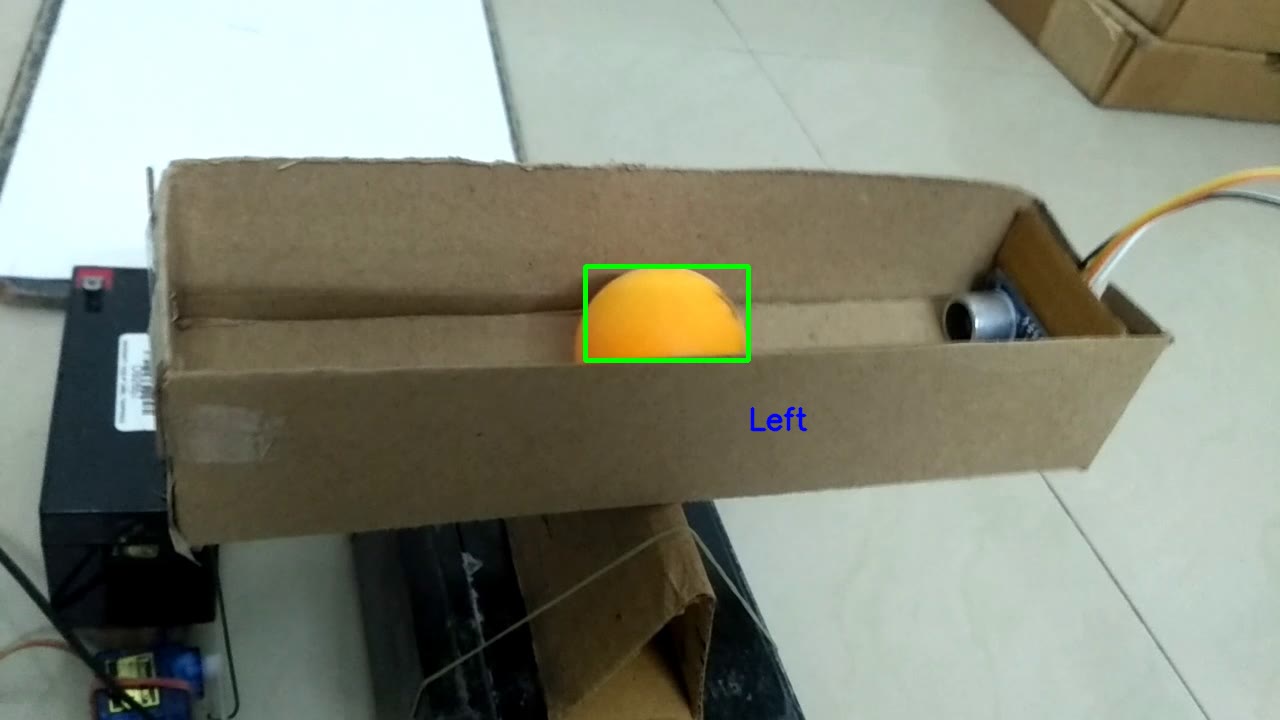
This project abandons hardware sensors for optical computational telemetry. A high-speed USB camera watches the board, analyzing the physical color pixels of the ball locally in Python using **OpenCV**. It discovers the exact X/Y Cartesian coordinates, dynamically calculates the necessary Tilt/Pan angles, and sends Serial hardware commands to an Arduino to manipulate two Servo Motors to restore equilibrium!
Then we used the image recognition technique, OpenCV, in the Python programming language. It has a threshold set for the orange color. It encircles any orange-colored object seen from the camera. The heavy lifting is done in Python on a PC or Raspberry Pi, as the Arduino processor is far too weak to analyze video.
Python OpenCV Image Thresholding (The Vision Engine)
- OpenCV grabs the USB webcam frame!
- It converts the image to the **HSV (Hue, Saturation, Value)** color space.
- The image is "Masked" to isolate only the bright orange ping pong ball pixels, converting everything else to pure black!
- It calls `cv2.moments()` to mathematically calculate the precise 2D Center of Mass of the orange blob!
# The Python OpenCV Center-Finding Algorithm!
mask = cv2.inRange(hsv_frame, orange_lower, orange_upper)
M = cv2.moments(mask)

if M["m00"] != 0:
    cX = int(M["m10"] / M["m00"]) # Calculate absolute X Coordinate
    cY = int(M["m01"] / M["m00"]) # Calculate absolute Y Coordinate

    # Calculate the PID Error from the exact Center of the physical glass!
    errorX = CenterX - cX
    # Run PID Math and send exact Servo Angle to Arduino via Serial!
    ser.write(f"X{servoAngleX}Y{servoAngleY}\n".encode())
There is an imaginary line separating the video on the left and right. So, whenever it detects the object on the left side, it displays the word "left" in blue color. And whenever it detects the object on the right side, it displays the word "right" in red color.
The Proportional-Integral-Derivative (PID) Struggle
If the Arduino just moves the servo fully to the left when the ball rolls right, the ball will violently shoot off the table instantly! You MUST tune a **PID Controller**:
- Proportional (P): Move the plane based on exactly how far away the ball is from the center.
- Derivative (D): If the ball is moving incredibly fast toward the edge, tilt the plane aggressively early to act as a physical brake!
- Integral (I): If the ball settles slightly off-center continuously due to table slope, slowly ramp up the angle to force it back to true zero!
After detection, Python serially sends the data to the microcontroller. And microcontroller moves the motor based on the input. For this period, the ultrasonic sensor is disconnected. And All the balancing work is done by camera and servo.
Robotic Control Hardware
- A Laptop or Raspberry Pi 4 (Absolutely mandatory to natively run the complex Python OpenCV hardware image matrices).
- USB Webcam (Mounted directly overhead staring downwards at the plane, ideally capable of 60FPS for minimal tracking latency).
- Arduino Uno / Nano (Acts purely as a slave motor-controller receiving serial string commands).
- 2x Fast Micro Servos (SG90 or MG90S) mounted in a custom 3D-Printed dual-axis Gimbal joint.
- A flat transparent Acrylic Plate or White Glass (Contrasts sharply with the Orange Ball for flawless OpenCV optical thresholding).