The aim of the project was to develop the first robot capable of playing Backgammon against a human being. It possesses the ability to comprehend the board and execute intelligent, precise moves based on well-known Backgammon software that calculates the optimal next move.
Full video:
Main Features and Challenges:
1. Closed-Loop Monitoring System
A camera positioned above the board and dice captures their status and relays it to the controlling PC. An old mobile phone serves as the camera, transmitting its output to the PC. This real-time visual feedback is the foundation for the robot's situational awareness.
2. Board Calibration
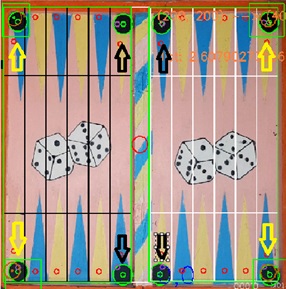
Calibration involves identifying four well-known 'machine location' checkers on the board, establishing an initial mapping between screen coordinates and machine coordinates. Due to camera distortion, the mapping isn't linear. I used the following steps to calibrate the board:
- Board-Camera Initial Mapping: Identify points at the corners to define the initial coordinate transformation.
- Board Rotation: To align the image with the board, it's rotated since the board borders aren't perfectly aligned with the camera's X and Y directions.
- Camera Distortion Compensation: Camera lens distortion causes errors of a few millimeters, necessitating compensation to prevent critical errors like missed checkers.
3. Checkers Identification
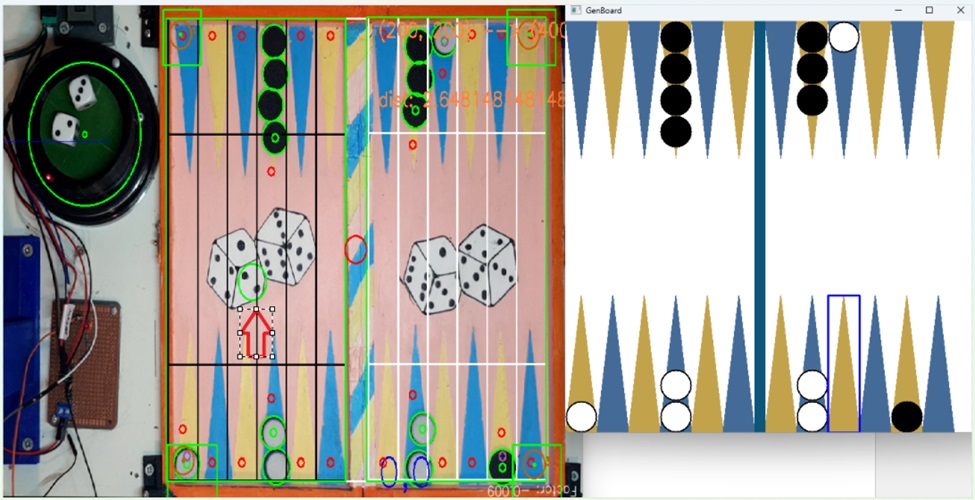
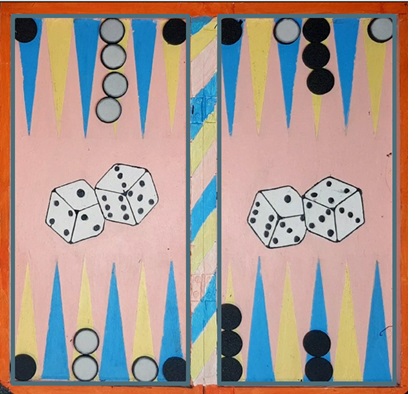
An algorithm identifies checkers and their colors, filtering out noise like the markers and the paintings on the board. It then interprets the image and translates it to a digital board state.
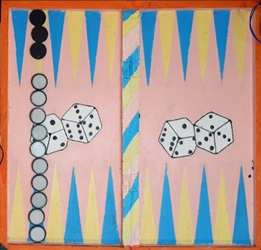
Special handling is required for unusual cases, such as when checker columns are high enough to 'invade' the opposite column, as shown in the example below.
Robot Control Architecture
The robot is managed using GRBL, a platform for motion control for CNC, adapted to control the robot's head for playing backgammon. An Arduino serves as the main controller, communicating with another Arduino running GRBL to execute move commands.
Motion Strategy and Offline Simulation
Offline simulation was crucial due to the numerous maneuver types involved. It was essential to develop a simulation that clearly illustrates the head's movement from the origin to various pickup and target positions. Additionally, the simulation provides warnings if it detects potential collisions with the board's bars (the simulation runs before every movement, to prevent damage to the robot’s head).
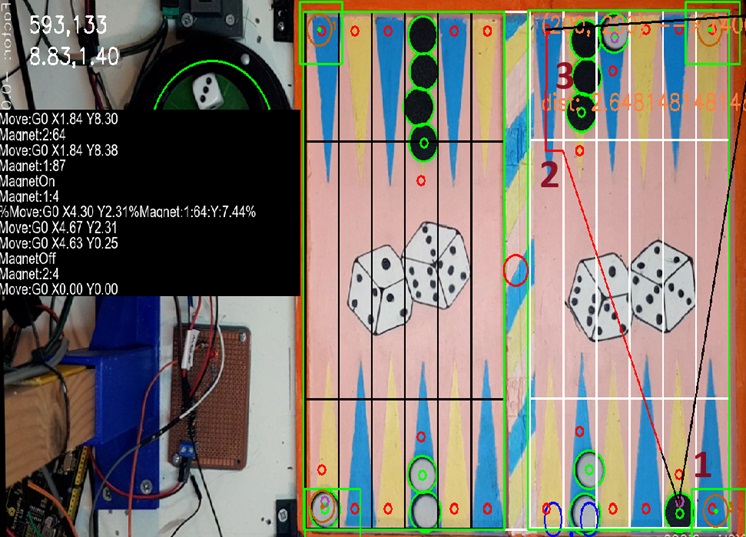
In this example, the head moves to 1 (Black line - head is up), picks up the checker, then it descends when running to 2 (red line), getting closer to the bar and slides the checker into its target position.
- Approaching for Pickup: To avoid collisions with the bars around the board, a 'no-descending zone' is defined (see Grey borders below). The robot's head avoids descending in this area and adopts a specific approach when picking up checkers near the bars.
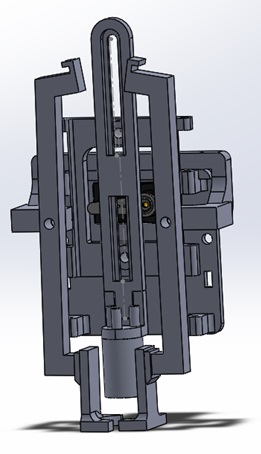
- Picking up Checkers: Once the robot's head is positioned above (or nearly above) the checker, it descends, activates a magnet, and picks up the checker. The checkers are outfitted with metal that becomes magnetized when in close proximity to an active magnet. To achieve this, I opted to utilize a small round battery with this magnetic property.
- ‘Lift & Shift’ Innovation: In order to prevent difficulties during the descent onto the checker, I incorporated a mechanism that provides a degree of flexibility in the descent height. Once a checker is collected and being lifted – it is being straightened up. This becomes crucial when descending and placing the checkers, as it prevents placing it on top of other checkers, due to misalignments. This is a game changer in this whole implementation.
Intelligent Board Space Management
Placing a checker on board
- Avoiding bars – another challenge is to put the checker back on the board. When the checker’s target position is close to the corner, it behaves in a similar way to when it was picked up – first, go as fast as possible near the target position, then, descend and then – drop the checker in its final position. This avoids collisions and some mess on the board afterwards.
- Avoiding clashes with other checkers. Sometimes, there’s a need to put the checkers in a very narrow position since there are checkers on both sides of the target column and not enough space for the checker. For that, I decided to approach the target position from the top of the column and then make some way for the checker to be placed. Fortunately, the magnet was strong enough to hold the checker when moving some other checkers away and giving some space. The key success factor here is to maneuver the checker high enough so it doesn't touch the board, but low enough to make it move other checkers. The height of the checkers was adjusted to make this happen.
It was also necessary to ensure the checkers on the bar, when flying over them. This was handled by adjusting the height of the robot's head:
AI-Powered Dice Recognition (CNN Dice Recognition)
Implemented using a simple CNN (Convolutional Neural Network) trained on roughly 1K images. The NN is practically working perfectly, apart from the times when the dice is partially laying on the corner of the dice roller. This deep learning approach provides high accuracy under varying conditions.
Communication and Visual Feedback
Communication: I employ three communication protocols:
- TCP: Facilitating communication between the PC and the main Arduino.
- I2C: Establishing communication between the main Arduino and a communication transfer controller. This controller reads I2C and transmits data via Serial, compensating for the absence of additional Serial capability on the main Arduino.
- Serial: Enabling communication between the main Arduino and the GRBL controller, as well as between the main Arduino and the communication transfer controller.
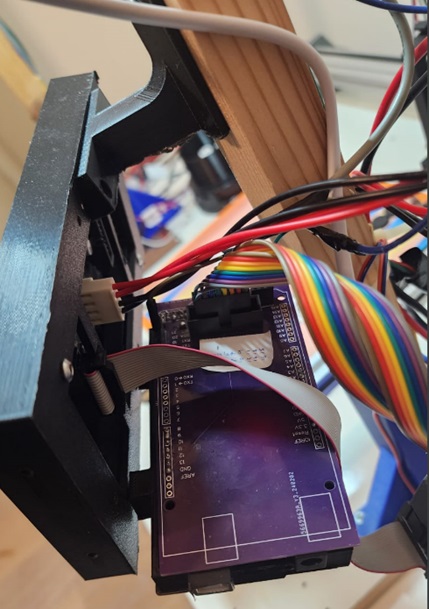
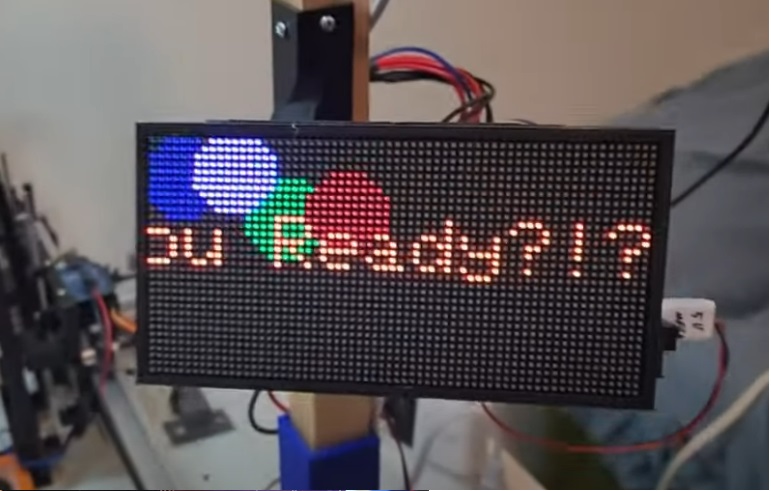
Visual Feedback: Utilizing a 64x32 LED Matrix to display messages and enhance the gaming experience. A simple PCB that I designed connects the LED Matrix to the controlling Arduino. There are many messages and multiple animations that the game provides.
BotGammon is therefore not just a typical robotics project, but a seamless integration of Mechanical Design, Computer Vision, and Embedded Logic to create a new board game experience that transcends the boundaries between humans and machines.