Project Overview: Revolutionizing Prescription Handling with Contactless Technology
According to the Centers of Disease Control and Prevention 84.3% of adults had contact with a health professional. If we consider data for children, it is 93%. And talking about crude numbers, it is a surprisingly high 883.7 Million visits annually. This represents a significant vector for disease transmission and a compelling case to carefully ponder upon more hygienic and efficient alternatives for healthcare interactions.
In times of global health challenges, such as the COVID-19 pandemic, where detection methods may be limited or slow, our best shot at winning is through preventive measures. One crucial preventive measure is ensuring the safety of our frontline health professionals and patients alike. This project introduces a solution aimed at significantly reducing physical contact in the process of obtaining and fulfilling prescriptions.
This initiative proposes a paperless and contactless prescription method where any person visiting a doctor is given a unique, re-programmable tag. This tag, likely an RFID (Radio-Frequency Identification) or NFC (Near Field Communication) card or key fob, would securely store the prescription details or a unique identifier linking to the prescription in a digital database. This eliminates the need for physical paper prescriptions, reducing potential fomite transmission and streamlining the process.
System Architecture: Two Interfaces for Seamless Interaction
The project is fundamentally structured around two distinct aspects and interfaces, each serving a critical role in the prescription lifecycle:
- Doctor's Interface (Prescription Issuance): This is where the healthcare professional electronically writes the prescription and securely associates it with the patient's RFID tag.
- Pharmacy/Patient Interface (Prescription Retrieval and Fulfillment): This is where the patient presents their tag to a pharmacy, allowing the pharmacist to instantly and accurately retrieve the prescription details for dispensing medication. Patients could also potentially use this interface to view their active prescriptions.
Hardware Components and Circuit Rationale
The core of this contactless prescription system relies on an Arduino microcontroller for processing and an RFID module for contactless communication. The visual representation in the provided image confirms the use of an Arduino Uno, an RC522 RFID module, and a 16x2 LCD display with an I2C backpack.
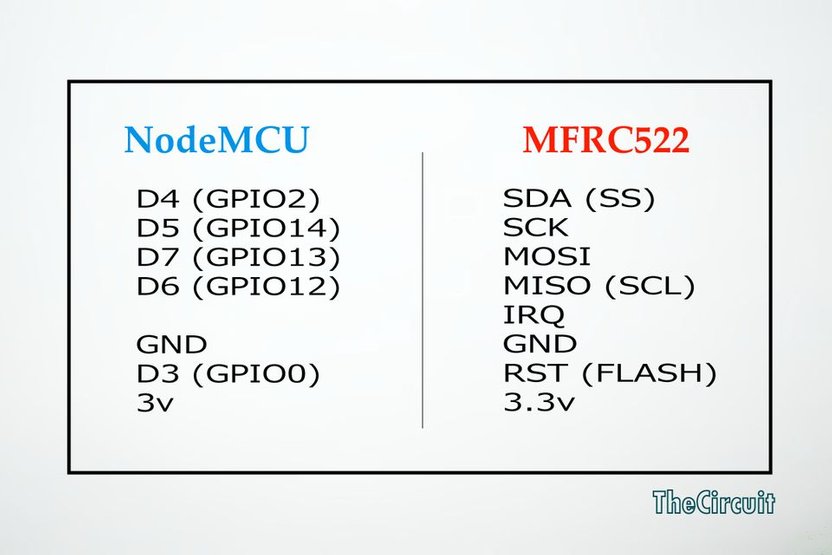
For the circuit diagram, while no traditional schematic is provided, the interaction between components is typically defined by the code's pin assignments. This approach implies that the software logic dictates which Arduino pins connect to which component functions.
Let's break down the components and their intended connections based on standard practices and the visible hardware:
- Arduino Uno: This is the brains of the operation. It's a popular microcontroller board known for its ease of use and versatility, making it ideal for prototyping. It will execute the code to control the RFID module, manage data storage/retrieval, and drive the display.
- RC522 RFID Module: This module is responsible for reading and writing data to 13.56MHz RFID tags. It communicates with the Arduino using the Serial Peripheral Interface (SPI) protocol, which is a fast, full-duplex synchronous serial communication interface.
- Wiring Rationale (RC522 to Arduino Uno):
- VCC: Connects to Arduino's 3.3V pin. The RC522 operates at 3.3V.
- RST (Reset): Connects to an Arduino digital pin (e.g., D9), used to reset the module.
- GND: Connects to Arduino's GND.
- MISO (Master In, Slave Out): Connects to Arduino's digital pin D12 (SPI MISO). This is how data goes from the RFID module to the Arduino.
- MOSI (Master Out, Slave In): Connects to Arduino's digital pin D11 (SPI MOSI). This is how data goes from the Arduino to the RFID module.
- SCK (Serial Clock): Connects to Arduino's digital pin D13 (SPI SCK). This provides the clock signal for synchronous communication.
- SDA (Slave Select / SS): Connects to an Arduino digital pin (e.g., D10). This pin is used by the Arduino (master) to select the RC522 (slave) when multiple SPI devices are connected.
- Wiring Rationale (RC522 to Arduino Uno):
- 16x2 LCD with I2C Backpack: This display is used to show information to the user, such as prescription details, patient ID, or status messages. The I2C backpack simplifies wiring significantly, requiring only two data lines (SDA, SCL) plus power and ground.
- Wiring Rationale (LCD I2C to Arduino Uno):
- VCC: Connects to Arduino's 5V pin.
- GND: Connects to Arduino's GND.
- SDA (Serial Data): Connects to Arduino's Analog 4 (A4) pin (I2C SDA on Uno). This is the data line for I2C communication.
- SCL (Serial Clock): Connects to Arduino's Analog 5 (A5) pin (I2C SCL on Uno). This is the clock line for I2C communication.
- Wiring Rationale (LCD I2C to Arduino Uno):
- Breadboard: Used for organized prototyping and connecting components easily without soldering.
This setup forms a robust basis for a contactless interaction system. The Arduino can read the unique ID of an RFID tag, and potentially read/write small amounts of data directly to the tag's memory sectors, or use the tag's unique ID to look up larger datasets from an external database (e.g., via a connected computer or network shield).
Anticipated Software Logic and Functionality
While no specific code snippet is provided, based on the hardware and project description, the Arduino's software would likely implement the following core functionalities:
1. Common Libraries and Setup:
- MFRC522 Library: Essential for interacting with the RC522 RFID module. This library handles the complex SPI communication and provides functions for detecting tags, reading their Unique Identifier (UID), and reading/writing data to specific memory blocks.
- LiquidCrystal_I2C Library: Used for easy control of the 16x2 LCD display via the I2C backpack. This library simplifies sending text and commands to the display.
setup()Function:- Initialize Serial communication for debugging and logging.
- Initialize the I2C LCD display.
- Initialize the SPI bus and the MFRC522 RFID module.
- Print initial welcome messages on the LCD and Serial Monitor.
2. Doctor's Interface Logic (Prescription Issuance):
- Tag Detection: The Arduino continuously polls for an RFID tag. Once a tag is placed on the reader, its UID is read.
- Prescription Data Input (Conceptual): In a full system, a doctor's interface (e.g., a connected PC with a GUI) would allow input of patient details and prescription information. This information (or a unique prescription ID) would then be sent to the Arduino via Serial communication.
- Data Writing to Tag:
- The Arduino would authenticate the tag (optional, but good practice).
- It would select a specific memory block on the RFID tag (e.g., MiFare Classic 1K tags have 16 sectors, each with 4 blocks).
- The unique prescription ID or encrypted prescription data would be written to one or more of these blocks. Data integrity checks (like CRC) would be crucial.
- Confirmation messages would be displayed on the LCD.
- Error Handling: The code would include logic for handling failed writes, invalid tags, or communication errors.
3. Pharmacy/Patient Interface Logic (Prescription Retrieval):
- Tag Detection and UID Reading: Similar to the doctor's interface, the system continuously scans for an RFID tag.
- Data Reading from Tag:
- Once a tag is detected, the Arduino would read the pre-defined memory blocks where the prescription ID or data is stored.
- The read data would be parsed.
- Prescription Display: The extracted prescription ID or details would be displayed on the 16x2 LCD for the pharmacist or patient to review.
- Backend Integration (Conceptual): For a more robust system, the read UID or prescription ID would be sent to a backend server (e.g., via Wi-Fi/Ethernet shield or a connected PC) to retrieve the full, secure prescription details from a central database. This ensures data security and allows for comprehensive medical records management.
- Fulfillment Acknowledgment: The system could potentially allow the pharmacist to mark a prescription as "fulfilled" by writing a status update back to the tag or updating the central database.
Advantages of a Contactless Prescription System
This system offers several significant benefits:
- Enhanced Hygiene and Safety: Dramatically reduces physical contact points, minimizing the spread of pathogens, especially critical in healthcare settings.
- Efficiency and Speed: Eliminates paper handling, manual transcription errors, and reduces waiting times for both patients and pharmacists.
- Accuracy: Digital data transfer reduces the risk of misinterpretation of handwritten prescriptions.
- Environmental Impact: Contributes to a paperless environment, aligning with sustainability goals.
- Security Potential: With proper encryption and database integration, sensitive patient data can be handled more securely than physical paper.
- Streamlined Workflow: Simplifies the process from doctor's consultation to pharmacy dispensing.
This project lays a robust foundation for a modern, secure, and efficient healthcare interaction model, moving towards a future of truly smart and contactless medical services.