Digital Orchestration: Mastering the S2 with Arduino
The S2 Synthesizer is a powerful sound engine, but navigating its internal General MIDI (GM) program bank can be cumbersome during a live performance. This project uses the Arduino Nano as a dedicated MIDI controller, providing a tactile, menu-driven interface that allows a musician to scroll through and select from the 128 standard GM patches with speed and precision.
The General MIDI (GM) Standard
General MIDI isn't just a file format; it's a hardware specification that ensures consistency across different instruments.
- Patch Mapping: GM defines 128 standard instruments (Pianos, Strings, Percussion, etc.) across 16 channels.
- MIDI Message Format: The Arduino Nano sends Program Change messages via a standard 5-pin DIN or Serial-to-USB link. A typical message consists of a status byte (
0xCnwherenis the channel) followed by a data byte (0-127 for the instrument).
Hardware Interface for Performance
To make the control interface intuitive, the project integrates an 16x2 Alphanumeric LCD:
- Menu Navigation: The Arduino manages a list of instrument names (e.g., "Acoustic Grand," "Hammond Organ").
- State Management: As the user scrolls (via buttons or a rotary encoder), the screen updates to show the currently selected patch name.
- Instant Execution: Upon confirmation, the Nano sends the corresponding MIDI command to the S2 Synthesizer, instantly changing the sound engine's output without the musician needing to touch the synthesizer's complex front panel.
Expanding the Sonic Palette
By offloading program management to the Arduino, the musician can focus on performance. This setup can be expanded to include:
- Control Change (CC) Messages: Add knobs to the Arduino to control real-time S2 parameters like Filter Cutoff, Resonance, or Reverb depth.
- Multitimbral Control: Use the Arduino to split the keyboard or layer multiple GM programs across different MIDI channels simultaneously.
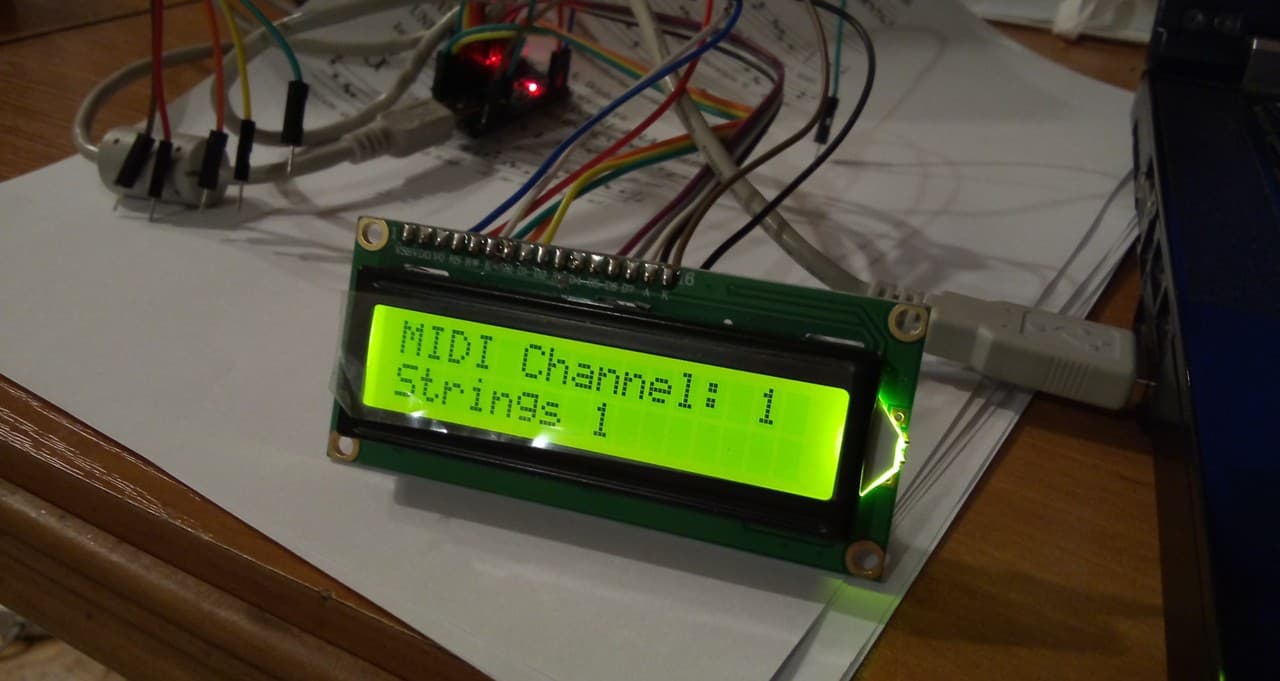
Controlling the GM program in the S2 synthesizer using the Arduino Nano.