A lot of people seem to get a Deek-Robot datalogging shield and expect it to work easily on a Mega2560. But it doesn't work with the normal SD library, so they have to ask for help on the forum. Turns out that it is not hard at all to use this shield on a Mega2560.
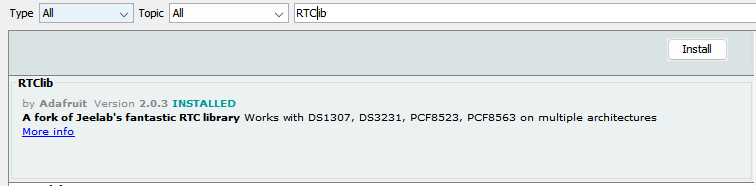
Start by connecting pin A4 to pin 20, and pin A5 to pin 21 using two jumper leads. Then install the RTClib library through the library manager.
Then upload the DS1307 example code from the RTClib example code.
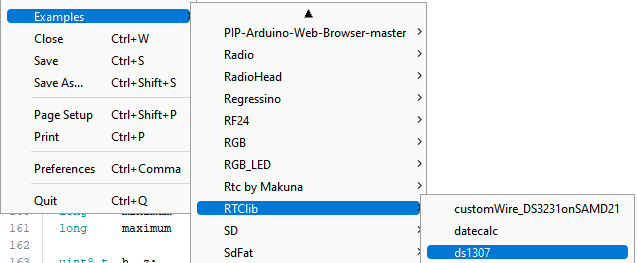
That should set the time chip to the compile time.
Next, download and install https://drive.google.com/file/d/1T5GEPMKtLjfiJvdL_DHEbsTk9sAIzThP/view library.
Then upload the Datalogger example located under SD.
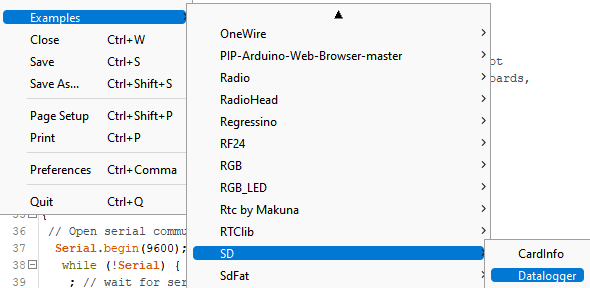
You will then need to change lines 49 - 53 from this:
 if (!SD.begin(chipSelect)) {
   Serial.println("Card failed, or not present");
   // don't do anything more:
   while (1) ;
 }
to this:
if (!SD.begin(10, 11, 12, 13)) {
   Serial.println("Card failed, or not present");
   // don't do anything more:
   while (1) ;
 }
You will need to do this in every code that you write if it uses this Datalogging shield.
This Datalogging shield does not work with SD cards that are larger than 2 gigabytes. It also does not work with micro sd card adapters.
If anyone finds that this does not work, please post in the comments and I will help you ASAP!
EXPANDED TECHNICAL DETAILS
Advanced Storage & Timekeeping
This tutorial optimizes the use of the Deek-Robot Shield specifically for the high-pin-count Arduino Mega.
- Combined Shield Utility: Integrates a MicroSD Card slot for storage and a DS1307 Real-Time Clock (RTC) for timestamping.
- Buffer Logic: The Arduino Mega's large SRAM is used to "Buffer" sensor data before writing to the SD card, reducing power consumption and wear on the flash memory.
Field Reliability
- Timestamped Logs: Every data entry is saved as a row in a
.CSVfile with an exact millisecond timestamp, making it ready for professional scientific analysis.