Delta Robot Kinematics Library: High-Precision Motion Control System for Parallel Robots
Forward and Inverse Kinematics Library for Delta robot.
In the world of industrial robots, the Delta Robot stands out as a type of Parallel Robot, renowned for its extremely high speed and precision. It is often used in pick-and-place tasks, packaging, or even 3D printing. The greatest challenge for this type of robot isn't just its mechanical structure, but the "mathematics" behind its motion.
This library is designed to handle both directions of Kinematics problems: Forward Kinematics and Inverse Kinematics. This allows you to control the Delta Robot's robotic arm as easily as moving standard Cartesian coordinates.

Thank you to:
Special thanks to the mathematical and engineering resources that form the foundation of this library:
- http://forums.trossenrobotics.com/tutorials/introduction-129/delta-robot-kinematics-3276/
- https://www.marginallyclever.com/other/samples/fk-ik-test.html
- https://github.com/Tomdf/Delta_Robots/blob/master/Diagrams/Delta%20Robot%20Kinematics%20-%20Trossen%20Robotics.pdf
- http://hypertriangle.com/~alex/delta-robot-tutorial/
Delta Kinematics Setup
For the library to calculate positions correctly, you need to specify the robot's physical dimensions using 4 main variables, as shown in the diagram below:
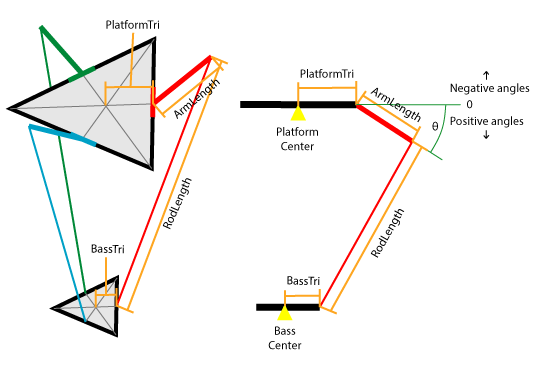
Engineering Variable Descriptions:
- ArmLength (L): The length of the Upper Arm directly connected to the motor axis.
- RodLength (l): The length of the Parallel Rods connecting the Upper Arm and the End-Effector platform.
- BassTri (sb): The distance from the center of the Base to the pivot point of each motor.
- PlatformTri (sp): The distance from the center of the End-Effector platform to the attachment point of each arm.
Recommendation: While the library supports all units of measurement (meters, inches), it is recommended to use "millimeters (mm)" for the highest resolution and precision in micro-level position calculations.
Functions
SETUP
DeltaKinematics(double ArmLength,double RodLength,double BassTri,double PlatformTri)
This function is used to create an Instance and define the structural dimensions of the robot you wish to control. These values will be used in internal matrix equations to calculate positions.
This Fuction is set up the class to calulate the forward and inverse kinematics for the delta. ArmLength, RodLength, BassTri and PlatformTri are the set values from the Delta robot. See image above to see how to take the measurement.
Millimetre, meters, inches or any other lenth measurement can be used for ArmLength, RodLength, BassTri and PlatformTri. The measurement will need to be the same for x, y and z.
It is recommended to use Millimetre for ArmLength, RodLength, BassTri and PlatformTri
SETUP
int forward()
int forward(double thetaA, double thetaB, double thetaC)
This function is used when you know the angles of all 3 motors (in degrees) and want to determine the coordinates of the print head or End-Effector in 3D space.
- Operation: When you input the values
thetaA, B, C, the library calculates the intersection point of the three spheres where the arm ends converge, storing the result in the object'sx, y, zvariables.
This functions is to calulate the forward kinematics of for the delta. The calulations can be set using the variables a, b and c or in the function with ThetaA, thetaB and thetaC.
ThetaA, thetaB and thetaC valuse are in degrees. a, b and c valuse are in degrees (see Variables below). See image above.
int inverse()
int inverse(double x0, double y0, double z0)
This is the most crucial function for Motion Control when you want the robot to move to a specific position (e.g., to X=10, Y=20, Z=-150).
- Operation: The system calculates backward to find the "degree angles" each motor must achieve to reach that target. The results are stored in the
a, b, cvariables.
This function is to calculate the inverse kinematics of for the delta. The calculations can be set using the variables x, y and z or in the function with x0, y0 and z0.
It is recommended to use Millimetre for x, y and z
Variables
double x, double y, double z
These variables are used to store Cartesian axis coordinates.
- When
forward()is called, the result is stored here. - When
inverse(x0, y0, z0)is called, these values are used as input. - Units: Recommended to use millimeters (mm).
These variables (x, y and z) and be read and written. They are used to set the position of the Delta robot's platform for Kinematics. If forward kinematics are calulated, the return values are placed in x, y and z.
It is recommended to use Millimetre for x, y and z
double a, double b, double c
These variables are used to store "motor angles" (Servo/Stepper angles).
- When
inverse()is called, the calculated angle results are stored here. - When
forward(thetaA, thetaB, thetaC)is called, these values are used as input. - Units: Degrees.
These variables (a, b and c) and be read and written. They are used to set the angle of the Delta robot's motors for Kinematics. If inverse kinematics are calulated, the return values are placed in a, b and c.
a, b and c valuse are in degrees. See image above.
Technical Deep Dive: Why Use a Kinematics Library?
In engineering, moving a Delta Robot cannot be achieved by simply commanding one motor to rotate and expecting linear motion, as all three arms exert coupled forces (Coupled Dynamics).
- The Inverse Kinematics of a Delta Robot relies on the principle of finding the intersection points between circles generated by the sweep of the upper arms and spheres generated by the length of the rods.
- Forward Kinematics is significantly more complex, as it requires solving polynomial equations to find the intersection point of three spheres (Trilateration).
This library automatically handles the complexity of these Sine, Cosine, and Square Root calculations, reducing CPU load and saving development time for control programs. This allows you to fully focus on the project's logic, such as picking and placing objects or drawing.