กลับไปหน้ารวมไฟล์
diy-nodemcu-development-board-b2bfb3-en.md

If you have ever programmed a NodeMCU, then I bet you know the pain you have to go through while connecting sensors to NodeMCU on a breadboard.I looked for various solution on the web and found "NodeMCU Development Boards" for around $6 to $7. Well, I wasn't ready to spend that much for a simple projects. So, I went ahead and designed a replica of those boards, which, 10 of them I got fabricated from PCBWay for just $5.

Project Perspective

This DIY - NodeMCU Development Board is a fundamental and practical breakout board for anyone starting their journey with the NodeMCU. By creating a custom PCB that extends all the digital and analog pins, you can build a more organized and easy-to-use development environment for all your NodeMCU-based projects.

Technical Implementation: PCB and Pin Extension

The project focuses on creating a robust and expandable hardware platform:

  • PCB Design layer: The custom PCB design features extensions for all the NodeMCU pins, including dedicated power rails for 3.3V, 5V, and GND.
  • Header Integration layer: Using both Male and Female Pin Headers side-by-side, the board can accommodate any sensor or module with ease, providing a more versatile experience.
  • Power Management layer: The board includes a dedicated VIN Connector and leverages the NodeMCU's built-in LDO regulator for stable 3.3V power.

Hardware Infrastructure

  • NodeMCU ESP8266: The core WiFi-enabled microcontroller that will be the heart of all your development.
  • Custom PCB (Replica Design): A professionally designed and fabricated PCB that acts as the backbone for the entire development board.
  • Male and Female Pin Headers: Providing multiple connection points for all of the NodeMCU's digital and analog pins.
  • Reset Button: A convenient way to reset the NodeMCU without having to unplug it.
  • Screw Terminal (VIN): A sturdy way to connect an external power source to the board.

PCB Design
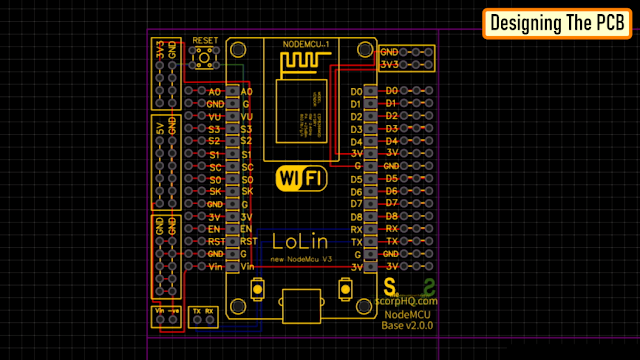
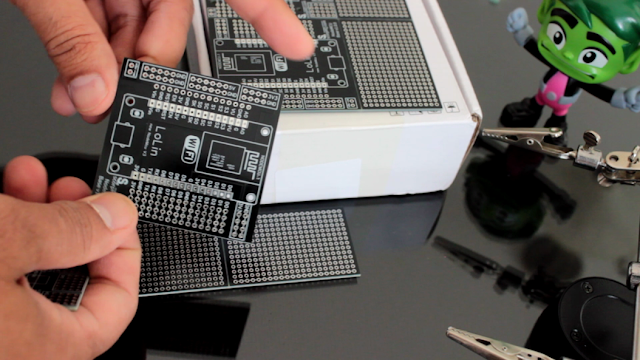
Let me first show you the design of the board.I have placed the NodeMCU in the middle of the board.On the right hand side are the extensions of all the digital pins. And on the left hand side are the extensions of the left hand side pins.Starting from left to right I have the VIN and the -VE pin to power up the NodeMCU at the bottom left hand side of the board. NodeMCU has an inbuilt LDO voltage regulator which keep the voltage level at 3.3v so there is no need for an additional voltage regulator. Just above that, is a series of GND pins. On top of that is a series of +5v and GND pins, followed by a series of 3.3v and GND pins. I have also added a series of 3v3 and GND pins on the top right hand side of the board. Then there is a reset button and a set of TX and RX pins for serial communication. On the same breakout board I have also added an Arduino Nano's Development Board.Since, I had a fair bit of real-estate left on my board, I created a generic PCB out of the left over space.

PCB Assembly

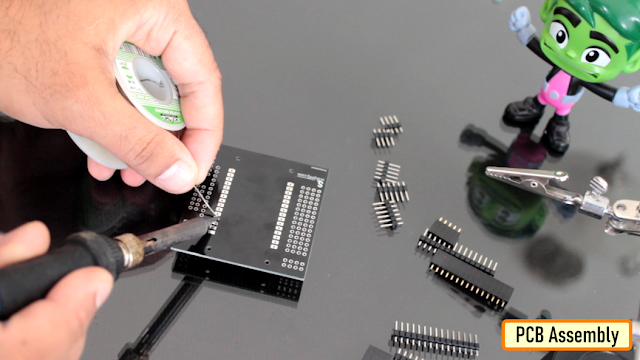
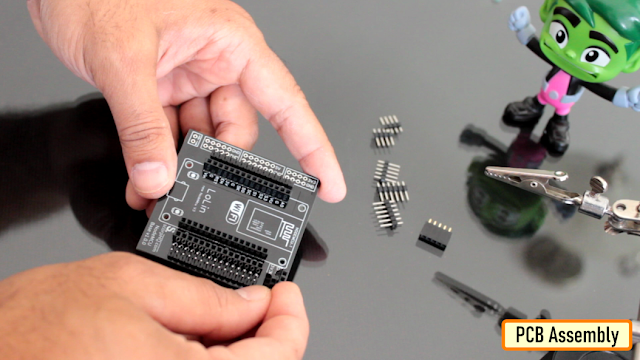
Lets start by soldering the male and the female pin headers to the board. It really doesn't matter, what order you solder the components to the board. The only think to remember is that, do not solder a component that blocks another one.
As you can see in the image above, I am soldering both male and female pin headers side by side on the board so that sensors with either male or female pin header can be hooked up to the board, making it more generic and expandable.
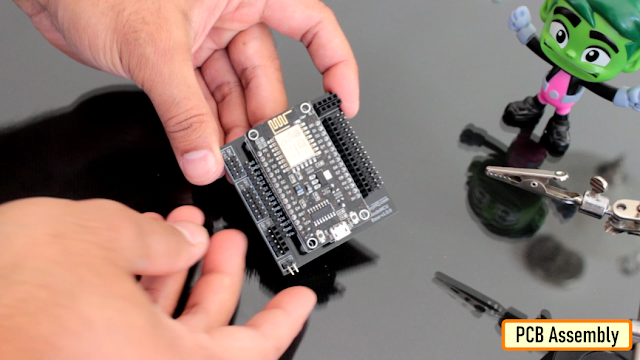
So, this is how the final setup looks like. Please comment and let me know if there is any scope of improvement, thanks

Future Expansion

  • OLED Display Integration: Add a dedicated header for an OLED display to show real-time status and telemetry from your NodeMCU.
  • Sensor Port Integration: Add specific headers for common sensors like DHT11 or HC-SR04 for even easier prototyping.
  • Vibration/Motion Detection: Integrate motion or vibration sensors to trigger specific actions or alerts from your development board.
  • MQTT/Cloud Sync: Use the NodeMCU's built-in WiFi to sync sensor data from your board with various cloud IoT platforms.

DIY - NodeMCU Development Board is a perfect project for any electronics enthusiast looking for a more interactive and engaging development tool!

Thanks

Thanks again for checking my post. I hope it helps you.If you want to support me subscribe to my YouTube Channel: **https://www.youtube.com/user/tarantula3** Blog Posts: **https://diyfactory007.blogspot.com/2021/11/nodemcu-development-board.html **

YouTube: https://youtu.be/y2m2nh7wHaY

Odysee : https://odysee.com/@Arduino:7/DIY---NodeMCU-Development-Board:1

cos.tv : https://cos.tv/videos/play/32048547001832448

Schema : https://drive.google.com/file/d/1XRR2sNZ5t4NhLFla9X3DyjaPAujrjeGY/view?usp=sharing

Support My Work:

BTC: 1M1PdxVxSTPLoMK91XnvEPksVuAa4J4dDp

LTC: MQFkVkWimYngMwp5SMuSbMP4ADStjysstm

DOGE: DDe7Fws24zf7acZevoT8uERnmisiHwR5st

ETH: 0x939aa4e13ecb4b46663c8017986abc0d204cde60

BAT: 0x939aa4e13ecb4b46663c8017986abc0d204cde60

LBC: bZ8ANEJFsd2MNFfpoxBhtFNPboh7PmD7M2 Thanks, ca again in my next tutorial.

ข้อมูล Frontmatter ดั้งเดิม

apps:
  - "1x Arduino IDE"
author: "shassandanish1"
category: "Home Automation"
components:
  - "1x NodeMCU ESP8266"
  - "1x Custom PCB (Replica Design)"
  - "2x Male Pin Header"
  - "2x Female Pin Header"
  - "1x Reset Button (Push-Button)"
  - "1x VIN Connector (Screw Terminal)"
  - "10x Jumper wires (generic)"
description: "I designed a replica of the NodeMCU Development Board, which, 10 of them I got fabricated for just $5."
difficulty: "Easy"
documentationLinks: []
downloadableFiles: []
encryptedPayload: "U2FsdGVkX19qN8AnOC4gxIsdj1wqY0EvUKNA8TOAG5+mpW6qSBWMZ5ybQDkJv2rPrjP9an1gd8pEzAW7c0KkRGiY0tcoJMXsKpBFpTEmq14="
heroImage: "https://cdn.jsdelivr.net/gh/bigboxthailand/arduino-assets@main/images/projects/diy-nodemcu-development-board-b2bfb3_cover.jpg"
lang: "en"
likes: 1
passwordHash: "7e173fe7ff0e92edaef9a04a7c9249bad700836535d62d9e7e9f6cc9974e33bc"
price: 1299
seoDescription: "DIY NodeMCU Development Board replica. I designed and fabricated 10 boards for only $5. A budget-friendly Arduino project."
tags:
  - "home automation"
  - "smart appliances"
  - "internet of things"
  - "monitoring"
  - "robots"
title: "DIY - NodeMCU Development Board"
tools: []
videoLinks:
  - "https://www.youtube.com/embed/y2m2nh7wHaY"
  - "https://www.youtube.com/embed/y2m2nh7wHaY"
views: 3125