I was inspired to create this project one day once I saw a YouTube recommendation for Scott Marley's video for making the ESP32 VU meter.
His project caught my eye when I thought it can be a great alternative to Logitech's Lightsync PC gaming speakers. Their speakers provide a fantastic way to create that intense mood when gaming compared to just standard RGB LED Strips that don't really do much.
Now to the guts of the project.
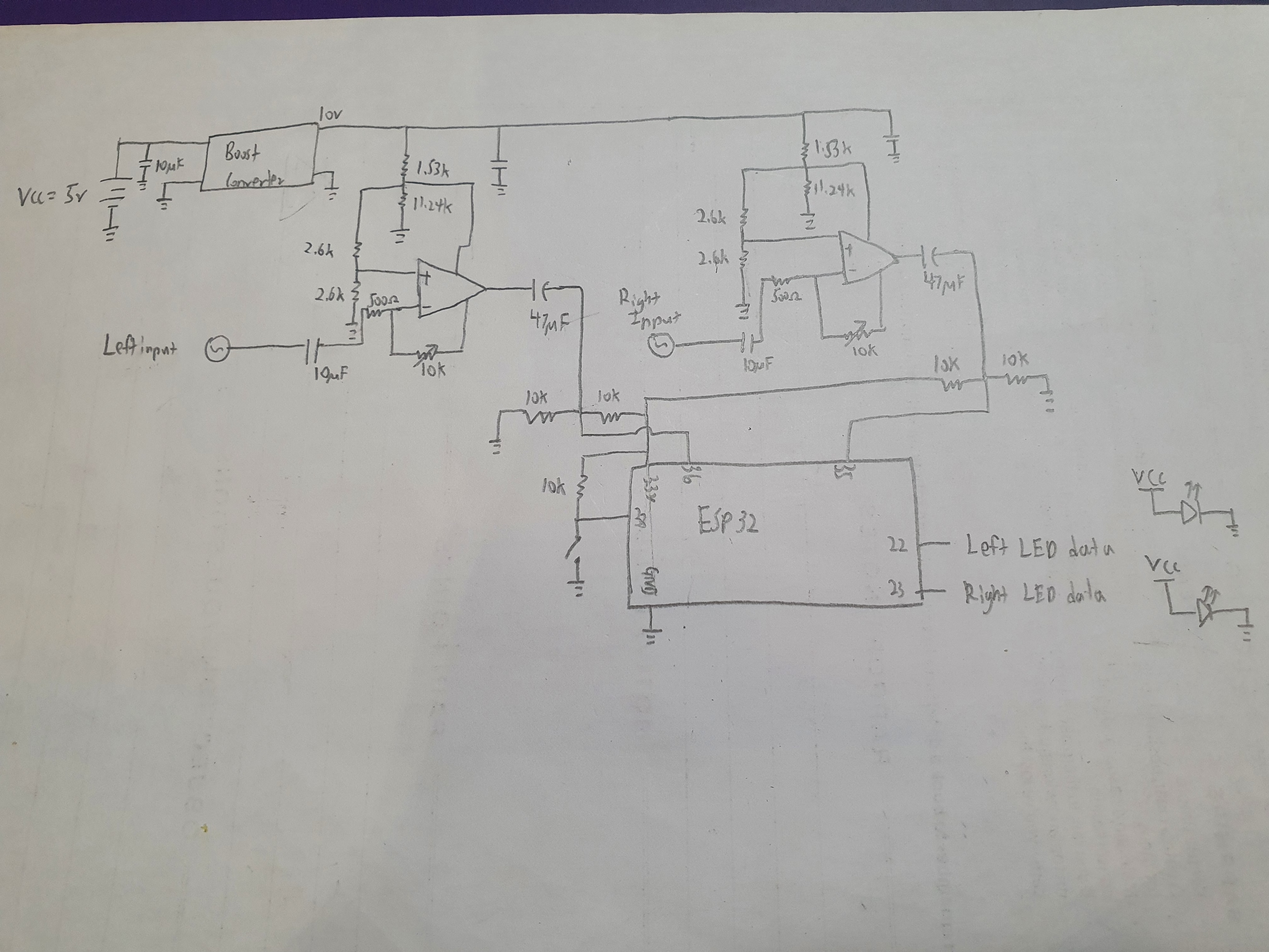
I apologize for providing a hand drawn schematic. Anyway, here's how the circuit works.
Make sure that your 5V power supply can handle at least 2A on most situations, your pc USB power supply should be enough if you don't set the brightness too high.
It is recommended that you use an external power supply not the 5V from the Vin pin of the ESP32. The AMS 1117 is only meant to regulate 5V to 3.3V for the ESP board. It will heat up if you draw too much current from it and might possibly burn out.
The value may vary based on the brightness you set
- The left and right audio channels are connected to inverting input of the OP AMPs.
- The potentiometers are used to control the gain of the OP AMPs. Control the gain accordingly to the "loudness" of the audio signal to make sure that the LED strips are able to react to the audio signal given( They can achieve a gain of about 20)
Reminder: Do not set the gain too high or the audio signal will be cut off because the of the amplified signal needs to be in the limits of the OP AMP amplification range. You can tell when the signal is cut off when the lights are too bright.
- To simplify things, we are only using a single supply (assuming most of us do not have a split supply). We are offsetting the virtual ground of the OP AMP so it gets to amplify the full wave
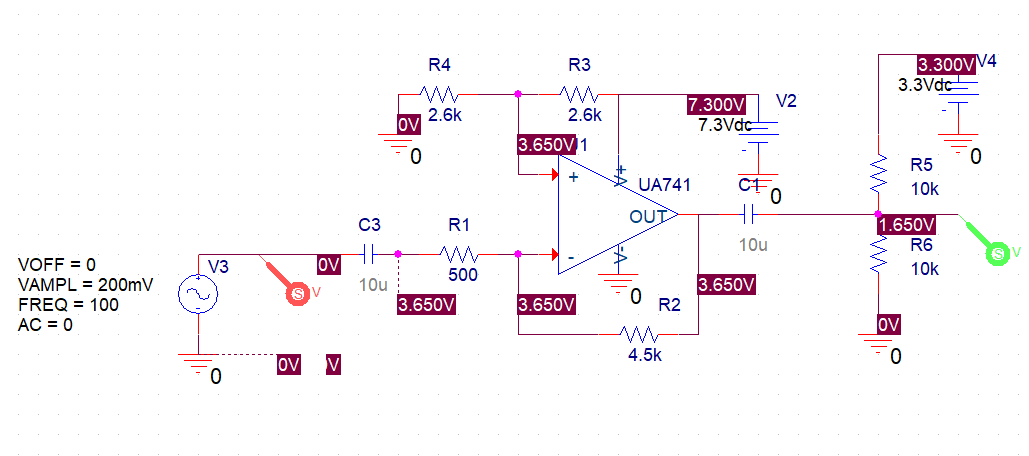
- The output capacitor is used to AC Couple the output signal to remove the Virtual ground offset applied at the non-inverting input of the OP AMP.
- We need to offset the signal once again using a voltage divider for it to be in the positive range because the ADC of the ESP 32 does not pick up negative voltages.
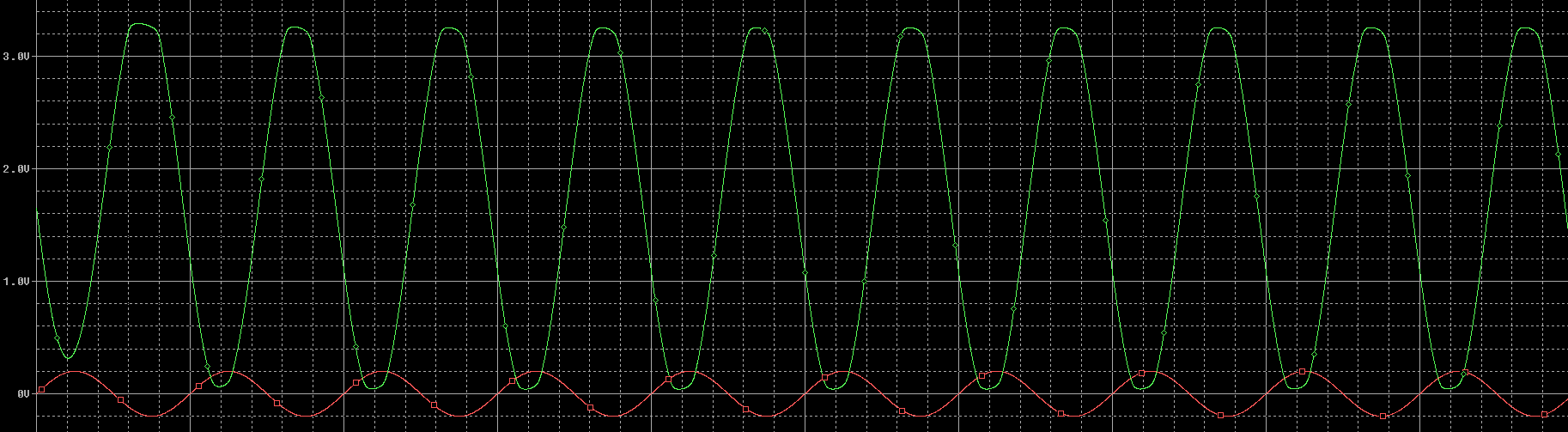
Note that this is a simulation and your mileage may vary depending on your condition. I didn't have a Oscilloscope so this is the best I could do.
(Range of ADC for ESP32 = 0-3.3V)
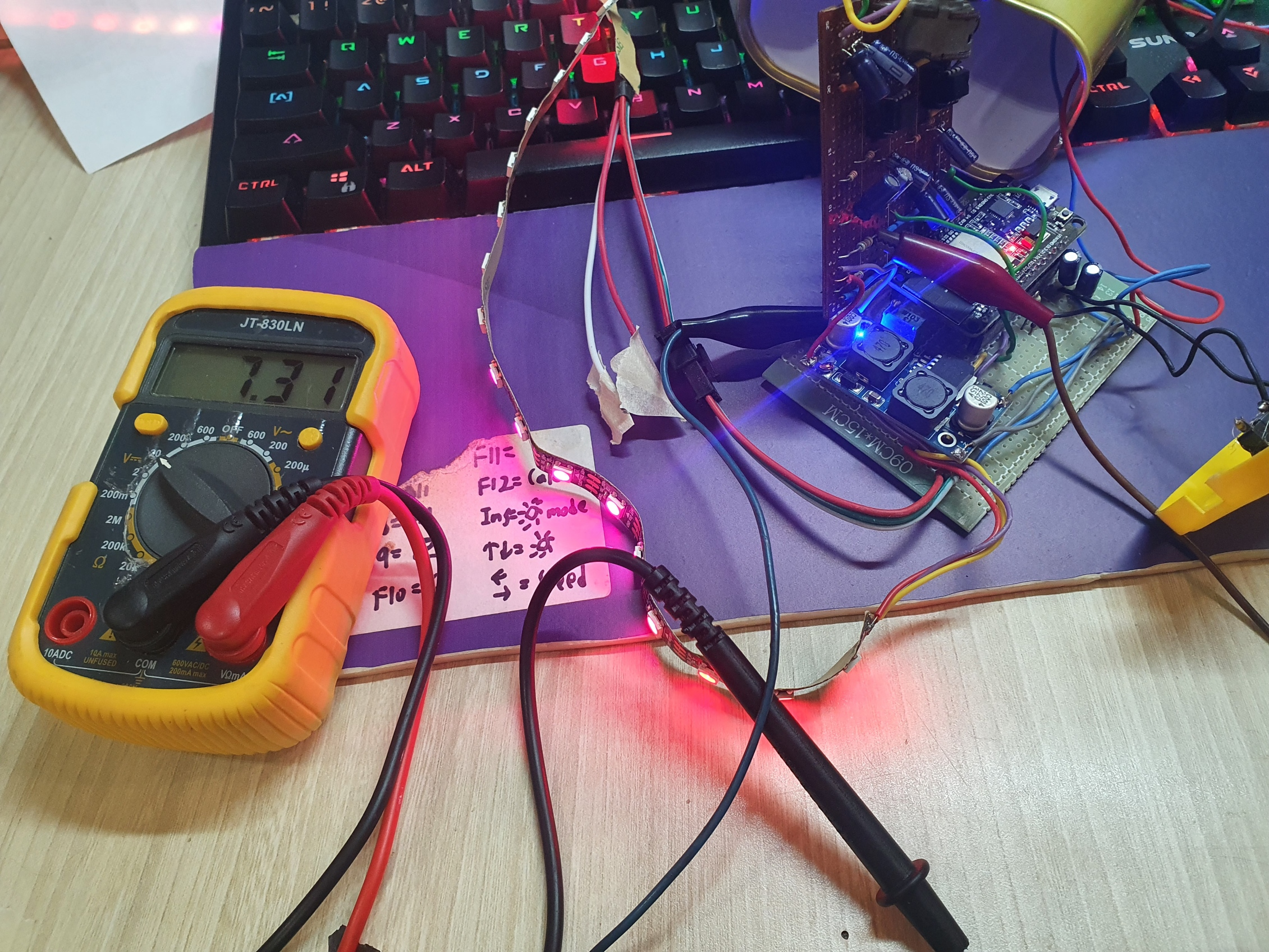
I've set the input voltage for the OP AMP to 7.3V so that the signal gets saturated before it reaches a voltage too high that might damage the ESP32 GPIO pins.
If you're using buck/boost converter module like mine shown in the picture below, there is a small screw you can turn to adjust the output voltage of the buck/boost converter.
In my case, I've had a problem directly setting it to 7.3V so I had use a voltage divider to get the 7.3V for the OP AMP.
Remembertogroundtheinputaudiosignal!
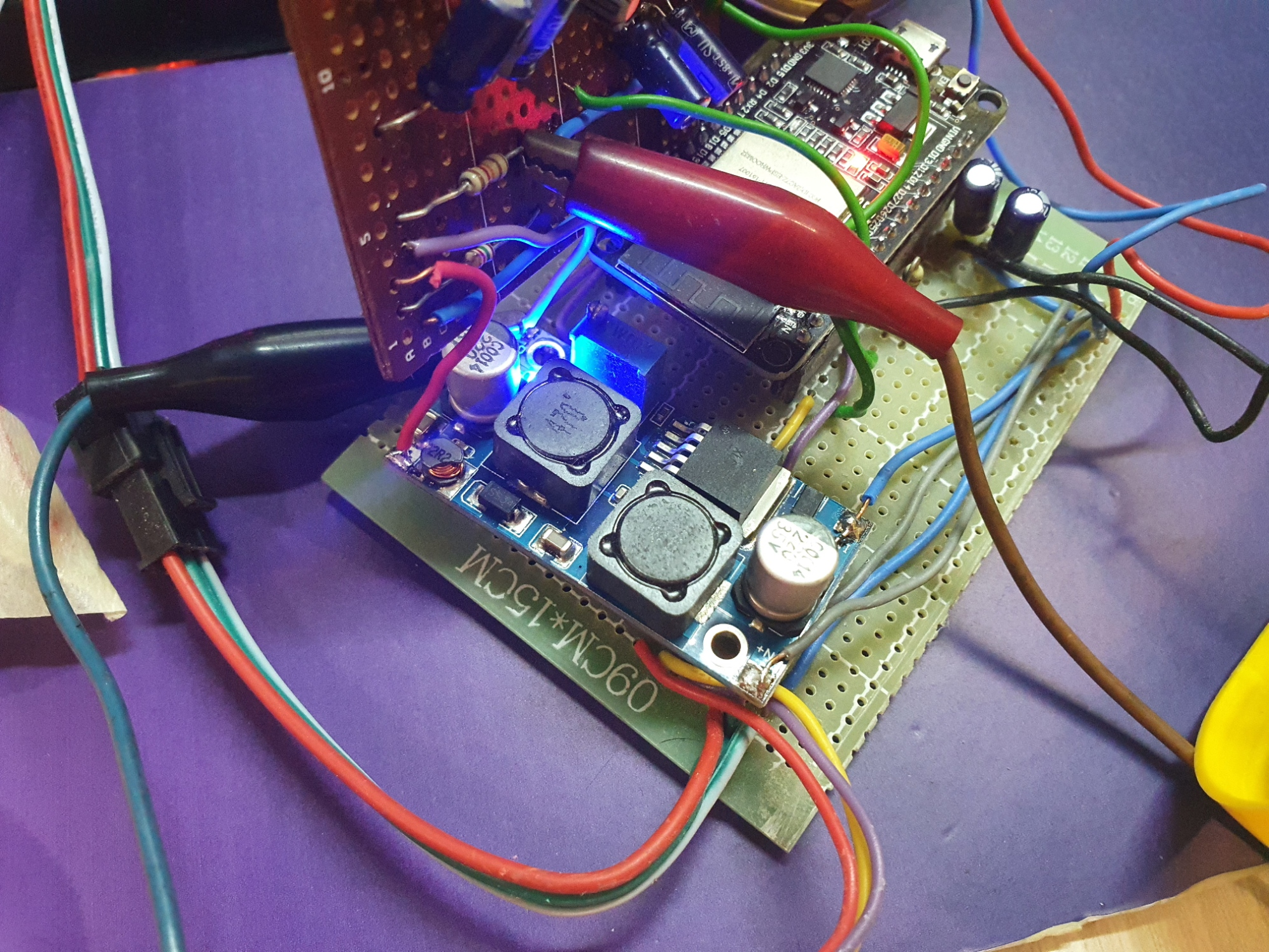
We're done with the hardware!
You can use any enclosure you'd like to keep things need and for a better look. I've used a old container with holes driller out for the wires and inputs. Choose whatever you like and make you project special!
NOTE:
Before you implement the code. It is Highly Recommended that you get familiar with the FastLED library.
Do check out the videos linked to get ready for the project.
High-Speed DSP: Stereo Spectrum Visualizer
The MSGEQ7 hardware chip is an easy shortcut for single-channel audio. But to visualize two channels (Left and Right Stereo) with extreme 16-band resolution, you must force the microcontroller to perform Digital Signal Processing. The ESP32 Stereo Visualizer utilizes the massive clock speed of a dual-core 32-bit chip to run Fast Fourier Transforms (FFT) in real time.
Dual-Core Fast Fourier Transform
An Arduino Uno runs at 16MHz. The ESP32 runs at 240MHz.
- The Sampling: The ESP32 utilizes two analog pins (one wired to the Left audio channel, one to the Right). Using hardware timers, it samples the audio 40,000 times a second.
- The Math (arduinoFFT Library): The library takes 512 tiny audio samples and runs complex trigonometric equations. It magically transforms a squiggly time-based audio wave into a bar graph of frequencies.
- Because the ESP32 is so fast, it can calculate the FFT for the Left Ear, then instantly calculate it for the Right Ear, without lagging the music.
Double WS2812B NeoPixel Matrices
The visual output is stunning.
- You wire two 16x16 WS2812B LED Matrices (one on the left of the speaker, one on the right).
- The code maps the 16 frequency bands to the 16 columns of the LED matrix.
- Column 0 (Far Left) represents 60Hz Bass.
- Column 15 (Far Right) represents 16kHz Treble.
- The amplitude of the FFT dictates how bright and how high the NeoPixel bar shoots up.
- Color Palettes: Using
<FastLED.h>, the bars are colored dynamically (e.g., green at the bottom, shifting to solid red at peak volume).
Necessary System Build
- ESP32 NodeMCU: Essential for the 240MHz computational speed.
- Two 16x16 WS2812B LED Matrices (Totaling 512 separate LEDs).
- Massive 5V/15A Power Supply: To run 512 Neopixels at full brightness.
- PAM8403 or PAM8610 Stereo Amplifier: To actually hear the music while looking at the lights.
Op Amp tutorial:
ESP32 8-Octave Audio Spectrum Display
ESP32 spectrum analyser VU meter using arduinoFFT and a FastLED matrix
FastLED basics
Huge Shoutout to Scott Marley for all the tutorials on Fast LED and Arduino FFT. and also to all the other people that made tutorials online that aided this project.
End notes
Feel free to modify the code to produce any pattern you like and optimize it to suit your needs.
there is no need to choose the exact same resistors used in this project, I've just used what I had lying around. Use whatever you like that works.
It is recommended that you use an ESP32 to make sure that you have enough horse power to sample the audio at a high enough frequency and work fast enough to achieve a desirable LED strip frame rate.
If the ESP32 suddenly does not work, check your power supply.
If things still don't work, check the serial monitor to check if there are any back traces. An error might occur like an unhandled exception.
In that case, Reset the ESP32 via the ESP32 flash tool that can be downloaded from the official website.
UPDATE( 7 JAN 2020): the Unhandled excepetion error in the _amp section of the code.
Good luck and happy making!