Types of 7 Segment Display
There are two types of LED 7-segment display called: Common Cathode (CC) and Common Anode (CA).
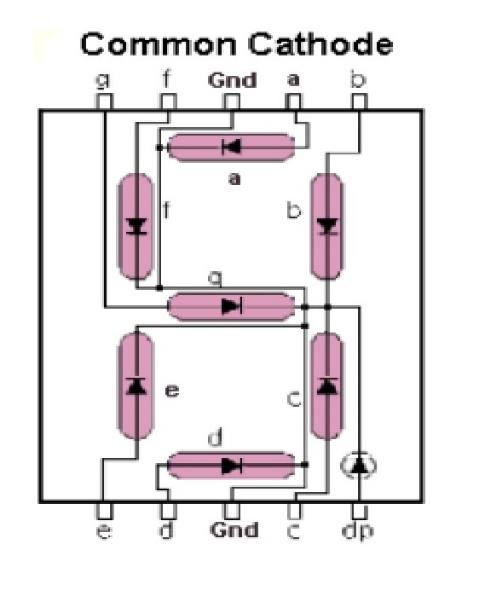
1.Common Cathode
In common cathode seven segment displays, all the cathode connections of LED segments are connected together to logic 0 or ground. We use logic 1 through a current limiting resistor to forward bias the individual anode terminals a to g.
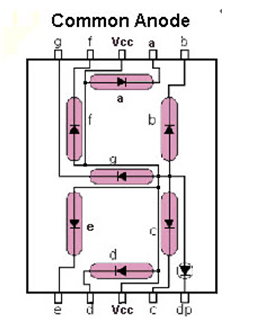
2.Common Anode
Whereas all the anode connections of the LED segments are connected together to logic 1 in a common anode seven segment display. We use logic 0 through a current limiting resistor to the cathode of a particular segment a to g.
Steps to make this project:
1. Gather components like Arduino Uno/ Nano, 7 segment display ( Common Anode / Common Cathode ), Breadboard, Jumper wires.
2. For Common Cathode connections:
See the connection diagram of Common Cathode
3. For Common Anode connections:
See the connection diagram of Common Anode
4. Upload respective codes.
You learned How to do connections of 7 segment display.
Visit my website from below link for more projects:
https://electronicsisfun08.blogspot.com/
EXPANDED TECHNICAL DETAILS
Numeric Visualization Foundations
This comprehensive guide provides the technical blueprint for interfacing single and multi-digit 7-segment displays with an Arduino.
- Direct Drive vs. Multiplexing Analysis: Explains the difference between "Common Anode" and "Common Cathode" configurations. The project demonstrates the use of current-limiting resistors (e.g., 220Ω) on each segment to prevent LED burnout.
- Pin-Optimization Matrix: Shows how to use a 74HC595 Shift Register to control an entire 7-segment display using only 3 data pins, essential for projects that require many other sensors.
Software Hub
- Bitmask Rendering Kernel: Includes a code library that maps the numbers 0-9 to an 8-bit segment byte, allowing users to display any integer with a single function call.