Acoustic Measurement: HC-SR04 Guide
The Ultrasonic Sensor Interfacing project is a foundational skill for any builder. It is the "Hello World" of robotics sensor integration, allowing your microcontroller to perceive depth and stop before it crashes into a wall.
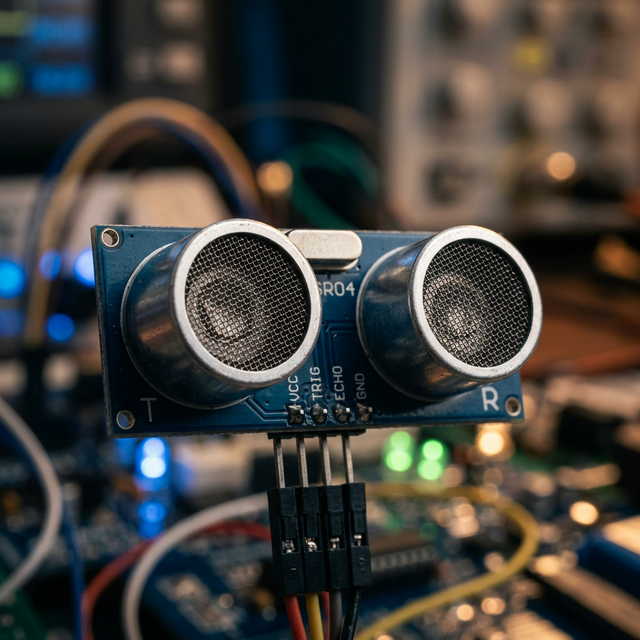
Echolocation Physics
The HC-SR04 mimics a bat's echolocation. It has two large silver cylinders:
- The Trigger: The Arduino sends a 10-microsecond HIGH pulse to the sensor's
Trigpin. The left cylinder (Speaker) blasts an ultrasonic burst of sound at 40 kHz (inaudible to humans). - The Wait: The
Echopin immediately goes HIGH. The sound wave travels through the air until it hits a solid object and bounces back. - The Receive: The right cylinder (Microphone) hears the bounce. The
Echopin immediately goes LOW.
The Crucial Math
The Arduino uses the function pulseIn(echoPin, HIGH) to measure exactly how many microseconds the pin stayed high. If the result is 1160 microseconds:
- Sound travels at 340 meters per second (or 0.034 cm per microsecond).
- Distance = (Time * Speed) / 2 (because the sound travels there and back).
Distance = (1160 * 0.034) / 2 = 19.72 centimeters!
Hardware Connect
- Arduino Uno/Nano.
- HC-SR04 Module.
- 4 Jumper Wires (VCC to 5V, GND to GND, and two digital pins).
By printing this final number to the Serial Monitor, you instantly have a functional digital tape measure.