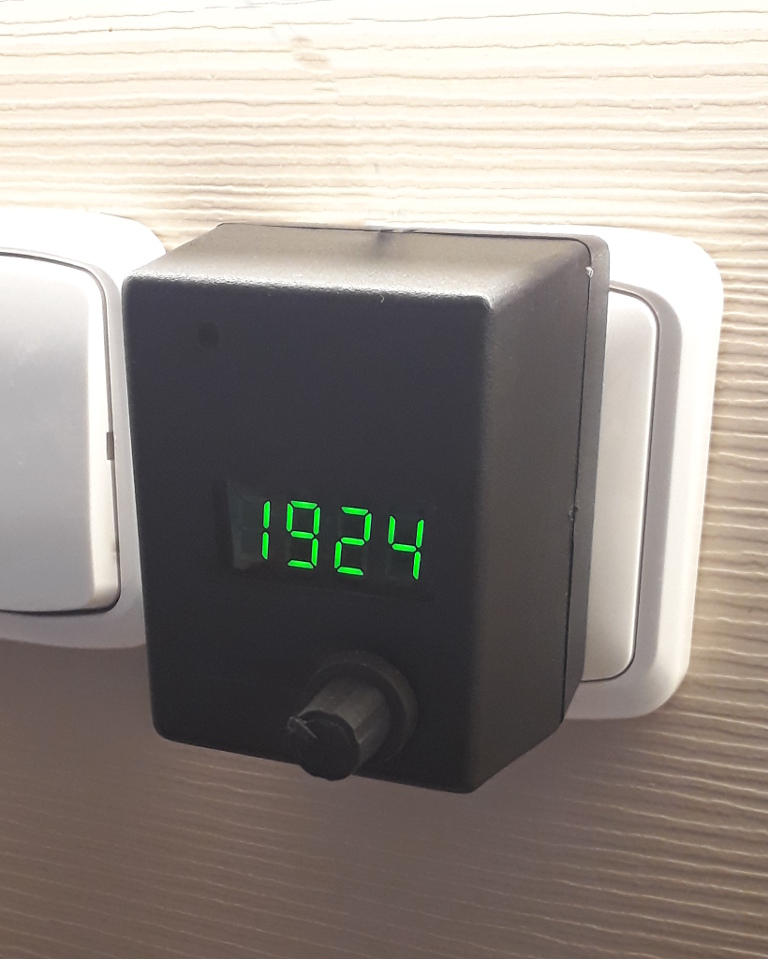
The request was a kitchen timer working the same way as the timer on a Whirlpool microwave oven.
User's manual
- The rotating knob is a push button too.
- In the clock mode pushing the knob or rotating it clockwise starts the timer's setting mode.
- Rotating the knob in timer setting mode sets the start time of the countdown.
- Pushing the knob with timer start time set, starts the timer countdown.
- Rotating the knob in countdown mode changes the running countdown time.
- When the timer countdown reaches zero the display starts to blink at full brightness and the bell rings tree times.
- Pushing the knob ends the alarm end returns the timer to the last set start time.
- In alarm mode the bell rings tree times every minute.
- Pushing the knob at 0:00 switches back to the clock view.
- Timer set mode returns to clock view after a minute of no activity.
- Long push in timer setting mode resets the timer start time to 0:00.
- Long push in clock mode starts the clock time setting mode.
- Long push time is 3 seconds.
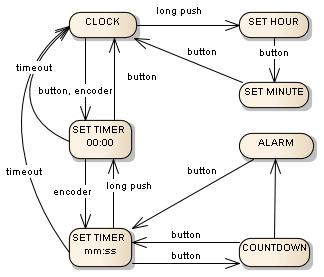
- All possible actions are shown in the states diagram.
EXPANDED TECHNICAL DETAILS
Precision Multi-Tasking Appliance
A practical household tool that combines a traditional 24-hour clock with a high-accuracy independent countdown timer.
- Asynchronous Dual-Clock Logic: The Arduino manages two independent time-tracking loops—one for maintaining the "Current Time" and another for the "Countdown Timer"—without using
delay()calls. - Interfacing via I2C LCD: Displays both the clock and the active timer on a 16x2 LCD. The firmware features a "Timer Expired" event that pulses the backlight and sounds an intermittent piezo alarm.
Interaction
- Rotary Encoder Time Setting: Uses a rotary encoder for "Fast-Dialing" the timer, allowing the user to set a 60-minute duration in just a few clicks compared to pressing a button dozens of times.