Line Follower Robot
Best & Fast PCB Supplier (2$ for 10 PCBs) https://jlcpcb.com
A proximity sensor is a sensor able to detect the presence of nearby objects without any physical contact. A proximity sensor often emits an electromagnetic field or a beam of electromagnetic radiation (infrared, for instance), and looks for changes in the field or return signal.
Concepts of Line Follower
Concept of working of line follower is related to light. We use here the behavior of light at black and white surface. When light fall on a white surface it is almost full reflected and in case of black surface light is completely absorbed. This behavior of light is used in building a line follower robot.


In this arduino based line follower robot we have used IR Transmitters and IR receivers also called photo diodes. They are used for sending and receiving light. IR transmits infrared lights. When infrared rays falls on white surface, it’s reflected back and catched by photodiodes which generates some voltage changes. When IR light falls on a black surface, light is absorb by the black surface and no rays are reflected back, thus photo diode does not receive any light or rays.
Here in this arduino line follower robot when sensor senses white surface then arduino gets 1 as input and when senses black line arduino gets 0 as input.
Circuit Explanation
The whole arduino line follower robot can be divided into 3 sections: sensor section, control section and driver section.
Sensor section:
This section contains IR diodes, potentiometer, Comparator (Op-Amp) and LED’s. Potentiometer is used for setting reference voltage at comparator’s one terminal and IR sensors are used to sense the line and provide a change in voltage at comparator’s second terminal. Then comparator compares both voltages and generates a digital signal at output. Here in this line follower circuit we have used two comparator for two sensors. LM 358 is used as comparator. LM358 has inbuilt two low noise Op-amps.
Working of Line Follower Robot using Arduino
Working of line follower is very interesting. Line follower robot senses black line by using sensor and then sends the signal to arduino. Then arduino drives the motor according to sensors' output.

Here in this project we are using two IR sensor modules namely left sensor and right sensor. When both left and right sensor senses white then robot move forward.

If left sensor comes on black line then robot turn left side.
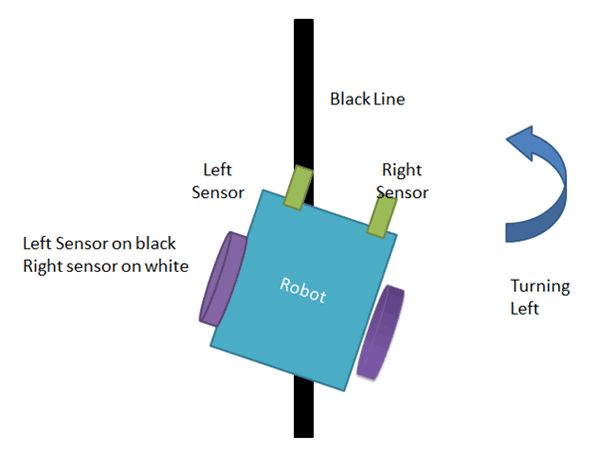
If right sensor sense black line then robot turn right side until both sensor comes at white surface. When white surface comes robot starts moving on forward again.

If both sensors comes on black line, robot stops.

EXPANDED TECHNICAL DETAILS
A Line Follower Robot is the absolute foundation of autonomous industrial vehicles! Used continuously inside massive Amazon warehouses to retrieve physical shelves along painted tracks, this project requires the programmer to connect dual Infrared Reflection sensor optics directly into an L298N Differential output matrix, forcing the Uno to "Hunt" the black track dynamically a thousand times a second!
The Differential IR Optics Array (TCRT5000)
The robot physically uses two "Eyes" staring straight down at the floor, utilizing the physical properties of photon reflection. (White floors bounce IR light perfectly; Black tape absorbs all IR light).
- The Left IR Sensor is on
Pin 2. The Right IR Sensor is onPin 3. - Both "Eyes" are straddling the outside edges of the Black Tape track!
Both read WHITE (Low)! - The Execution Loop (
Digital Array):int leftEye = digitalRead(2); int rightEye = digitalRead(3);if (leftEye == LOW && rightEye == LOW) { // On the white floor! driveForward(200); // 200 PWM! Both motors max! }
Asymmetrical Brakes (Hunting the Curve)
If the robot hits a sharp 90-degree curve to the Left, the Left Eye will suddenly drive directly over the Black Tape and swing to HIGH! This is visually represented in the animation where the left sensor is on the black line.
- The robot realizes it is violently drifting off the right side of the track!
- The Correction Trap: You cannot just "turn left." You must halt the left wheel completely!
if (leftEye == HIGH && rightEye == LOW) { // Drifting Right! motorRight(200); // Blast the right track forward! motorLeft(0); // Dead stop on the left track to violently pivot the chassis! } - By running this logic cycle every millisecond, the robot vibrates and snakes incredibly fast down the complex track, flawlessly locked into the optical corridor, as shown in the working animations.
Autonomous Tracing Hardware
- Arduino Uno/Nano (Standard functionality).
- TCRT5000 IR Infrared Line Tracking Sensor Modules (Tear-drop style) (Do NOT use the generic "Obstacle Avoidance" IR modules; their focal points are too wide and will cause catastrophic path finding failure!).
- L298N Heavy Duty Motor Driver Interface Board.
- A 2WD or 4WD Robot Base Frame (A 2WD with a Front Caster wheel turns 100x smoother than a 4WD chassis!).
- Standard Black Electrical Tape to build the physical race track on a light-colored wooden table or floor tile!
*******BUY*******
Arduino UNO - https://www.gearbest.com/arduino-scm-supplies/pp_311407.html?wid=1433363&lkid=14127045
Full Arduino Project Kit - https://www.gearbest.com/development-boards/pp_211518.html?wid=1433363&lkid=14127055
Music - https://bensound.com - Summer
Website - https://robocircuits.com
Facebook - https://facebook.com/Robocircuits
Instagram - https://Instagram.com/Robocircuits
Twitter - https://Twitter.com/Robocircuits