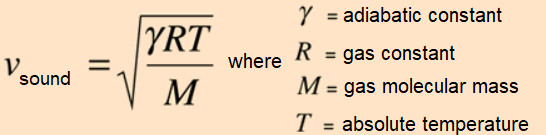
The speed of sound in an ideal gas is related to two characteristics of the gaseous substance, its molecular mass in kg/mol and its adiabatic constant ( heat capacity ratio ), or its average values in case of being a mixture of gases.
It is for this reason that the measurement of the speed of sound can be used as a preliminary way to identify a pure gas or mixture of gaseous substances.
The measurement can be performed using an ultrasonic proximity sensor, to measure the round trip time ( t/2 ) of a sonic pulse in a tube of known length ( x ) ( echo method ), filled with the gas under study ( v = 2x/t ).
Since the speed of sound is also absolute temperature ( K ) dependent, it must be measured using a temperature sensor.
The values measured by the sensors are captured and processed by an Arduino microcontroller that transmits them via bluetooth to a mobile application, designed with MIT App Inventor 2 , which will allow to calibrate the length of the tube using a reference gas whose sound speed is known.
The application will use this information to calculate the sound speed of an unknown sample of gas and perform preliminary identification.
NOTE: This project is part of a series of proposals that seeks to exemplify the use of Arduino as a tool to develop scientific thinking at home ( REVOLUCIÓN CIENTÍFICA EN CASA: EXPERIMENTOS CON ARDUINO Y APPS NO-CODE ).
This project is a high-accuracy implementation of an analytical laboratory tool. By measuring the speed of sound through a 3D-printed cell, the system can determine key physical properties of a gas, enabling the identification of unknown substances—from pure nitrogen to common refrigerant gases.
The Speed of Sound in Gases is a definitive physical constant, determined by two primary variables: the molecular mass of the substance and its Adiabatic Constant (Heat Capacity Ratio). This project utilizes an Arduino microprocessor and a custom Android application to create a "Virtual Spectrometer," turning acoustic Echo technology into a professional chemical identification tool.
Scientific Analysis & Acoustic Telemetry Overview
The core of the Gas Identification Cell is the Echo Method. By firing an ultrasonic pulse through a tube of precisely calibrated length and timing the "Round Trip" (Time-of-Flight), the system calculates velocity (v = 2x/t). Because the speed of sound is heavily dependent on the absolute temperature of the medium, the device integrates a high-precision digital thermometer to perform real-time mathematical compensation, ensuring the data remains accurate regardless of environmental conditions.
Hardware Infrastructure & The Analytical Tier
- Arduino Nano V3.0: The "Computational Core." It manages the microsecond-level timing required for the HC-SR04 ultrasonic sensor while simultaneously polling the 1-Wire temperature sensor.
- HC-SR04 Ultrasonic Sensor: The "Acoustic Transceiver." Mounted at one end of the 3D-printed tube, it sends the "Ping" and waits for the signature echo from the flat plate at the opposite end.
- DS18B20 Digital Thermometer: Provides the critical thermal data used to normalize the sound speed readings to a reference temperature (usually 0°C or 20°C).
- 3D Printed Measurement Cell: Custom-engineered in Autodesk 123D Design, this cell provides a sealed, airtight environment for the gas under study. The tube length is adjustable (63.5mm to 98.4mm), allowing for different sensitivity ranges.
- HC-06 Bluetooth Module: Transmits the raw results to a mobile application for complex mathematical processing and identification against a built-in database of gases.
Technological Logic and The Mobile ID Engine
The system functions through a rigorous Sampling and Comparison lifecycle:
- The Probe Sampling Phase: The Arduino takes an average of seven high-speed acoustic readings to filter out noise and atmospheric turbulence within the tube.
- Bluetooth Data Burst: This average, along with the corrected temperature value, is sent to an app created in MIT App Inventor 2.
- Calibration Protocol: To ensure sub-millimeter accuracy, the user first "Zeroes" the machine using a reference gas of known speed (like dry air or pure nitrogen).
- The Identification Database: The app compares the measured speed against theoretical curves for gases like Helium, Argon, or R134a refrigerants. The candidate with the lowest percentage of error is identified as the "Likely Substance."
Why This Project is Important
Mastering acoustic gas analysis is an advanced step into Analytical Instrumentation. It teaches the fundamentals of Signal Decomposition (separating temperature effects from gas density) and Sensor Fusion. Beyond hobbyist curiosity, these principles are used in Industrial Gas Leak Detection, Medical Anesthesia Monitors, and HVAC Refrigerant Analyzers. This project proves that with the right combination of 3D design and embedded math, a simple microcontroller can perform the work of expensive laboratory equipment.
Measurement Cell
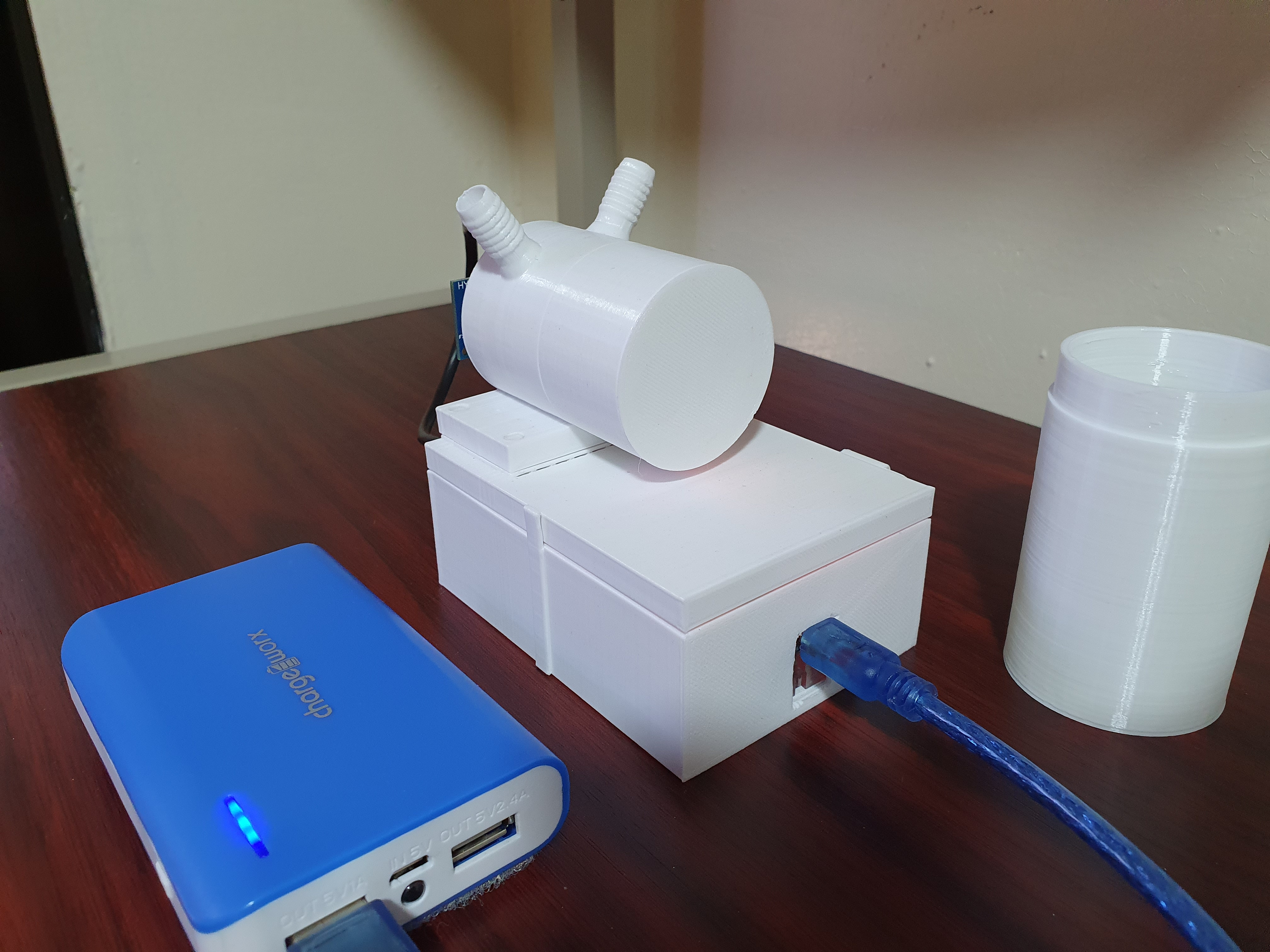
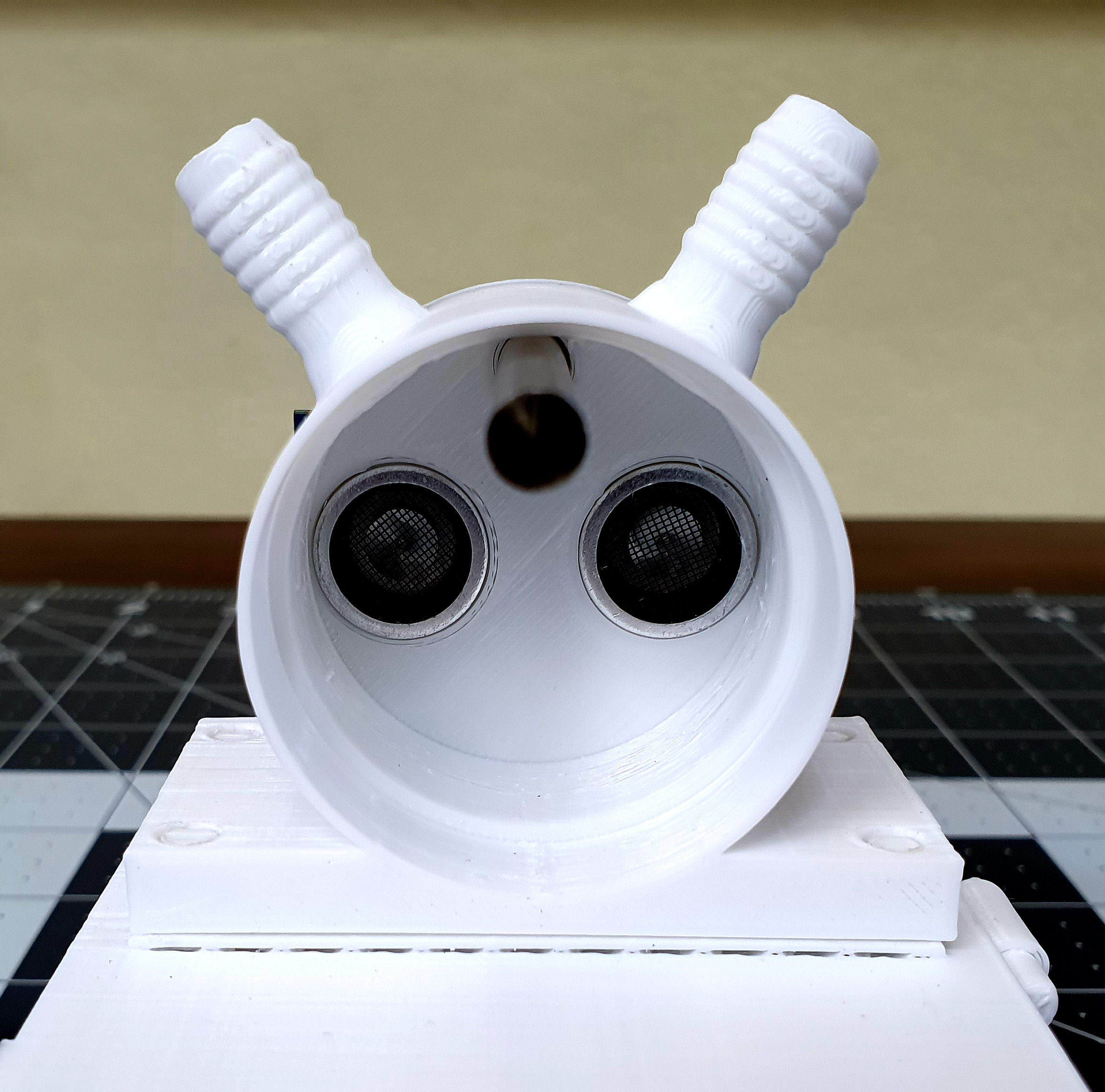
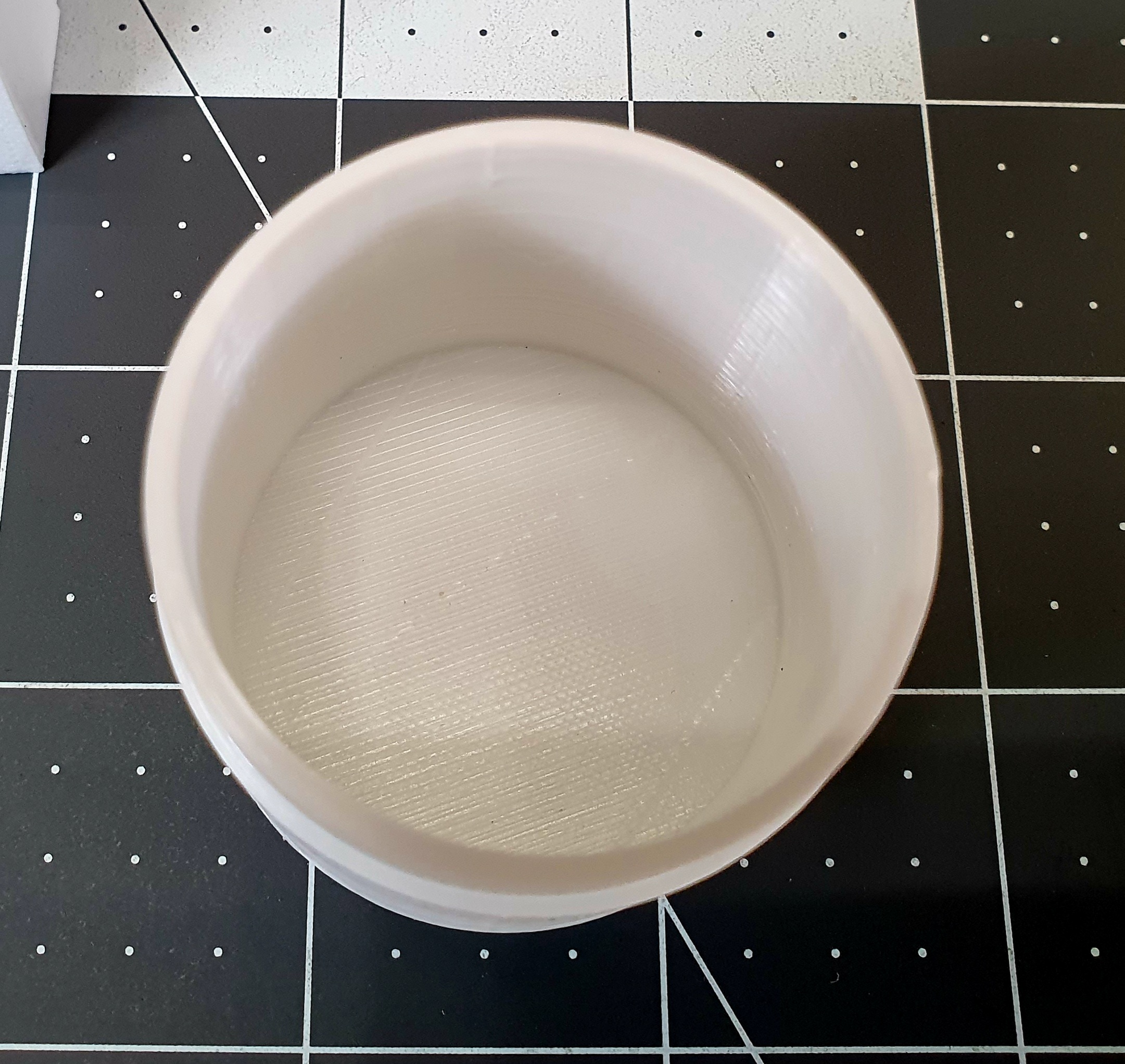
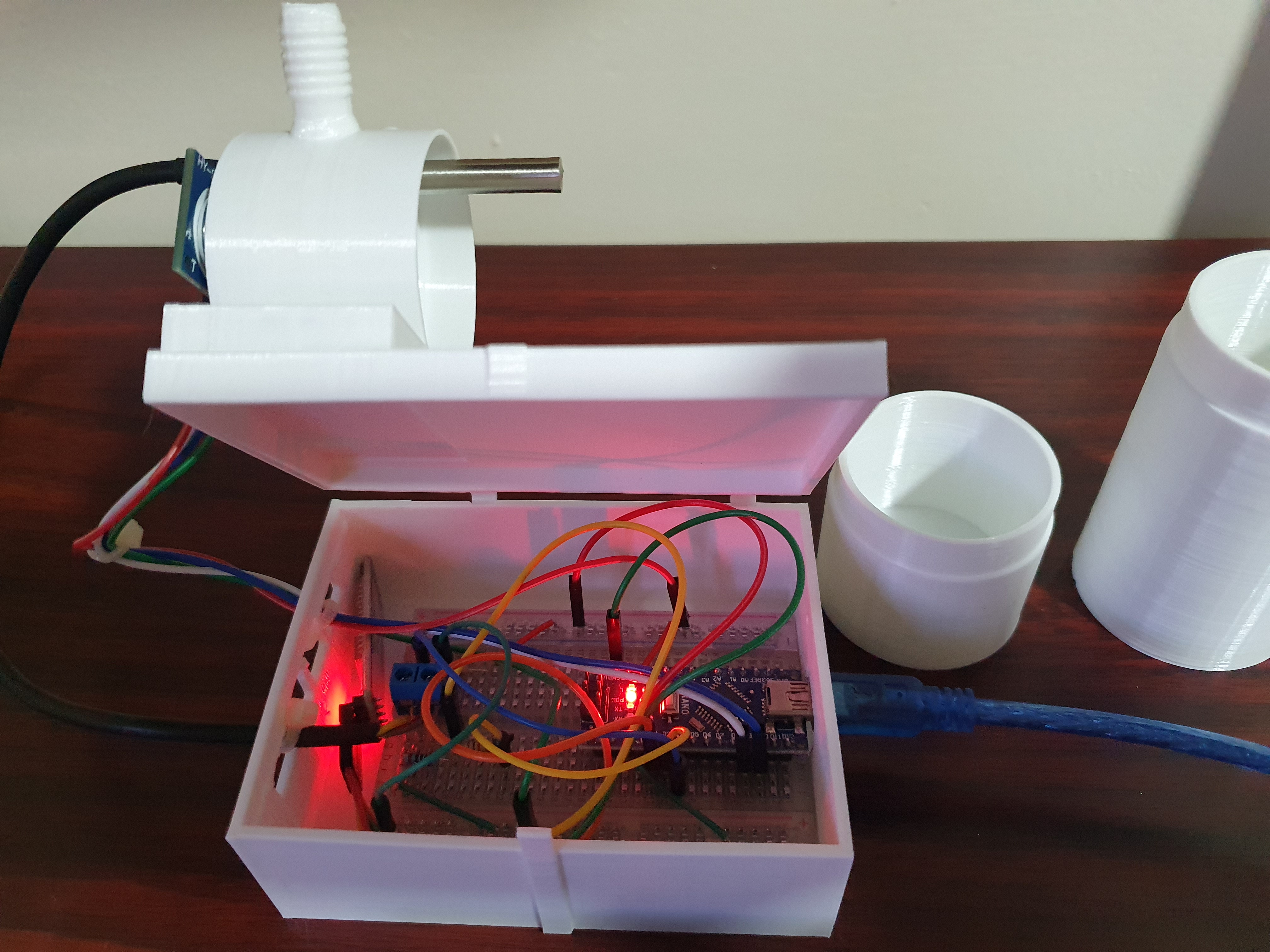
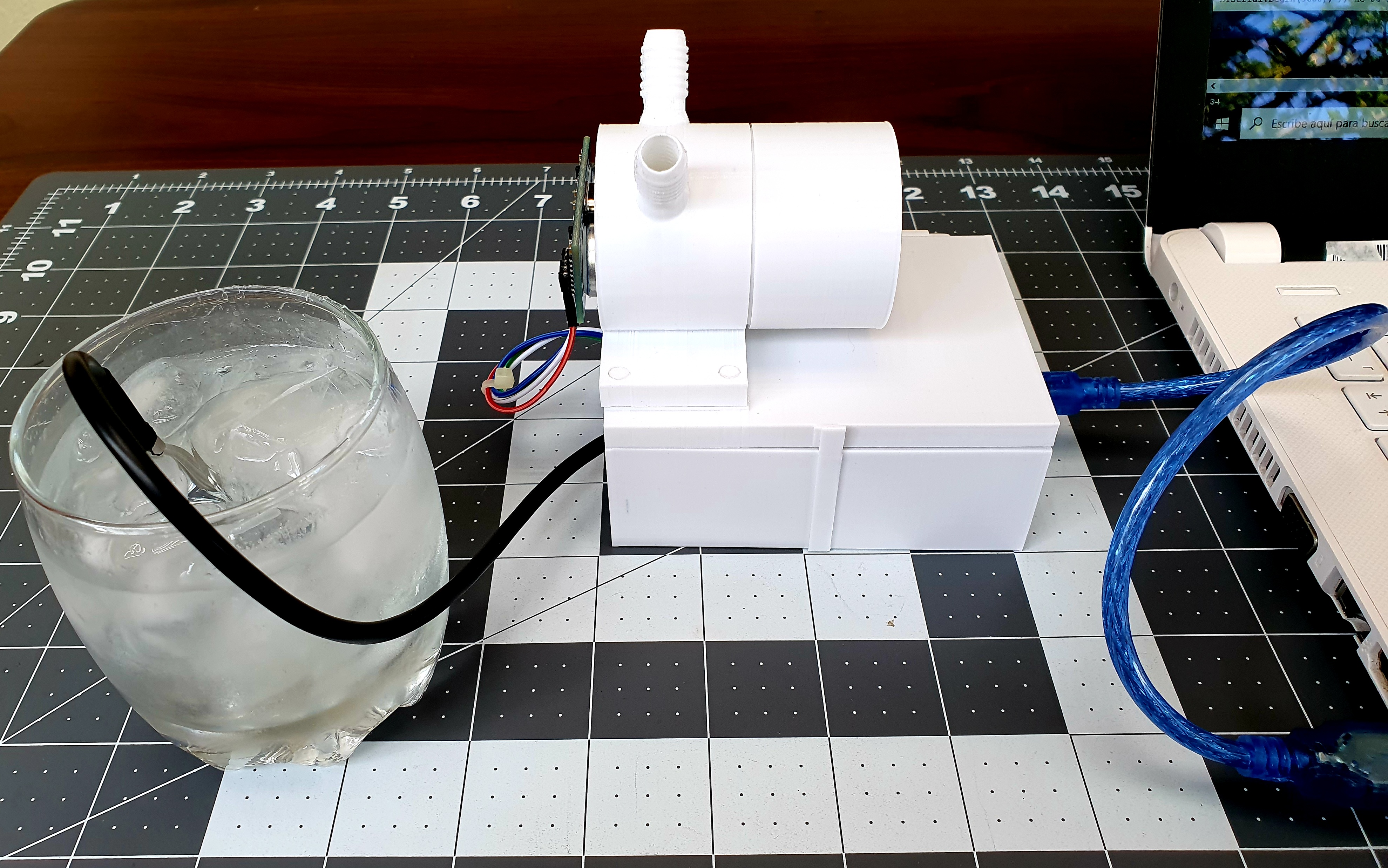
The measurement cell, printed in 3D, consists of a disassembleable cylindrical tube of 46 mm in diameter whose length can be varied between 63.5 mm and 98.4 mm depending on the type of sample to be analyzed and the precision required.
At the fixed end of the tube are the ultrasound sensor and temperature sensor, as well as the inlet and outlet of the gaseous sample.
The opposite end of the two detachable tubes is flat so that the ultrasonic pulse waves bounce symmetrically towards the microphone of the ultrasound sensor.
A piece of flexible hose was attached to the gas inlets and outlets to use it as a closing valves (small binder clips are used to strangle hoses) once the cell is filled.
Arduino Connections and Calibration
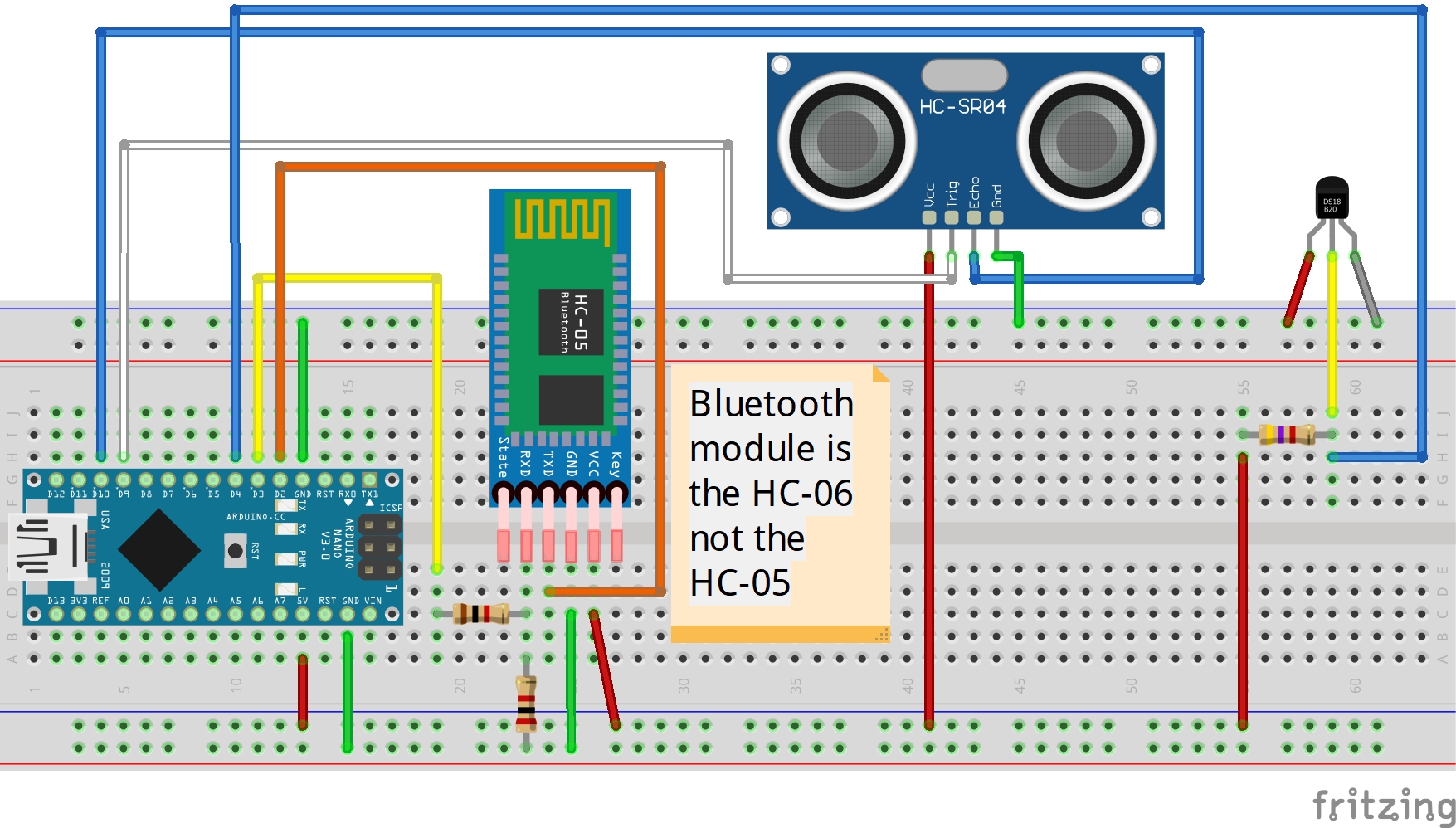
The connections of the measuring cell to the Arduino controller are shown in a Fritzing scheme that is attached ( SoundSpeed_3D_2023.fzz ).
It should be noted that while the HC-06 Bluetooth component can operate with input voltages between 3.3 and 5 volts the higher value was chosen, otherwise the signal is frequently cut off.
Attached is the programming code of the Arduino Nano V3.0 CH340 ( SoundSpeed_3D_2022.ino ) in which two important points should be noted.
- The first is that the float constant CorrecTemp is a correction that is made to the initial measurement of the temperature sensor. This correction is estimated by reading the temperature value that the sensor marks when immersed in an ice bath (ice floating in water). The deviation of 0°C, which is the value that the ice bath should have, is the one used as a temperature sensor correction.
- The other point is delay(150) value which must be less than or equal to the bluetooth clock speed in the App Inventor 2 app so that the transmission and reception of data from the Arduino to the mobile app can be fluid.
The code was uploaded to the Arduino Nano using the IDE 1.8.19 and a Portable battery charger (6000 mAh 3.7V, Out 5V, Output Max. 2.4A) was used as a power supply.
SoundSpeed_2023 App Inventor Description
The data processed by the Arduino microprocessor is transmitted via bluetooth to a mobile phone app (Android 12) designed using a visual programming environment called MIT App Inventor 2 .
The app ( SoundSpeed_2023_2.apk ) are attached.
Note : A new version ( SoundSpeed_2024.apk ) compatible with Android 12 is added.
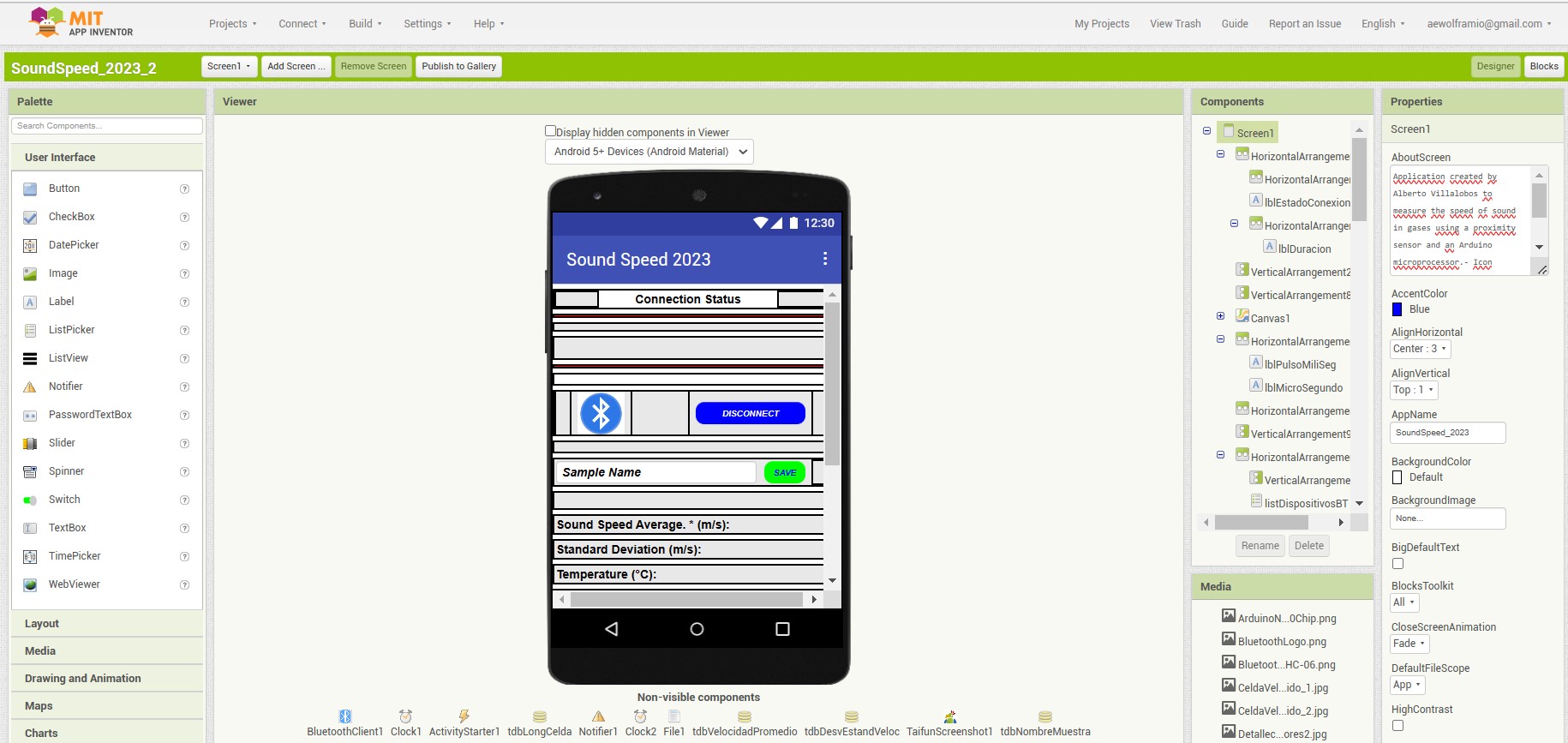
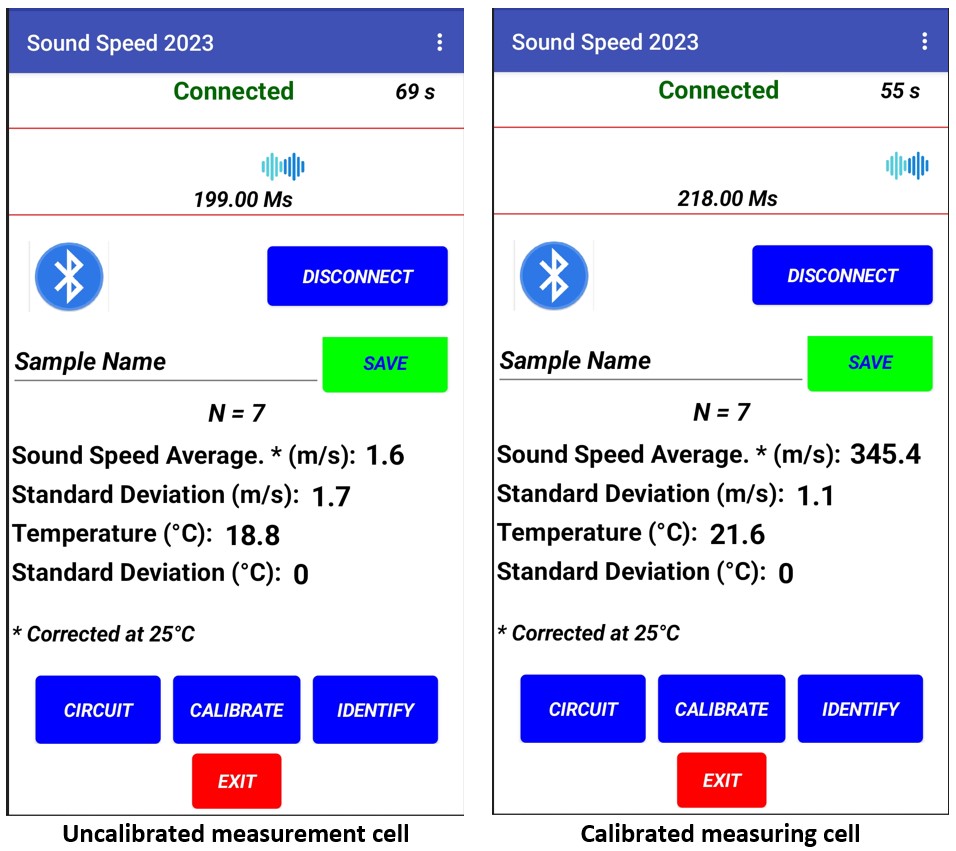
The application consists of an initial screen where, once connected via bluetooth to the measuring cell ( Bluetooth Icon button ), the value of the measurement of the sound speed ( m/s ) of the gas contained in the probe is reported.
The reported value is the average of 7 measurements, and the measurement temperature ( °C ) as well as the standard deviation of these two data are also reported. This data can be saved on mobile after a file name ( SAVE button ) is assigned.
This initial screen also displays five buttons that allow you to:
• Know the circuit and basic components that make up the measuring equipment ( CIRCUIT button ).
• Measure the length of the measuring probe ( m ) using a reference gas ( CALIBRATE button )
• Once calibrated the equipment make an approximate identification of the identity of the gaseous substance in measurement ( IDENTIFY button )
• Disconnect the bluetooth sensor ( DISCONECT button )
• Exit the application ( EXIT button ).
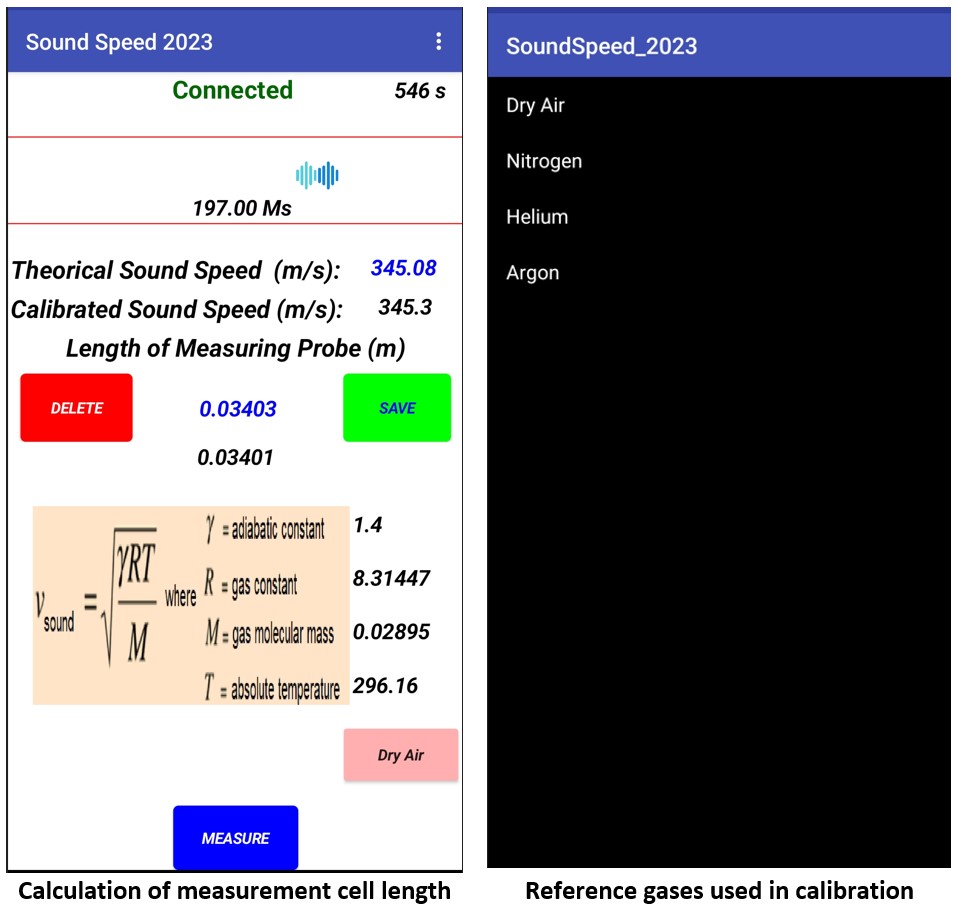
The screen that is displayed when you press the CALIBRATE button displays four buttons that allow you to:
• Select a reference gas ( REFERENCE GAS button ) that will allow you to calibrate the length of the measuring probe.
• Save the measured measuring cell (probe) length value for use in measurements made in unknown gas samples ( SAVE button ).
• Clear the saved measurement cell length value ( DELETE button ).
• Make measurements to the sample of unknown gas ( MEASURE button ) that will return us to the initial screen.
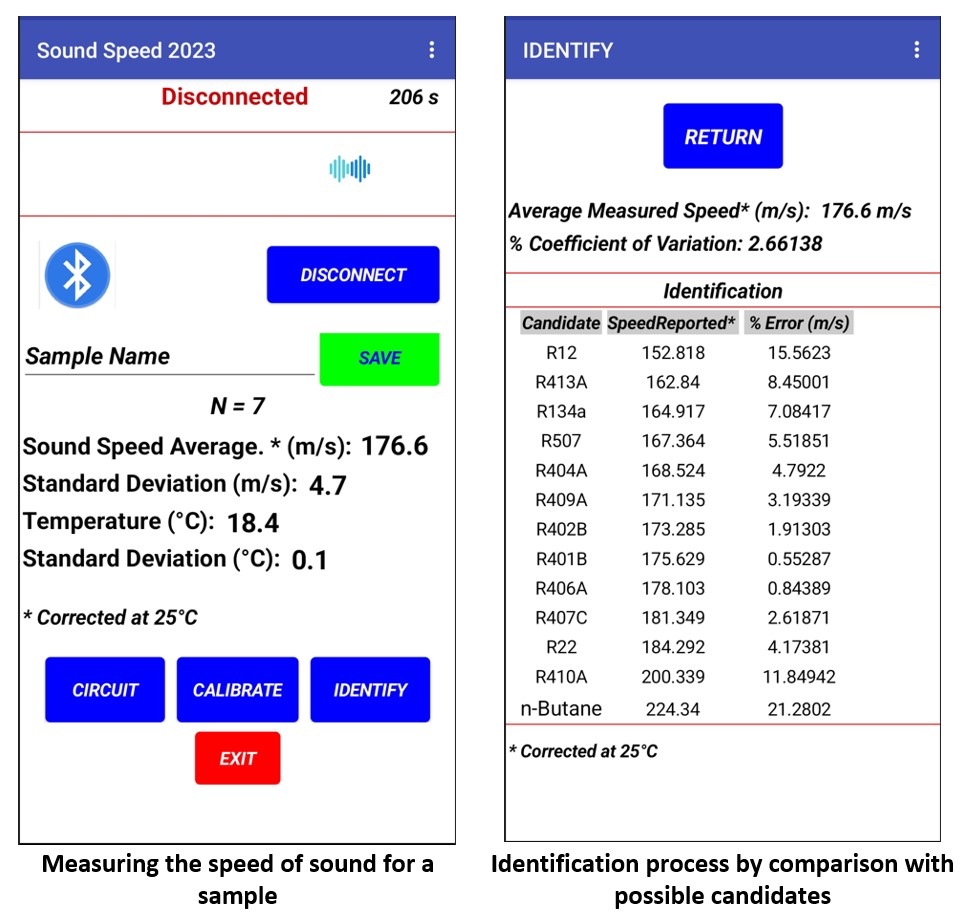
Once the measuring cell has been calibrated and the measurements have been made to the unknown gas, the identification of the same is carried out by pressing the IDENTIFY button that takes us to a third screen showing the sound speed value measured as well as its coefficient of variation in addition to a list of possible identifications of the gaseous substance under study.
In this list, the candidate with a lower error % value will be the one to be taken as the most likely identification candidate.
On this screen there is a button that will return us to the initial screen ( RETURN button ).
Installation
Once you have the armed measuring device (measurement cell and connections to the Arduino) the app SoundSpeed_2023.apk (Android 11 or lower) or SoundSpeed_2024.apk (Android 12 or lower) must be downloaded and installed on mobile. As this application does not come from an official site you should follow the following procedure:
• The mobile will ask you for authorization to change the security settings to install applications of unknown origin, you must make the suggested change, remembering to return to the original state after the installation is complete.
• When you first open the app the program will ask you for authorization for SoundSpeed_2024 to find nearby devices, connect to them and determine their relative location, this is because the app must connect via bluetooth with the Arduino microprocessor. This access must be allowed and the application must be restarted.
• The Arduino microprocessor must then be connected to the backup battery to activate the Bluetooth module.
• The search for Bluetooth devices must then be activated on the mobile and the corresponding one must be linked to the Arduino microprocessor emitter (the specific name of the Bluetooth emitter is typical of each device but can be changed if desired).
• Once the emitter is linked, press the button with the Bluetooth icon in the application which will display a list of available Bluetooth devices, select the one corresponding to the Arduino microcontroller emitter.
Calibration
When the Bluetooth emitter has been selected, as indicated in the previous procedure, the app starts making measurements, however as the initial calibration of the measurement cell length has not yet been performed the values are not correct. Therefore, an initial calibration should be performed following the following procedure ( see disclaimer ** ):
• Open the measuring cell closing valves (pieces of flexible hose described above) and slowly ( low flow and pressure ) fill the cell with any of the calibration gases listed below ( Do this operation in a ventilated site! Wear safety glasses and insulating gloves ):
1. Dry Air
2. Nitrogen
3. Helium
4. Argon
• As the measuring cell is filled, the value of the sound speed indicated on the initial display will change to stabilize at some value, at which point stop filling and close the closing valves of the measuring cell (depending on the filling speed this operation can last between 10 and 20 seconds