IDEA Description
We all communicate with each other through our natural Sensors (tongue, Gesture...etc). The Exciting part starts when you want to share secret information to someone. Question is How to do it ?
So the answer lies in how you transmit information in such a way that even if a third Person looks at message he won't be able to understand Until and Unless he finds a key. For this purpose I used Morse Code Communication you can also use another way to accomplish this task.
What is Morse Code ?
Morse Code is a way of communication to pass information which is done by representing original letters to combination of dot. and dashes - Like A ->.- and B-> -...
For more information on Morse code click the link below
http://wrvmuseum.org/morsecodehistory.htm

Why I Choose Morse Code ?
The Reason is Simple recently I watched a movie in which agent was passing information by clicking a button and at the receiving end other people were disclosing it. So I thought to make this with using Arduino and simple basic components.
How this Project Works ?
It is very Simple When you done making circuit on breadboard and uploaded Sketch. Click Serial Monitor and you will see it like below image
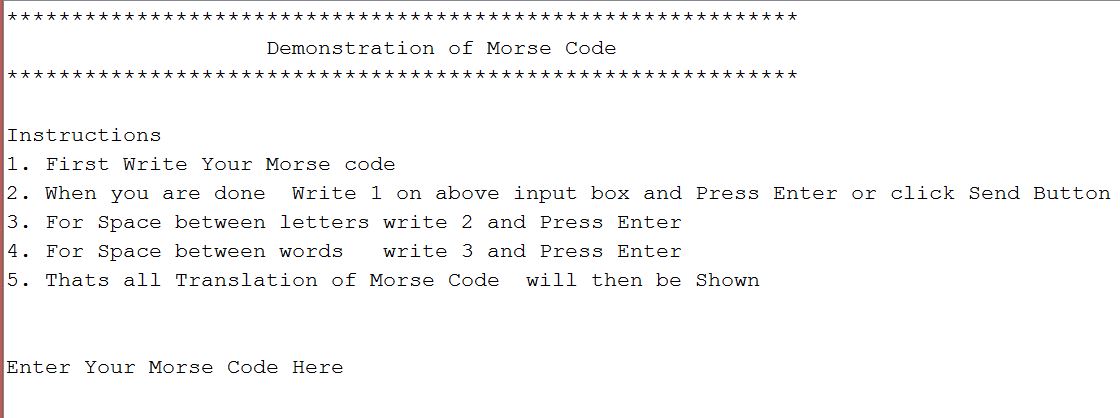
Follow the instructions and You are Ready to go
If you have any confusion Simply watch the demonstration video
Expanded Technical Details
The Morse Code Generator is a fantastic exercise in C++ string manipulation and array mapping. It requires the Arduino to iterate through a sentence letter-by-letter and look up the translation in an index to flash an LED.
Defining the Morse Timing Standard
Morse Code isn't random; it has strict mathematical timing rules based on a "Unit":
- 1 Unit = The length of a "Dot."
- A "Dash" = 3 Units.
- Space between parts of a letter = 1 Unit.
- Space between letters = 3 Units.
- The Arduino code defines an integer
unitDelay = 250;(milliseconds). Every single action in the program is a multiplier of this variable, guaranteeing a perfect, professional rhythm!
Character Arrays (Lookups)
How does the Arduino know 'A' is "Dot-Dash"?
- You create an array holding 26 strings representing the alphabet:
String morseAlphabet[] = {".-", "-...", "-.-.", ...}. - The user inputs a word like
"SOS"into the Serial Monitor (as shown in the Serial Monitor image above). - The Arduino breaks down the string into a character array
['S', 'O', 'S']. - It converts 'S' to an ASCII integer, does some math to find its index (e.g., S is the 18th letter). It looks up slot 18 in the
morseAlphabetarray and finds.... - It runs a
forloop, sending three short 250ms bursts of 5V to the LED pin!
Component List
- Arduino Uno/Nano: The translator.
- An LED and Resistor.
- An Active Piezo Buzzer: So you can hear the transmission as well as see it!