กลับไปหน้ารวมไฟล์
photoresistor-brightness-sensor-519a6d-en.md

This is a basic tutorial for beginners to learn about the Arduino UNO / programming

Step 1: Build your Circuit
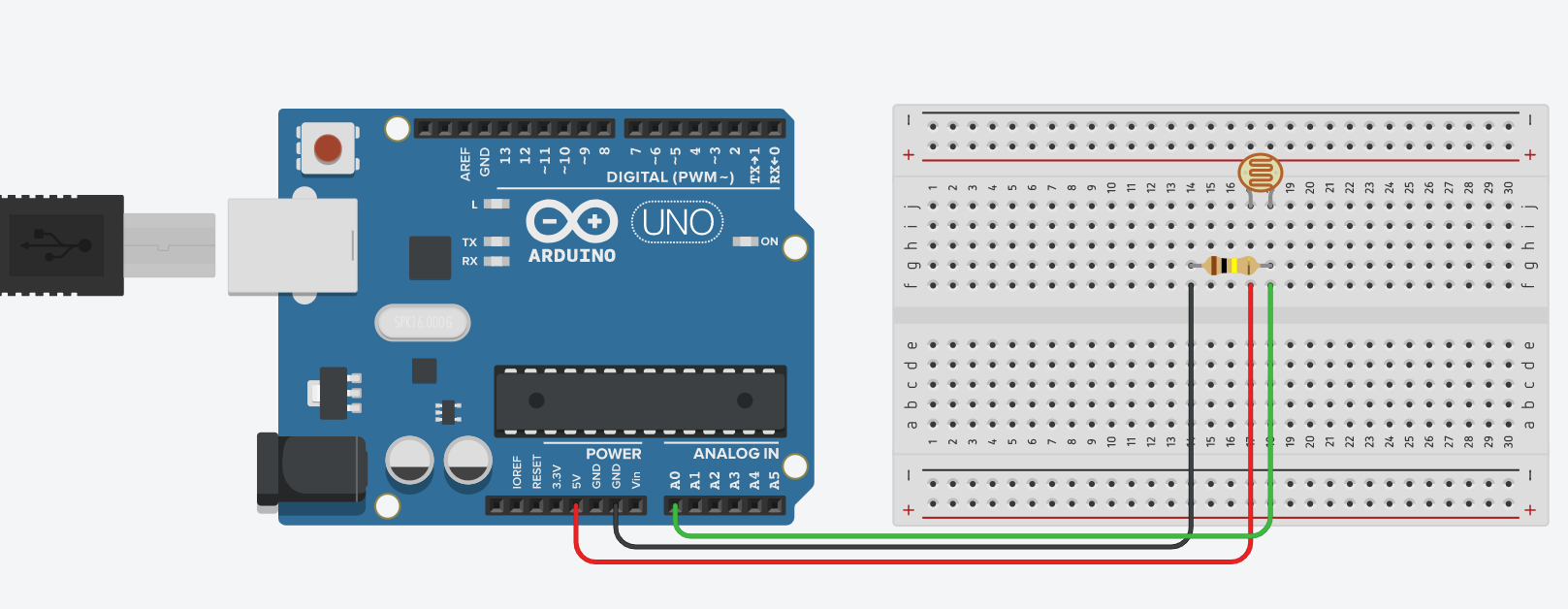
Step 2: Upload the Code

You can find the code below

Step 3: Try It!

Start your program and press Ctrl + Shift + M to open the serial monitor.

Try turning the lights on and off to see the serial monitor change.

Make sure to comment down below if you have any questions!

EXPANDED TECHNICAL DETAILS

Optical Intensity Analytics

This project provides a precise way to monitor ambient light levels for automation and energy-saving applications.

  • Cadmium-Sulfide (CdS) Voltage Divider: Uses a photoresistor in series with a fixed resistor. The Arduino monitors the analog midpoint; as light intensity increases, the resistance drops, and the voltage changes proportionately.
  • Lumen-Equivalent Calculation: (Advanced version) The firmware applies a logarithmic formula to approximate the actual "Lux" level of the environment, displaying the results on a Serial terminal or an I2C LCD.

Prototyping

  • Web Editor verified: The code was optimized using the Arduino Web Editor, providing seamless cloud storage and easy sharing of the light-sensing logic.

ข้อมูล Frontmatter ดั้งเดิม

title: "Photoresistor Brightness Sensor"
description: "Use a photoresistor to measure brightness!"
author: "ccPegasus"
category: ""
tags:
  - "environmental sensing"
  - "lights"
  - "resistor"
views: 5777
likes: 0
price: 299
difficulty: "Easy"
components:
  - "1x 9V battery (generic)"
  - "1x Breadboard (generic)"
  - "1x 9V Battery Clip"
  - "1x Photo resistor"
  - "3x Jumper wires (generic)"
  - "1x Arduino UNO"
  - "1x Resistor 100k ohm"
  - "1x USB-A to Mini-USB Cable"
tools: []
apps:
  - "1x Arduino Web Editor"
  - "1x Arduino IDE"
downloadableFiles: []
documentationLinks: []
passwordHash: "ac81523479e0a538dc39e251d9dadf8b152424d7950b77e583684bcf8338d326"
encryptedPayload: "U2FsdGVkX19G0n14IvCo4w0UR9CH+CiWehLM7IuB7pQz2uujCPiItptc3FvOR/NbFMa5lDCuwRhhhmCduAG3APvnjwuJx95hGt/gLHNDtWO2rxkuBPBfl01xHchDK1zj"
seoDescription: "Learn how to use a Photoresistor to measure light brightness in your Arduino projects with this easy guide."
videoLinks: []
heroImage: "https://cdn.jsdelivr.net/gh/bigboxthailand/arduino-assets@main/images/projects/photoresistor-brightness-sensor-519a6d_cover.jpg"
lang: "en"