This project was a funny idea while I tried to find out how the bluetooth module HC-05 works. As the first step I wanted to make a trial app for my phone to turn on and turn off a LED joined to the arduino board through the bluetooth.
When I sent a text from my phone to Arduino, its serial port received the letters (characters) of the text. First it was about to turn on and turn off the LED. But then an idea came and I said: "WOW", I can write a melody on my phone and send it to my Arduino to play it. And few minutes later I spent with my daugter some hours to create new and new songs that Arduino played.
So the melody can look like this:
2C..DE.E.D.D.C.C.
where "2" sets the octave for next tones to 1. We use the the range from 2 to 5.
and "." is not define, so it plays no tone. It pauses playing for the same long time as a note plays. We can use whatever not define symbol in the code instead of "."
Phone application
To create the app "Melody player" for the phone I used the MIT app inventor 2. Basic screen looks like this:
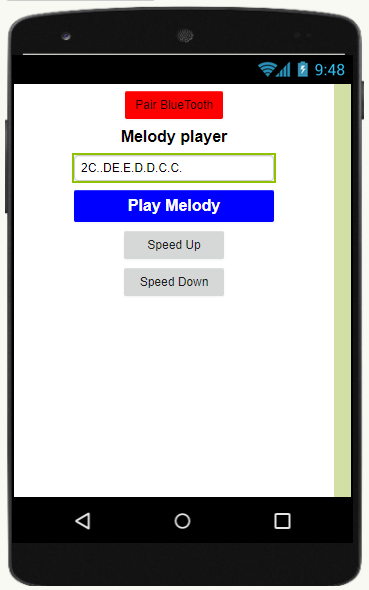
Where "Pair BlueTooth" is a ListPicker, then we need a TextBox "Melody" and 3 Buttons "PlayMelody", "SpeedUp" and "SpeedDown". Moreover we need to add a Clock component.
All the components are set in the "Blocks" part as following:
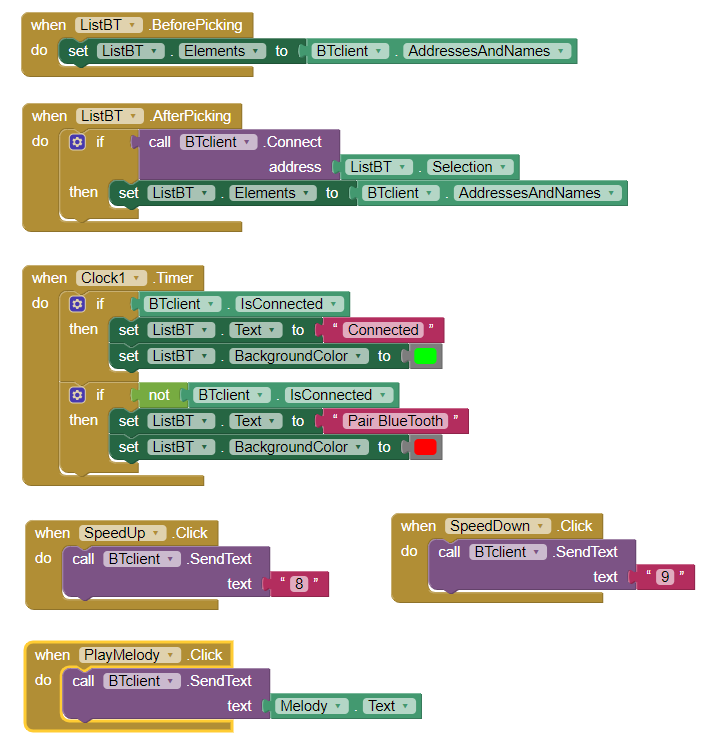
The code for Arduino is very simple too as you can see below.
Some notes to the curcuit:
- I use a 10k potentiometer to set the volume of the speaker, but you can use any you have, even a resistor (around 100 ohm)
- The switch for the bluetooth module is to turn it off when we load the code into Arduino. I use Arduino Nano and it cold not upload the code when the module was turn on
EXPANDED TECHNICAL DETAILS
Remote Melodic Synthesis Bridge
This fun and creative project allows you to "Play" an Arduino-connected buzzer like a musical instrument using a custom app on your smartphone.
- MIT App Inventor Musical Interface: The user's phone features a "Piano Keyboard." When a key is pressed, the app sends a specific frequency byte (e.g., 'C4') to the Arduino over Bluetooth.
- Square-Wave Tone Generator: The Arduino receives the note-command and uses the
tone()function to drive a piezoelectric speaker. The firmware handles complex timings to ensure that "Hold" and "Release" events are perfectly preserved.
Interaction
- Wireless Polyphonic Simulation: (Advanced version) Explores the use of two or three Arduinos synchronized via Bluetooth to play chords and complex multi-part harmonies from a single phone app.