Project Description:
Most of us have played dinosaur game by google when our internet was not working and if you have not played this game don't worry now can but not in a conventional way pressing buttons but by using motion of your hand. So in this project using hand motion photo resistor sends values to arduino and arduino sends it to python3 and by using famous library of python pyautogui we can perform "up" arrow function :)
How I decided to make this project ?
Recently I watched a video on youtube regarding project which was about Arduino based Hand Gesture Control of Computer and I really wanted to make that project but currently I don't have ultrasonic sensors which was required to make that project. So I read all the stuff how that project works ? and then I thought I can also do that kind of work by using photo resistor (LDR) sensor. And then I decided let's control "up arrow" key and use it in dinosaur game. Most importantly beginners can also try this project which can increase their interest level.
Below is a video I watched recently
Now let's start to make it:
Things required to make this project:
- One Arduno UNO board
- Breadboard
- Photo Resistor also known as LDR
- 10k ohm resistor
- Jumper wires
Thats' all
Schematic:
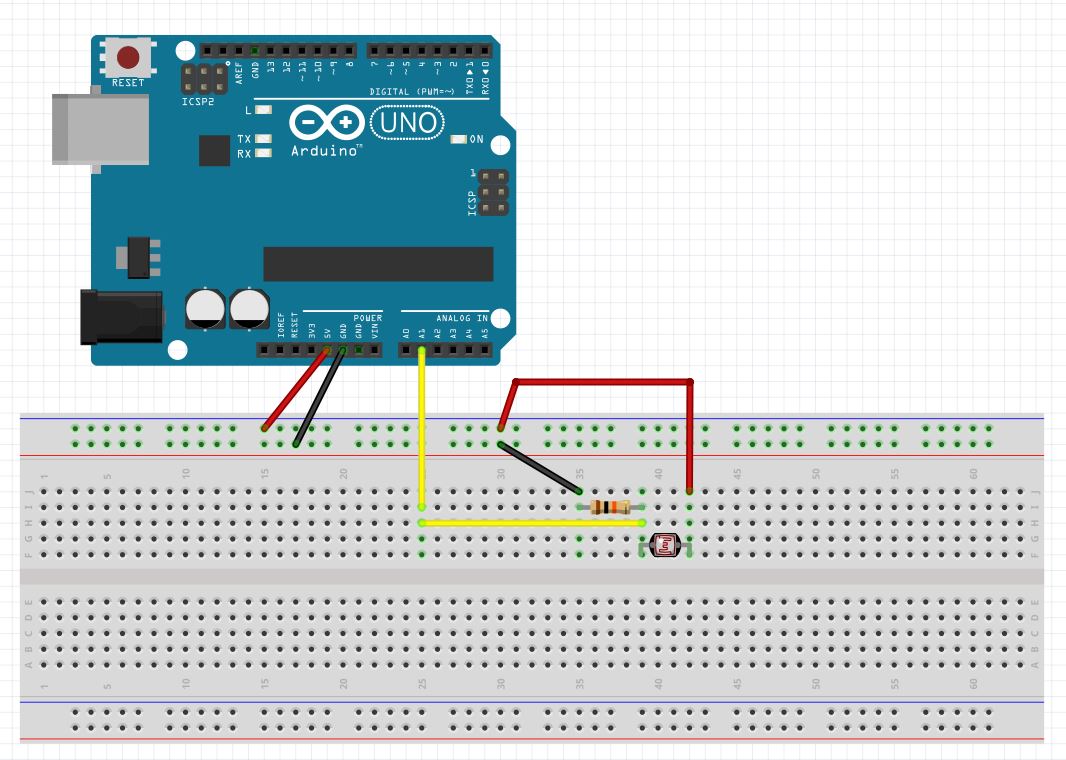
Information Regarding python3:
Now to make this project you need to install python3 on your system for that I recently uploaded a project "Python3 and Arduino Communication" and there I have uploaded stuff regarding how to install python3. If you want to get familiar with python3 and arduino I recommend you to check that project :)
Below is a link of "Python3 and Arduino Communication"
Last Step is to install library pyautogui :
Now you need to install python library pyautogui which will perform "up arrow" function.
After you have succesfully install python3 on your system:
Follow these steps:
- open command prompt by clicking run as administrator and write
cd C:\\Python37
- Now you need to write below command
python -m pip install --upgrade pip
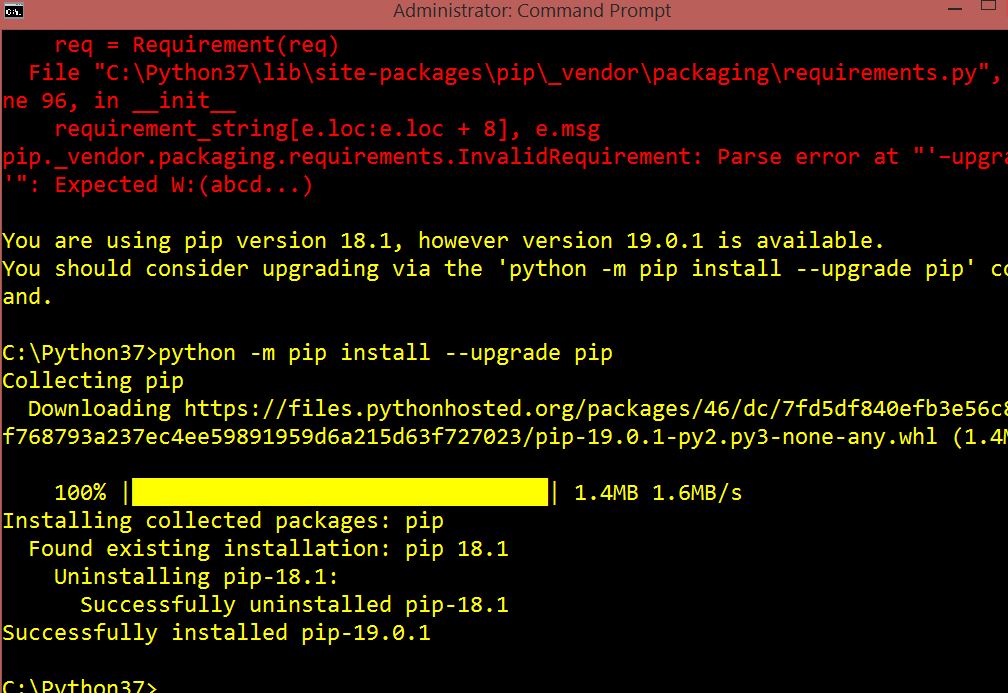
- Now this is last command you need to write
pip install pyautogui

Demonstration Video

EXPANDED TECHNICAL DETAILS
Physical-to-Digital Interfacing
This project creates a unique way to play the classic "Chrome Dino" game using high-speed serial communication and automation.
- Python Automation Bridge: A Python script runs on the PC, using the
PyAutoGUIlibrary to monitor a specific pixel on the screen. When the "Cactus" appears, Python sends a character (e.g., 'J') over a Serial link to the Arduino. - Hardware Triggering: (Alternative mode) Alternatively, an LDR sensor taped to the screen detects the cactus. The Arduino then simulates a "Spacebar" press via the
Keyboardlibrary (on ATmega32U4 boards) or sends a command back to Python to execute the jump.
Precision Timing
- Low-Latency Loop: The code is optimized to ensure the "Detection to Action" time is under 10ms, allowing the Dino to jump perfectly even at high game speeds.