In this project we will make Remote led strip.
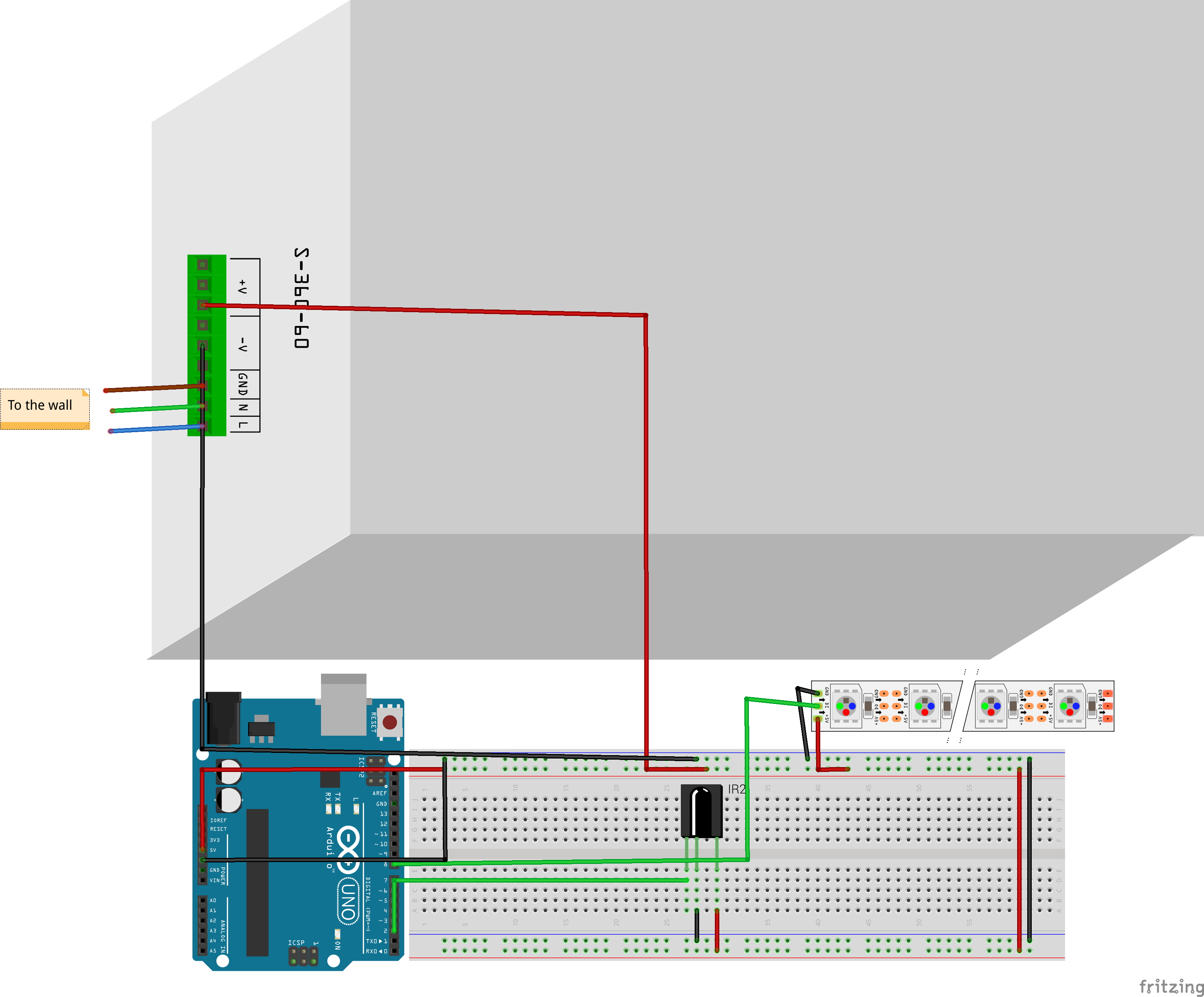
Wiring:
Advanced Lighting Control
This project demonstrates how to integrate high-density WS2812B (NeoPixel) LED strips with basic Infrared (IR) remote control. By using an IR receiver, we can transform any standard household remote (TV, AC, etc.) into a custom controller for ambient home lighting.
Technical Implementation
- High Power Management: Driving 144 or more NeoPixels requires significant current (each pixel can draw up to 60mA at full white). We use a dedicated 5V 10A power supply to ensure system stability and prevent voltage drops that could damage the Arduino or the strip.
- IR Protocol Handling: The project uses an IR Receiver (TSOP series) connected to Pin 2. The code decodes the incoming modulation from the remote and assigns specific HEX codes to lighting functions like ON/OFF, color changes, and animation patterns.
Software Configuration
In the Arduino code, you must define the Number of LEDs and the Control Pin:
#define NUM_LEDS 300
#define DATA_PIN 8
To bind your specific remote, use the Serial Monitor to identify the HEX codes for each button:
- Press a button on your remote.
- Read the HEX output (e.g.,
0xFFE01F). - Update the
#definestatements in your code:
#define ON 0xFFE01F
Safety and Optimization
- Power Injection: For long strips, it is recommended to "inject" power at both ends to ensure uniform brightness.
- Wait/Pattern Logic: The code includes logic to interrupt running patterns (animations) as soon as a new IR command is detected, providing a smooth and responsive user experience.
- Enclosure: A custom 3D-printed box is used to house the Arduino and the IR receiver, protecting the delicate prototype shield and soldering from external damage.
Project Resources
- Source Code: GitHub Repository
- Assembly: Start with a breadboard prototype before moving to a permanent soldered Proto Shield for long-term use.