Overview
This project showcases and gives a tutorial on how to make a Lock System using the RFID technology for better security alternative for a traditional key.
How does RFID work?
RFID tags are much more common than before. Most Credit and Debit cards nowadays also have a NFC system(Which is a subpart of RFID technology) for non - contact payment.
The way RFID technology works is similar to that of a transformer where because an alternating magnetic field in the primary winding, the secondary winding gets induced with an alternating voltage which is a way to power something wirelessly, same way wireless charging works.
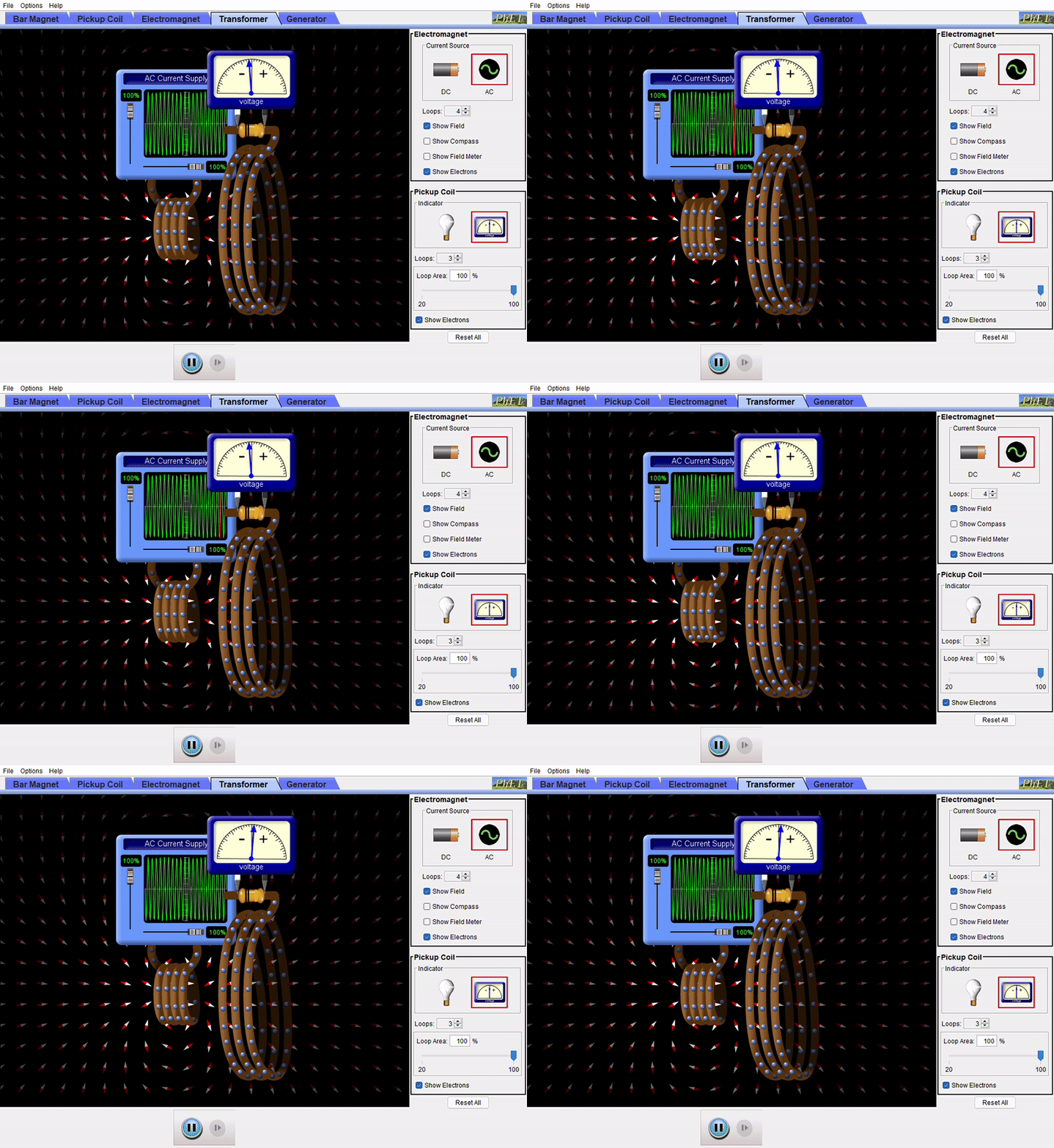
Only in this case, the secondary winding is inside the RFID Card and the voltage induced is used to power the internal memory and controller.
The way communication occurs in this technology is the IC shorts the winding in the card with a transistor which drops the voltage on the primary winding a bit which is then registered as a binary digit.
What security features it this project has to offer?
The first idea that comes to mind for making a key is to set a passcode. Since a single passcode is vulnerable to attacks, one might think of changing the passcode every now and then. In this system, a random passcode is generated every time you unlock the door so that once a passcode is used, it's going to get discarded after a single use. This kind of system is also used in Remote Car Keys where a new command code is generated every time you unlock your car so that anybody who might have recorded the code might not be able to get into the car.
This is called Rolling Codes.
The problem of implementing this with RFID tags is that it's not enough protection. Car Keys transmit a radio signal so if anyone wants to record it, they need to have a dedicated setup to do it, but in case of RFID tags, any smartphone that has NFC can read the entire memory of the RFID tag. The card doesn't even need to be touching the phone, it can just hover above it with up to 1 Inch gap and still be able to read it. So if its in your pocket or in your wallet, it can still be read. We can encrypt the card but most modules available for Arduino are not capable of decrypting it.
But still there's a solution to this problem.
Every RFID tag has some default data written by the manufacturer before shipping, like the PICC Type, UID, Key. The Unique ID or UID is one good way you can double check if its the same card, it is a 4 byte UID which looks something like this : F6 25 5C 11. Since it is 4 Bytes or 32 Bits, there can be 4, 294, 967, 296 possible combinations, so it's going to be really rare for 2 tags to have exact same UID, but there's a catch, you can write some codes on Arduino to change the UID, so a person could read everything about the card including the passcode and the UID and use it to clone the card. The good thing is that there are a variety of RFID tags that don't support UID change because they come with the UID and Model Name hard encoded into the memory. One of them is NXP's MIFARE Classic Series which I happen to have.
So essentially we check the the Model Name, then the UID because if Model is MIFARE Classic, then the UID isn't a modified one and could be original, after that we can check the passcode, giving us a solid Triple - Layer Protection System.
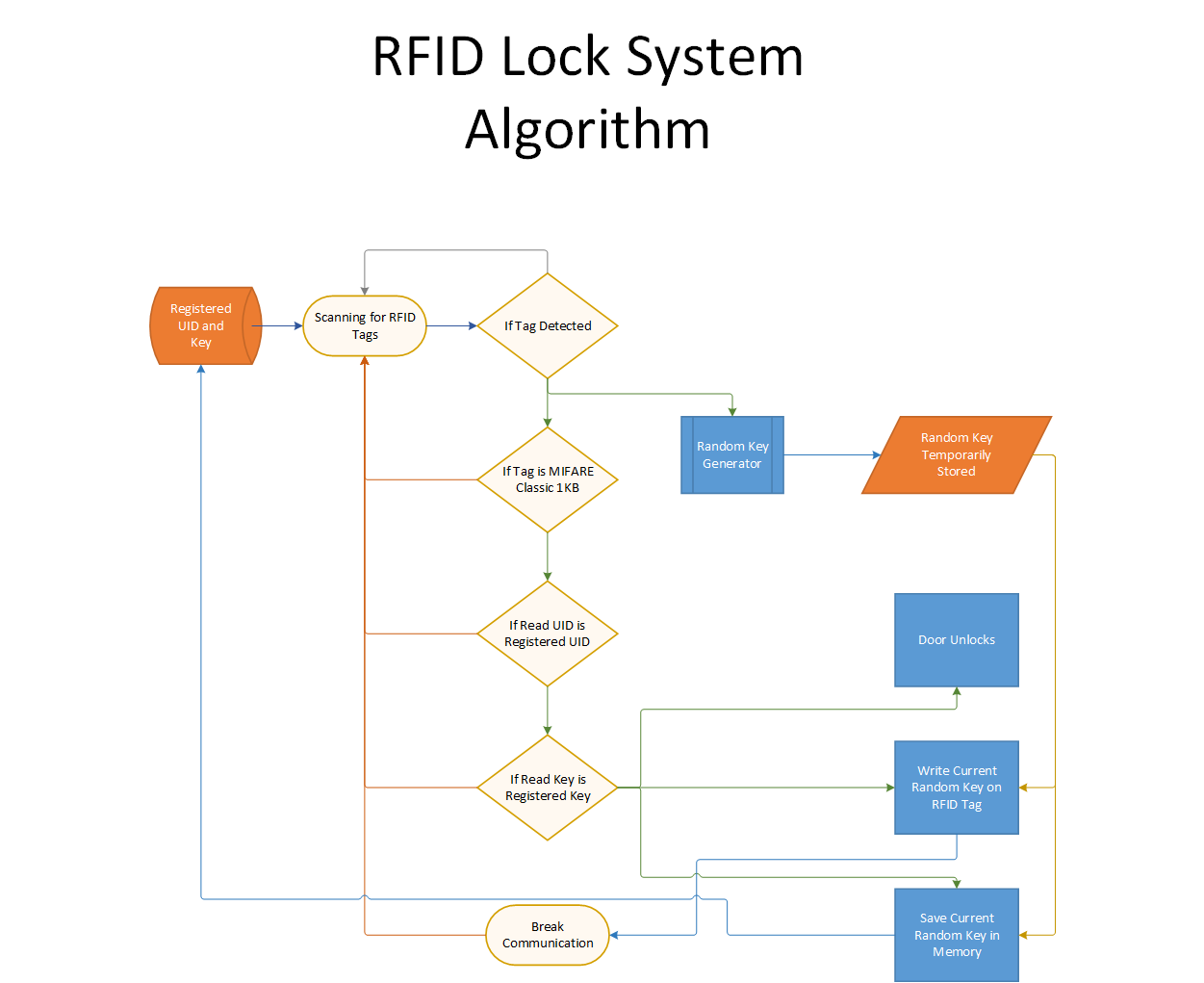
Hexadecimal UID Extraction
You cannot just scan a card and open the door. The MFRC522 reads heavily encrypted 4-byte identification blocks.
- The SPI Handshake: You wire the MFRC522 module using the mandatory SPI pins (MISO: Pin 12, MOSI: Pin 11, SCK: Pin 13).
- The user holds their tiny blue plastic token to the scanner.
- The scanner blasts an electromagnetic field, powering up the microscopic chip inside the blue token. The token replies:
0xDE 0xAD 0xBE 0xEF. - The C++ Logic Trap:
if (uid == "DEADBEEF") {
  UnlockDoor();
} else {
  TriggerAlarm();
}
Solenoid Control (The 12V Deadbolt)
The door lock requires immense physical power.
- The 12V Solenoid Deadbolt is a massive slug of steel blocking the door frame.
- The Arduino commands
digitalWrite(RelayPin, LOW);. - A 5V mechanical Relay board "Clicks", dumping 12 Volts / 1.5 Amps into the solenoid coil.
- A massive electromagnet sparks to life, physically yanking the steel bolt backward into the housing against extreme spring pressure! The door is now unlocked!
- After 5 seconds, the Arduino drops the relay, and the spring violently slams the bolt back into the locked position.
Safe Assembly Hardware
- Arduino Uno/Nano.
- MFRC522 13.56MHz Scanner Board.
- 12V Solenoid Cabinet Lock / Deadbolt.
- 5V Optically-Isolated Relay Module.
- 12V High-Amperage Wall Adapter (A weak 12V 500mA adapter will not have enough strength to pull the heavy iron bolt!).
Applications
This system can be used in doors for houses, safes, or instead of doors, It can be used to even mark a new identity for something like, RFID Personal ID Cards which would grant access to their workplace only to them.
Almost every application is only limited by our imagination.