Summary
I recently came across an old project that I used while I had a gecko as a pet, and I wanted to share it with you. The idea of the project was for the Arduino to serve as a controller and sensor reader in the terrarium, while I would collect all the data from the terrarium through an Android application. The application is written in C# (Xamarin.Android), while the communication between the application and the Arduino takes place via Bluetooth.
Circuit
Circuit is very simple.
- The Bluetooth module has 4 – pins: Vcc, Tx, Rx and Gnd. Vcc and Gnd are connected to 5V and ground from Arduino UNO. Since I used SoftwareSerial, Tx and Rx pins of the Bluetooth module do not have to be connected to Rx and Tx pins of the Arduino.
- DHT11 sensor have 4 pins, of which 3 are used - VCC, Signed, Used. VCC and GND are connected to 5V and ground from Arduino UNO. You will want to place a 10K ohm resistor between VCC and the data pin, to act as a medium-strength pull up on the data line. I used protoboard to solder resistor and pins.
- RGB Led have 4 pins - R, G, B and common pin. Common pin is connected to 5V on Arduino. Other pins will be connected to digital pins of Arduino, but with 220 ohm resistor between Led pin and Arduino pin like on circuit.
- PC Fan - I found old laptop fan for this project. Originally, I used two of them, but in this case we will use just one. I connected red wire of fan to 5V on Arduino, and other wire to digital pin on Arduino.
Android application
The idea of the application is to send an Arduino message immediately after the connection is established, which will request from it the current state of all sensors and actuators. After that, user can use image buttons to send or receive data to/from Arduino. Humidity and Temperature button have background that changes depending on the values. Fan and Light button have a background that indicate whether they are on or off. All those images are clickable and they send message to Arduino. Below them will be written the return values we get from the Arduino. For RGB Led, I used a color picker by which we select the color of the LED.
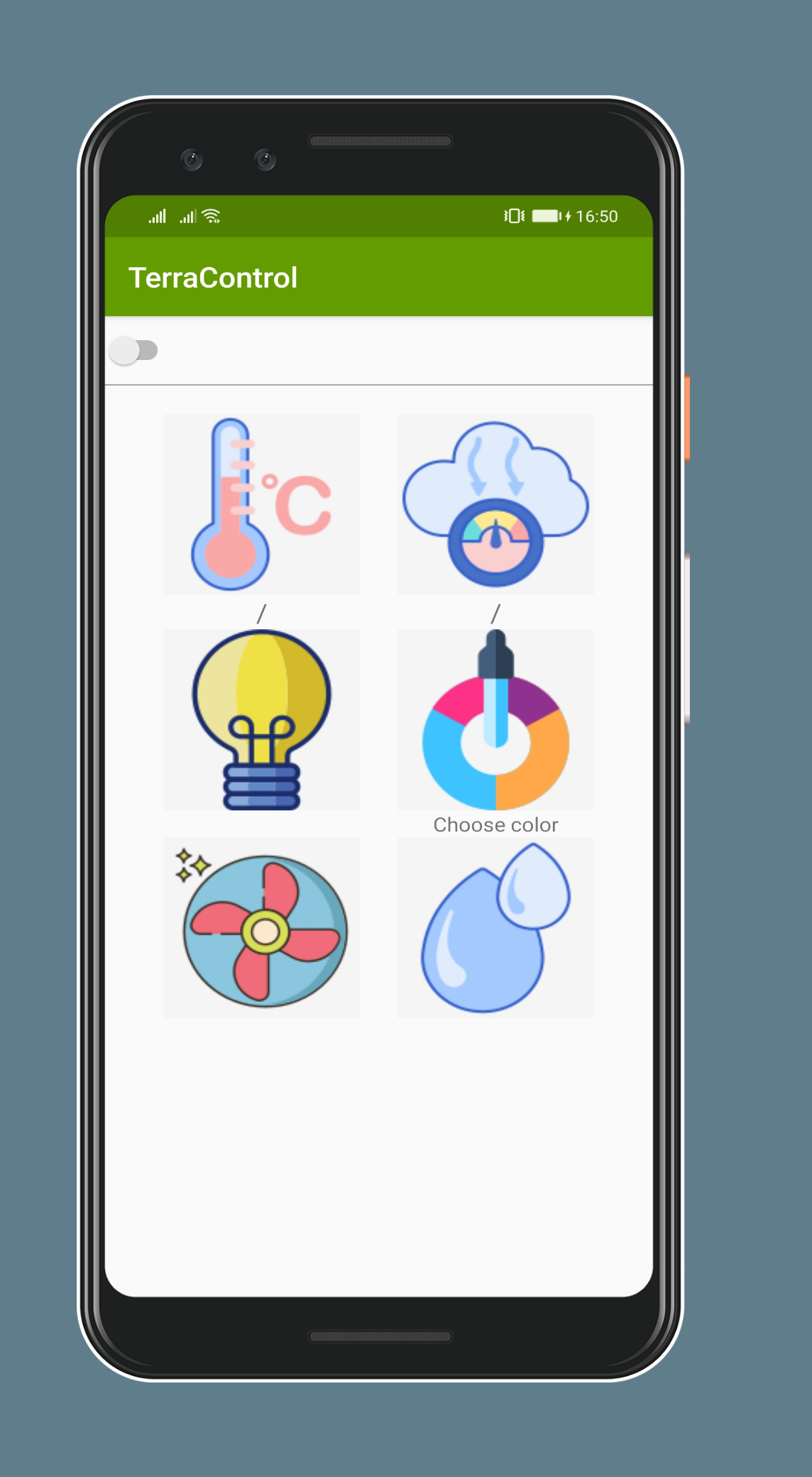
Code for Android and Sketch
You can download code for Android app here.
You can download sketch for Arduino here.
Sketch is using DHT11 Library which you could download here.
To do
Since I plan to keep geckos as pets again, I have more ideas on how to expand the app. I would add a water pump, a RTC, an MicroSD card reader and maybe a spot lamp (although not all geckos need this).
In the next few days, I will insert more pictures and a link to download the application.
I hope you like the project and that it will be useful to someone in the future. I am here to answer all questions and explanations.
EXPANDED TECHNICAL DETAILS
Advanced Vivarium Maintenance
TerraControl is a high-grade automation system designed specifically for the delicate health needs of reptiles like geckos.
- Multi-Zone Heat Management: The Arduino controls a heating mat and a basking light independently via a Dual Relay module, maintaining a specific "Heat Gradient" across the enclosure.
- Humidity & Misting: Uses a DHT22 to monitor moisture. If the air becomes too dry, the system activates a small water pump to mist the terrarium.
Professional Monitoring UI
- Xamarin Mobile App: The companion app (built with Xamarin/C#) provides a beautiful, cross-platform interface.
- Data Logging: All temperature and humidity logs are sent via WiFi to a central server, allowing the owner to ensure the gecko's environment is stable even when they are away from home.