Making a Tetris game console
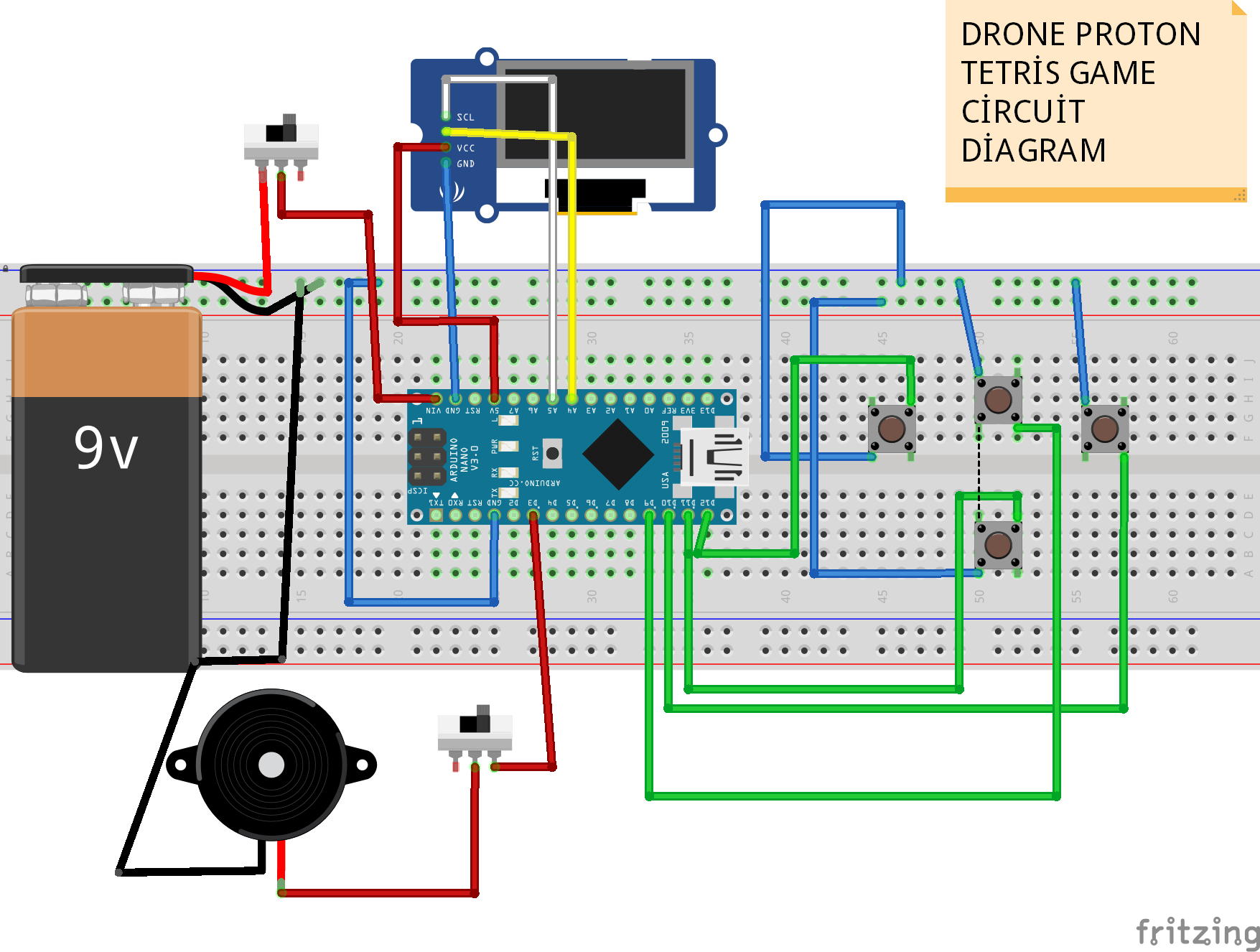
Welcome to Drone Proton. I will show you how to make a Tetris Game Console . In the diagrams below you can find the 3D model, code and electronics diagram. If you want to learn how the Tetris is made, watch the video.
Project Overview
The "DIY Handheld Tetris" is a professional-grade embedded systems project that brings the classic 1980s puzzle game to life on modern hardware. Powered by a compact Arduino Nano, the project utilizes high-speed I2C communication to drive a crisp 0.96-inch OLED display. This console serves as a masterclass in Game Engine Design for microcontrollers, handling complex tasks like collision detection, real-time matrix transformations for piece rotation, and a persistent "grid" memory system, all within a 3D-printed ergonomic shell.
Technical Deep-Dive
- Grid-Based Memory Architecture: Since the OLED has 128x64 pixels, calculating physics at the pixel level would be too slow. Instead, the game logic operates on an abstract 10x20 Grid. This grid is stored in the Arduino's RAM as a 2D byte array. The rendering routine then translates this grid into pixel blocks on the screen, optimizing the refresh rate to maintain a smooth frame rate even as the game speeds up.
- Tetromino Transformation Logic: Each of the seven classic Tetris pieces is stored as a series of coordinates. To handle rotation, the firmware applies a 90-degree Matrix Rotation formula. Before committing a move or rotation, the "Predictive Collision" logic checks the temporary piece position against the boundaries and the occupied blocks in the grid. If a collision is detected, the move is disallowed—a core mechanic of the game's physics.
- Input Multiplexing & Debouncing: The four digital pushbuttons (Left, Right, Rotate, Soft Drop) are polled in every game tick. To ensure that a single press doesn't trigger multiple rotations, the code implements Software Debouncing and "One-Shot" flag registers, ensuring a responsive yet precise "feel" to the controls.
- Line-Clear and Leveling Algorithm: When a horizontal row in the grid is completely filled (all 10 cells are non-zero), the system executes a "Clear" routine. It shifts all rows above the cleared line down by one, updates the player's score, and increments the "Global Tick Speed," increasing the gravity of the falling pieces.
Engineering & Ergonomics
- 3D Printed Enclosure: The console is housed in a bespoke enclosure designed in Cura. The 3D model includes standoffs for the Arduino Nano and the OLED, ensuring that the screen stays flush with the window. These mechanical constraints provide a durable, "pocketable" form factor suitable for long-term play.
- Portability & Power Management: Operating on a 9V Battery, the project uses the Arduino's onboard voltage regulator to down-step to 5V. The choice of a Nano over an Uno allows for a significantly smaller enclosure while providing the same processing power.
- I2C Bus Optimization: The SSD1306 OLED is a high-bandwidth component. The project emphasizes the use of optimized libraries like
Adafruit_SSD1306orU8g2to minimize the "wait-time" for serial data transmission, preventing the screen from flickering during rapid line clears. - Tilt-Switch Innovation: The inclusion of two Grove Tilt-Switches allows for experimental mechanics—perhaps detecting if the player is tilting the console as a secondary input or using it to trigger a "Pause" state when the device is laid horizontal.
instagram: https://instagram.com/drone.proton?igshid=YmMyMTA2M2Y=
3d Parts, electronic schematics and codes : https://github.com/Drone-Proton/Tetris-game-drone-proton
YouTube : https://youtu.be/E7JZR5urE1c