There was a question in my head, if Morse code can be used by eyes then... I can make music with that. Morse code is of some pattern, music is also some patterns of sound or bit (have a little knowledge in that). Then I thought if we can wink in a pattern we can definitely generate music, at least we can synthesize that pattern. That's what I've tried to do in this project. I tried to make music using eyes.
Let's see how we can do that.
Project Perspective
TuneGlass: Can We Make MUSIC Using Our EYES??? is a sophisticated exploration of assistive technology and audio-digital interaction. By focusing on the essential building blocks—the IR eye-sensors and the Arduino synthesizer—you'll learn how to communicate and generate your musical patterns using a specialized software logic and a robust wearable setup.
Step 1: Parts You'll Need
- Arduino Pro Mini – I've used the ATmega328P 5v 16 mHz one
- IR sensor (without ADC board)
- Speaker – I've taken it from old phone
- Powerbank Module – booster
- Small lipo battery – I used a 150 mAh battery
Hardware-Wearable Infrastructure
- Arduino Pro Mini: The "brain" of the project, managing multi-directional sensor sampling and coordinating sound output.
- IR Reflective Sensors: Providing high-precision and reliable "Blink Eye" detection for your music mission.
- Li-Po Battery: Essential for providing high-power and mobile base for the wearable glasses.
- Powerbank Module: Essential for providing clear and energy-efficient 5V power for the Pro Mini.
- Mini Speaker: Provides clear and professional auditory interface for your creation.
- Micro-USB Cable: Use to program your Arduino and provide the primary interface for the system controller.
Step 2: Principle & Technical Implementation
So, I've used two IR sensors to see if eyes are closed or open. Each IR sensor outputs some data (0 to 1023). Now if it sees any closed eye the value decreases thus it can say the corresponding Eye is closed (wink detected). You can buy an Eye Blink sensor but the working functionality is all the same yet my solution is cheaper and it works.
The project reveals the hidden layers of simple eye-to-sound interaction:
- Identification layer: Two IR Sensors act as high-resolution optical eyes, measuring your wink or blink through IR reflection.
- Conversion layer: The Arduino uses analog Pins (A0, A1) to receive high-speed sensor readings and coordinate mission-critical music tasks.
- Auditory Interface layer: A Mini Speaker provides high-resolution audio feedback for your wink pattern check (e.g., Left/Right/Both).
- Processing Logic layer: The Arduino code follows a "statistical threshold" (or frequency-mapping) strategy: it interprets the analog values and matches
tone()frequencies to provide a safe and intuitive "Eye-Instrument." - Communication Dialogue Loop: Counts and frequencies are sent rhythmically to the Serial Monitor during initial calibration to coordinate the status in real-time.
After detecting any wink or blink it outputs a sound in a different frequency for each eye. And if both the eyes are closed another frequency. Hope you got the point.
Now lets make it.
Step 3: Build the Circuit
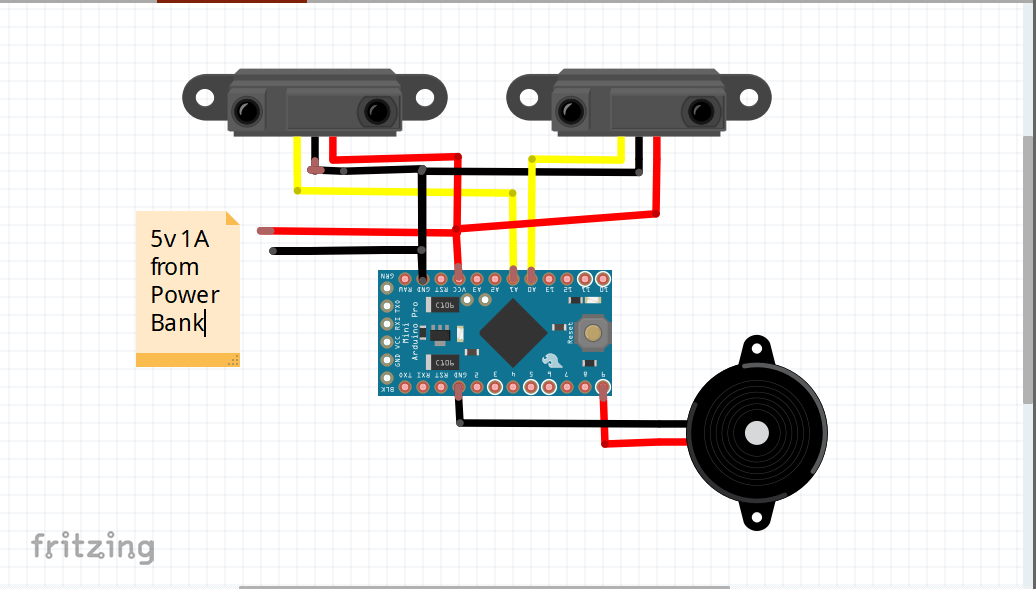
The circuit diagram is pretty easy and simple. You can always watch the video on top to see how I did it. Just use a ribbon cable to avoid messy wires. Then solder parts as per the circuit diagram.
Note: Use a better cable for battery connection. As you know that the resistance value increases as the wire becomes longer, so I've used a servo cable which can pass enough current to get things going. Then power it up before connecting things together.
Step 4: Upload the Program
Now as I've mentioned earlier two different frequencies are set for each eyes. This works using Tone function.
tone(speaker_name, frequency_in_Hz, delay);
To program Arduino pro mini:
- Remove the ATmega 328P IC from Arduino Uno
- Connect uno Tx to mini tx
- Uno Rx to mini rx
- Uno 5v to mini vcc
- Uno Gnd to mini gnd
- Uno Reset to mini rst
Then go to arduino.ide and select board (arduino pro mini) and port then upload the following code. You can also download or follow the code here.
/*
 * Making music using Eye
  * by: Ashraf Minhaj
  * mail: ashraf_minhaj@yahoo.com
  * license: General Public License
*/
//connect sensors on
int sen1 = A0;  //A0
int sen2 = A1;  //A1
//Connect speakers (Not acutally buzzers)
int buz1 = 8;  //on digital pin 8
int buz2 = 9;  //digital 9
void setup()  // put your setup code here, to run once:
{
  pinMode(buz1, OUTPUT); //set pins as output
  pinMode(buz2, OUTPUT);
  Serial.begin(9600); //initialize serial com to see values
}
void loop()
{
  // put your main code here, to run repeatedly:
  int val1 = analogRead(sen1);
  int val2 = analogRead(sen2);
  //print what's been read by the sensors
  Serial.println(val1);
  if(val1 < 750 && val2 < 750)
  {
    tone(buz1, 1000, 10);
  }
  else if(val1 < 750)
  {
  tone(buz1, 2000, 100);
  }
  else if(val2 < 750)
  {
    tone(buz1, 1500, 100);
  }

  //Serial.println(val2);
  //make sound


}
Integration and Interaction Step-by-Step
The TuneGlass wearable process is designed to be very efficient:
- Initialize Hardware: Correctly seat the IR sensors inside the glass frame and connect the speakers.
- Setup Output Sync: In the Arduino sketch, initialize the
analogpins and define the tone frequencies for each eye. - Internal Dialogue Loop: The glasses constantly performs high-performance wink checks and updates the audio status in real-time.
- Visual and Data Feedback Integration: Watch your blink dashboard automatically become a rhythmic musical signal, pulsing and following your eye settings on the frame.
Step 5: Connect All Things Together
Now, connect sensors facing at your eye, you might need to adjust that. Then Arduino and speaker on one side and the battery with 5v booster on another side of the frame. Use enough hot glue to secure the connections and secure the components on the frame.
[!TIP] Use Hot Glue to secure the IR sensors on the frame properly; even a small shift in position can stop the blink detection!
Step 6: Last, Power and Have Fun
Now power it up and see how it works. Use the serial monitor to see the values and adjust if needed. That's it !!! Now you have a glass that can generate music.
This can also be used to count blink numbers thus how many times a user blinks or winks thus this can also be used by disabled people. Got a project Idea?? ;)
Future Expansion
- OLED Identity Dashboard Integration: Add a small OLED display on the frame to show "Current Tone (Hz)" or "Battery (%)."
- Multi-sensor Climate Sync Synchronization: Connect a specialized "Accelerometer" to perform higher-precision "Head Gesture" music control.
- Cloud Interface Registration Support Synchronization: Add a specialized web-dashboard on a smartphone over WiFi/BT to precisely track and log total sleep history.
- Advanced Velocity Profile Customization Support: Add specialized "MIDI Output" to the code to allow the glasses to control a synthesizer automatically for professional music.
TuneGlass is a perfect project for any science enthusiast looking for a more interactive and engaging accessibility tool!
Thank you.