Background
Hello! Welcome back to ANOTHER lesson The project we're about to make is definitely the most fun and useful so far. A show of digital hands: who's played the game pong here? If you haven't, let's have a bit of backfill. Pong is one of the earliest arcade video games. It is a table tennis sports game featuring simple two-dimensional graphics. The game was originally manufactured by Atari, which released it in 1972. Allan Alcorn created Pong as a training exercise assigned to him by Atari co-founder Nolan Bushnell. But today, pong is essentially what it was 50 years back. Here's a video to watch.
There you have it. The game we're about to play is the one-player version. Let's have a look at some of the key elements to pong.
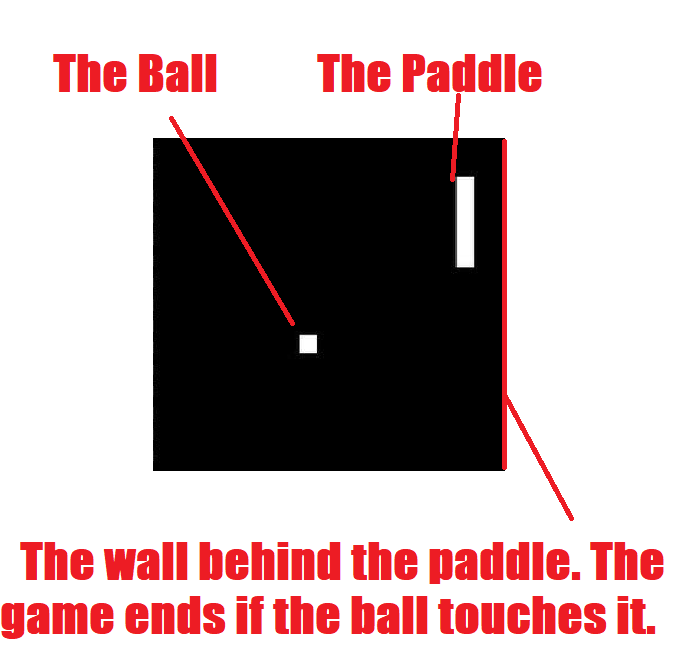
Great. Now let's look at our project.
Our Project
As I said before, if this works, it'll be really fun. If you weren't here for the last lesson(s) then I suggest you go back to them now. We are going to make a simple, one player Pong Game. If you want to, and have lots of Lego, you may be able to make a case for the game. But, the one new piece of equipment we'll be using today is the Matrix with the MaxMatrix2719. Let's have a look.
8X8 LED MaxMatrix
The MaxMatrix can do a lot of things For some projects, you can just use the Matrix, but for this, we'll use it with the MaxMatrix board. Let's see.
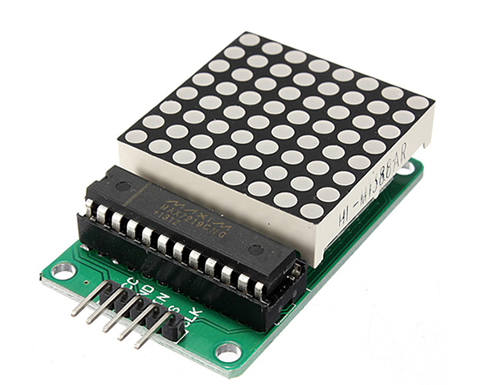
What the Matrix essentially is, is 64 LED lights in a square, 8 by 8. In another words, a screen (for our use). We'll be using it for pong. So without further ado, let's start building!
Assembly
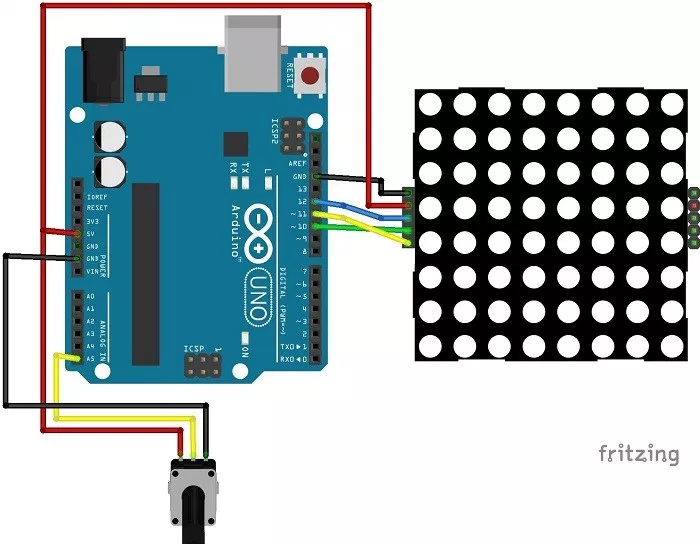
Go ahead, do that one.
Once you're done, get your battery compartment and plug it into the black hole next to the USB connector port. The Uno should turn on like it does with the USB connector in it. Now plug it in to the computer. Open Arduino IDE and paste in the code in the ''CODE" section below. Upload the code now grab the potentiometer. If it all worked, you should see the dots on the Matrix coming on in rows. After that's done, you'll see a smiley face. Then the game will start. Move the poteniometer from side to side to move the paddle. The great thing about this game is that it works even when you unplug it from the computer. You can simply remove the battery case to turn it off.
Well done! That brings us to the end of another lesson. I hope you enjoyed it.
EXPANDED TECHNICAL DETAILS
Advanced Hardware Orchestration Foundations
Part 3 of this series moves beyond basic LEDs into complex topics like digital communication, timing, and sensory feedback.
- I2C Bus Architecture: Introduces the
Wire.hlibrary and the principles of Master-Slave communication. Users learn how to address multiple sensors (like displays and temperature modules) using only two wires (SDA/SCL). - Non-Blocking Logic Kernel: Teaches students how to replace
delay()withmillis()state-machines, allowing their Arduinos to handle multiple tasks (like blinking and serial logging) simultaneously.
Performance
- Memory-Efficient Variable Scoping: Includes a deep-dive into
static,volatile, andconstkeywords, helping beginners write code that is optimized for the limited SRAM of the ATmega328P.