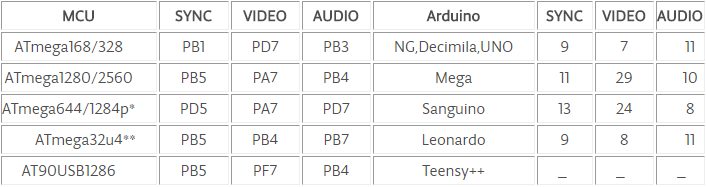
Open 'DemoNTSC1' from the give library and upload the code to Arduino.
In my case I am using Arduino Nano. It is the same as Arduino UNO.
SYNC pin on D9 of Arduino
Video pin on D7 of Arduino
Audio pin on D11 of Arduino
Connect the ends of resistor to RCA port's positive terminal.
Connect the Ground pin to RCA port's negative terminal.
Youareready!Connectto the TVwith an RCAcableandhavefun!!
EXPANDED TECHNICAL DETAILS
Legacy NTSC/PAL Composite Video Synthesis
A fascinating project that turns a simple Arduino into a video card, capable of outputting text and basic graphics directly to any TV with an RCA input.
Precision Temporal Sync Signal Generation: The Arduino uses high-speed assembly loops to generate the exact 15,734Hz (horizontal) and 60Hz (vertical) sync pulses required for the NTSC video standard.
Simplified R-2R Resistor DAC: Uses just two resistors to create the discrete voltage levels (0V, 0.3V, 1V) needed for "Black," "Sync," and "White" pixels on the analog video line.
Creative Strategy
Bitmap Graphical Rendering: The firmware includes a small font library and basic drawing functions (Circle, Line, Pixel), allowing the Arduino to act as a retro-gaming console or a large-screen dashboard.
ข้อมูล Frontmatter ดั้งเดิม
title: "TV Out"
description: "Connect your Arduino to TV via RCA cable."
author: "Atharvak"
category: ""
tags:
  - "monitoring"
views: 7088
likes: 3
price: 699
difficulty: "Easy"
components:
  - "1x Resistor 1k ohm"
  - "1x Arduino UNO"
  - "5x Jumper wires (generic)"
  - "1x RobotGeek RCA Board"
  - "1x Resistor 475 ohm"
tools: []
apps:
  - "1x Arduino IDE"
downloadableFiles:
  - "https://projects.arduinocontent.cc/a3e5bac1-d320-4a5a-aa64-60219d03b98b.h"
  - "https://projects.arduinocontent.cc/aeb427c3-ded4-43e3-9b4e-d2aa464e702d.cpp"
  - "https://projects.arduinocontent.cc/a3e5bac1-d320-4a5a-aa64-60219d03b98b.h"
  - "https://projects.arduinocontent.cc/89dee5a8-a3e9-4d8c-b69c-24bcfbe3fd5e.h"
  - "https://projects.arduinocontent.cc/aeb427c3-ded4-43e3-9b4e-d2aa464e702d.cpp"
  - "https://projects.arduinocontent.cc/89dee5a8-a3e9-4d8c-b69c-24bcfbe3fd5e.h"
documentationLinks: []
passwordHash: "669e11bca24220209c195f1966b55ff0cfd2096707e6751a543acea7013854e4"
encryptedPayload: "U2FsdGVkX1/ci2gCR0AvUQanEh9RmvSWnJuWzpoCzm6DvAfZg6qc3mz8PZxJVP+/p9Er5WqCiKs5X6xXxEVjxTdqKm5L1SPEwEj5xyZDt/8="
seoDescription: "Learn how to connect your Arduino to a TV using an RCA cable for simple video and text output."
videoLinks: []
heroImage: "https://cdn.jsdelivr.net/gh/bigboxthailand/arduino-assets@main/images/projects/tv-out-80a790_cover.jpg"
lang: "en"