Idea
After building a project that displayed temperature on an e-paper display as a bar chart, I wanted to take it to the next level and visualize the data as a continuous line. Having heard about Splines before, I decided to try applying the concept of continuous Splines to my project. I was able to showcase the data in a more intuitive and engaging way that made it easy for anyone to understand the temperature trends.
The project is all about using Splines to display real-world data on an e-paper screen. It involves creating various functions of different kinds of Splines that can be used with pretty much any display. The Splines can be used to visualize data in a way that is both beautiful and informative, making it easy for anyone to understand the trends and patterns in the data. The project is ideal for anyone who wants to showcase data in an aesthetically pleasing and efficient way.
THEORY
Bezier Curves
Bezier Curves are a mathematically-defined curve commonly used in computer graphics, and are used in Splines to easily create smooth and continuous curves by defining the shape through a set of control points.
Cubic Bezier curves are based on linear interpolations between control points, and can be written as a function that calculates the x and y coordinates of a point on the curve at a given value of t. To understand how this function works, consider a cubic Bezier curve defined by four control points: P0, P1, P2, and P3. The curve starts at P0 and ends at P3, and is shaped by the intermediate control points P1 and P2. At t=0, the function returns the starting point P0, and at t=1, it returns the end point P3. The intermediate points on the curve are calculated by linear interpolation between the control points, with the weighting of the interpolation determined by the value of t. Specifically, at t=0.5, the resulting point lies on the line segment that connects the midpoint of the line segment between the first and last control points (P0 and P3) to the midpoint of the line segment between the second and third control points (P1 and P2).
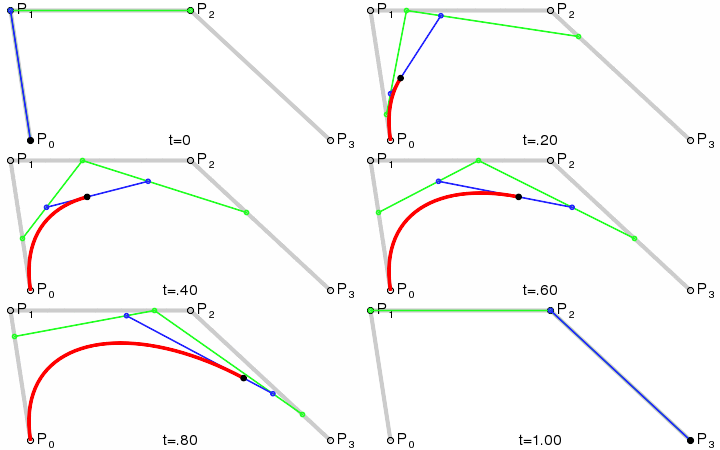
The above gif visualizes how a cubic Bezier curve is shaped by the control points and how linear interpolations between them combine to create the curve.
The function for a cubic Bezier curve is a combination of these linear interpolations, and is as follows:
B(t) = (1-t)^3 * P0 + 3(1-t)^2 * t * P1 + 3(1-t) * t^2 * P2 + t^3 * P3
B(t) is the point on the curve at value t.
P0 is the starting point of the curve.
P1 and P2 are the intermediate control points that shape the curve.
P3 is the end point of the curve.
The function calculates the x and y values of the point on the curve by using the values of t and the control points. The function calculates contributions of P0, P1, P2, and P3 respectively to determine the curve. The function can be used to generate a series of points on the curve by iterating over a range of t values from 0 to 1. When these points are plotted, they form a smooth, continuous curve.
Splines
In splines, knots or joints are the points where two or more curves meet, and control points define the shape of the curve between the knots. To ensure smooth continuity between adjacent curves, the control points at the joints need to be positioned in such a way that the tangent vectors of the adjacent curves are equal at the joint. Therefore the Control Points before and after a joint have to be on the same straight line that also passes through the joint in the middle. This ensures that the spline appears as a smooth, continuous curve rather than a series of individual curves, which is exactly what we want here.
While Bezier Curves provide an efficient way to interpolate between control points, it is still unclear how to ensure that the resulting Spline is smooth, given the condition that control points before and after a joint have to be on the same straight line that passes through the joint in the middle, since the slope of that line is variable. To address this, different kinds of Splines, such as Cardinal Splines, Catmull-Rom Splines, and Hermite Splines, define the two control points between joints that represent the known data, resulting in unique functions for each kind of Spline that can be represented in matrix form:
For Cardinal and Catmull-Rom Splines, the slope of the line passing through the control points and joints is set to be equal to the line that goes through the adjacent joints, which determines the position of the control points and the tangent at the joints. In the case of Cardinal Splines, this means that the tangent vector from a joint to a control point is equal to the vector between the adjacent joints. These vectors can now be scaled by multiplying the matrix. The Catmull-Rom Spline is a type of Cardinal Spline where the scaling factor is set to 0.5.
Cardinal Spline:
[ -s 2-s s-2 s ]
[ 2s s-3 3-2s -s ]
[ -s 0 s 0 ]
[ 0 1 0 0 ]
Catmull-Rom Spline (for s = 0.5):
1/2 * (
[-1 3 -3 1 ]
[ 2 -5 4 -1 ]
[-1 0 1 0 ]
[ 0 2 0 0 ] )
Here, each row corresponds to a set of four control points, and the columns represent the weights of the corresponding basis functions.
Hermite Spline:
[ 2 -2 1 1 ] * start joint
[-3 3 -2 -1 ] * tangent vector from start joint
[ 0 0 1 0 ] * end joint
[ 1 0 0 0 ] * tangent vector from end joint
Here, the first two rows correspond to the control points and tangent vectors for the start point of the curve, while the last two rows correspond to the control points and tangent vectors for the end point of the curve.
B-Spline :
1/6 * (
[ 1 4 1 0 ]
[-3 0 3 0 ]
[ 3 -6 3 0 ]
[-1 3 -3 1 ] )
Here, each row corresponds to a set of four control points, and the columns represent the weights of the corresponding basis functions.
The code includes a very simple implementation of the different Splines.
Mathematical Data Smoothing
Raw sensor data (like temperature or gas levels) is often "jagged" due to noise. This project implements Cubic Spline Interpolation to create smooth, professional-looking charts.
- Spline Logic: Instead of drawing straight lines between data points (Linear Interpolation), the algorithm calculates a third-degree polynomial for each interval, ensuring a smooth curve at every joint.
- Resource Management: Because spline calculation can be CPU-intensive, the system pre-calculates the "K-vectors" and stores them in a temporary buffer, allowing the Arduino to render the smooth graph in real-time.
Visual Presentation
- LCD/OLED Rendering: The smoothed coordinates are translated to pixel positions on a graphic display (like the SSD1306).
- High-Fidelity UI: This technique is essential for industrial dashboards or medical monitoring devices where visual clarity and trend analysis are more important than individual noisy data points.