Introduction
In so many of my projects, I used the ultrasonic distance sensor. It's such a useful and necessary tool. However, writing code for it is... repetitive, tedious, long, (insert negative word here). Here's an example of the "usual" way of using the distance sensor.
digitalWrite(trigPin, LOW);
delayMicroseconds(5);
digitalWrite(trigPin, HIGH);
delayMicroseconds(10);
digitalWrite(trigPin, LOW);
duration = pulseIn(echoPin, HIGH);
Serial.println(duration);
Ugly right? I know.
Using my library, EZDist, you can make it a one-liner! Here's a preview:
Serial.println(EZDist.raw());
That's it. Literally, a one-liner that looks beautiful.
This is just one of the awesome things this library can do.
Installation
1. Open Arduino IDE.
2. Download this GitHub repository as a ZIP file or folder.
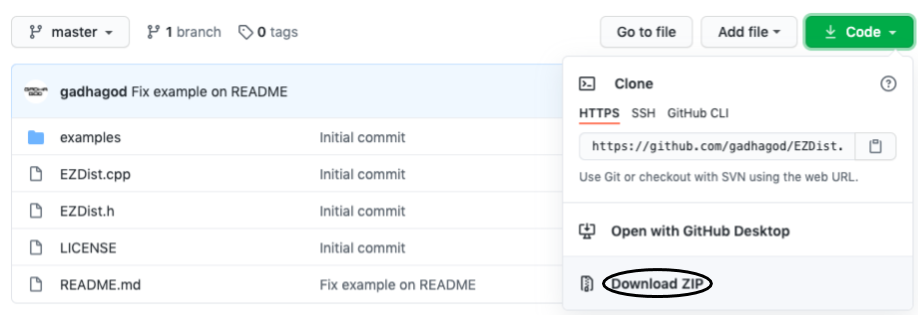
3. On the top bar, select Sketch > Include > Library > Add.ZIP Library. Select the downloaded folder.
Hooray! You now have the library on your computer!
Usage
Like any library, you have to include it at the start of the sketch.
#include <EZDist.h>
Now, you have to create an instance of the class with the pin numbers. This is just fancy for "put this before your setup()":
EZDist EZDist(trigPin, echoPin);
For printing the distance, begin the serial monitor in setup().
void setup() {

}
Now print the data.
void loop() {
  Serial.println(EZDist.raw());
}
Great! We now have distance on our serial monitor. However, we want the values to be in inches or centimeters, right? Maybe.
void loop() {
    Serial.println("Inches: " + String(EZDist.inch()) + ", Centimeters: " + String(EZDist.cm()));
}
Simply put, use EZDist.inch() getting distance for inches, and EZDist.cm() to get distance in centimeters. If you want it raw, use EZDist.raw().
Here's what it looks like in the end:
#include <EZDist.h>
int trigPin = 12;
int echoPin = 11;
EZDist EZDist(trigPin, echoPin);
void setup() {
 Serial.begin(9600);
}
void loop() {
 Serial.println(EZDist.cm()); // if you want it in CM
}
Now that's simple, beautiful, and efficient code.
Examples
Examples are the best way to learn (for me at least).
To see the examples, go File > Examples > EZDist, and select an example.
Library Source
See the library's source code and other cool things here.
Report issues and make suggestions here.
Wanna contribute to make this library great? Fork the GitHub repository and open a pull request here.
EXPANDED TECHNICAL DETAILS
Abstraction-Layer Sonar Logic
A beginner-friendly guide that focuses on using simplified code libraries to handle the complex timing required for ultrasonic sensors.
- Simplified
NewPingAPI Integration: Demonstrates how to replace hundreds of lines of rawdigitalWriteandpulseIncode with a singlesonar.ping_cm()function call. This library manages the 10µs trigger pulse and echo timeout automatically. - Non-Blocking Polling Kernel: Shows how to use the library's timer interrupts to perform distance checks in the background, allowing the main loop to handle other task like LCD updates or motor control simultaneously.
Hardware
- Single-Pin Mode Configuration: (Advanced Tip) Shows how to wire most ultrasonic sensors using only one Arduino pin instead of two, saving valuable GPIO space for larger projects.