Using a display to view the temperature and humidity of your environment can be possible using the DHT11 sensor with the easy to use Arduino. For this project, we will be using the Oled I2C SSD1306 display module to display the temperature and humidity readings gathered from the environment using the DHT11 temperature and humidity sensor.
Schematic:
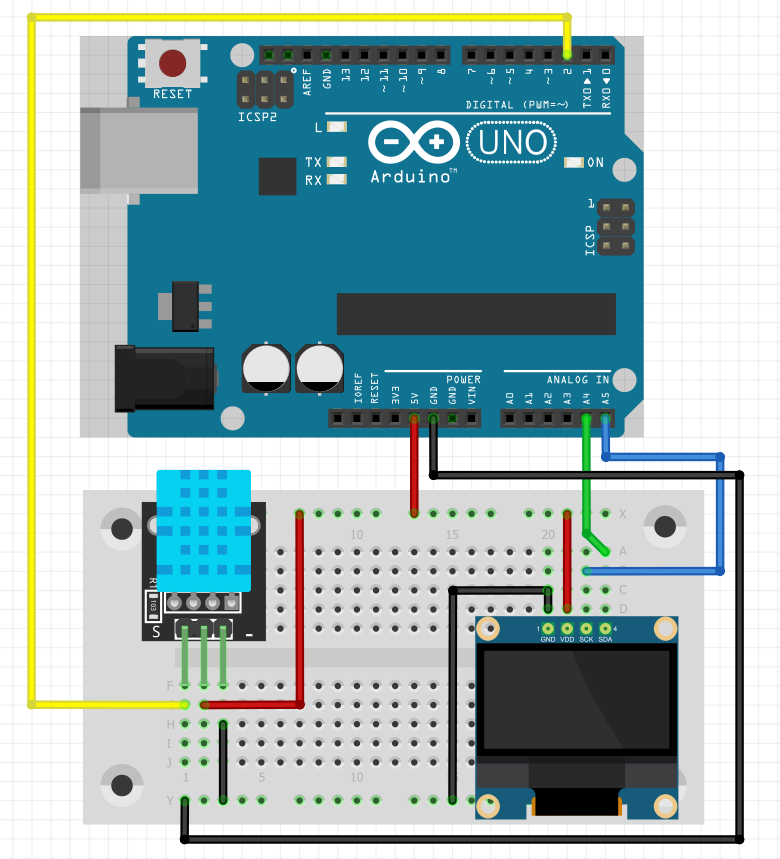
Video guide and demo:
I hope that you like this project. And subscribe my youtube channel.
Thanks for your watching!!!
Project Overview
The "Arduino Weather Station" is a practical environmental monitoring tool that tracks two crucial metrics: Ambient Temperature and Relative Humidity. By combining a digital sensor with a high-contrast OLED display, this project provides a clear and compact readout of your surrounding environment, perfect for placing on a desk or in a grow room.
Key Hardware & Connectivity
- Arduino UNO: The main workstation that processes the data.
- DHT11 Sensor: This is a low-cost, yet effective sensor. It uses a capacitive humidity sensing element and a thermistor to measure the air. It provides a digital signal on a single pin, making it easy to wire.
- SSD1306 OLED Display (128x64): Unlike standard LCDs, this organic light-emitting diode display is very bright and has a deep black level. It uses I2C communication, which means only 4 wires are required (VCC, GND, SDA, SCL).
- Solderless Breadboard: For temporary, non-permanent connections between the components and the Arduino.
Technological Flow and Libraries
The project's code logic is built on two primary libraries:
- DHT Library (from Adafruit): This library manages the complex digital timing required to communicate with the DHT11 sensor. It provides easy-to-use functions like
dht.readTemperature()anddht.readHumidity(). - Adafruit SSD1306 & GFX Libraries: These are used to control the OLED display. They allow the Arduino to draw text, circles, and even small icons on the screen.
How the System Works
- Reading Cycle: Every 2 seconds (the minimum interval for a DHT11), the Arduino polls the sensor for the latest values.
- Data Formatting: The raw values are converted into strings and formatted into a readable layout (e.g., "Temp: 25°C, Hum: 50%").
- Display Output: The OLED screen is cleared, and the new data is printed. Because the OLED emits its own light, it provides excellent visibility even in complete darkness.
Why This Project is Important
This build is a foundational lesson in Digital Sensor Interfacing and I2C Peripheral Management. It demonstrates how to combine disparate hardware modules into a unified, functional device that provides valuable information about the real world.