Introduction
Weatherbot is a weather monitoring robot, it can give recommendations on what to wear, provide alerts on current weather conditions such as Snow or Rain and show the current temperature and humidity.
The **WeatherBot** bridges the gap between internet API communication and physical animatronics. Instead of reading a screen to know the weather, you look at your robot. If it is raining outside, the robot unfurls a tiny umbrella! This project introduces the brilliant concept of **Ambient Technology**, where data is communicated through physical state changes rather than raw numbers.
Supplies
- Arduino Nano RP2040 Connect
- 0.96 OLED SPI Display
- Potentiometer
- DHT 11 Sensor
- Button
- Resistor 220
- Jumper Wires
How to build
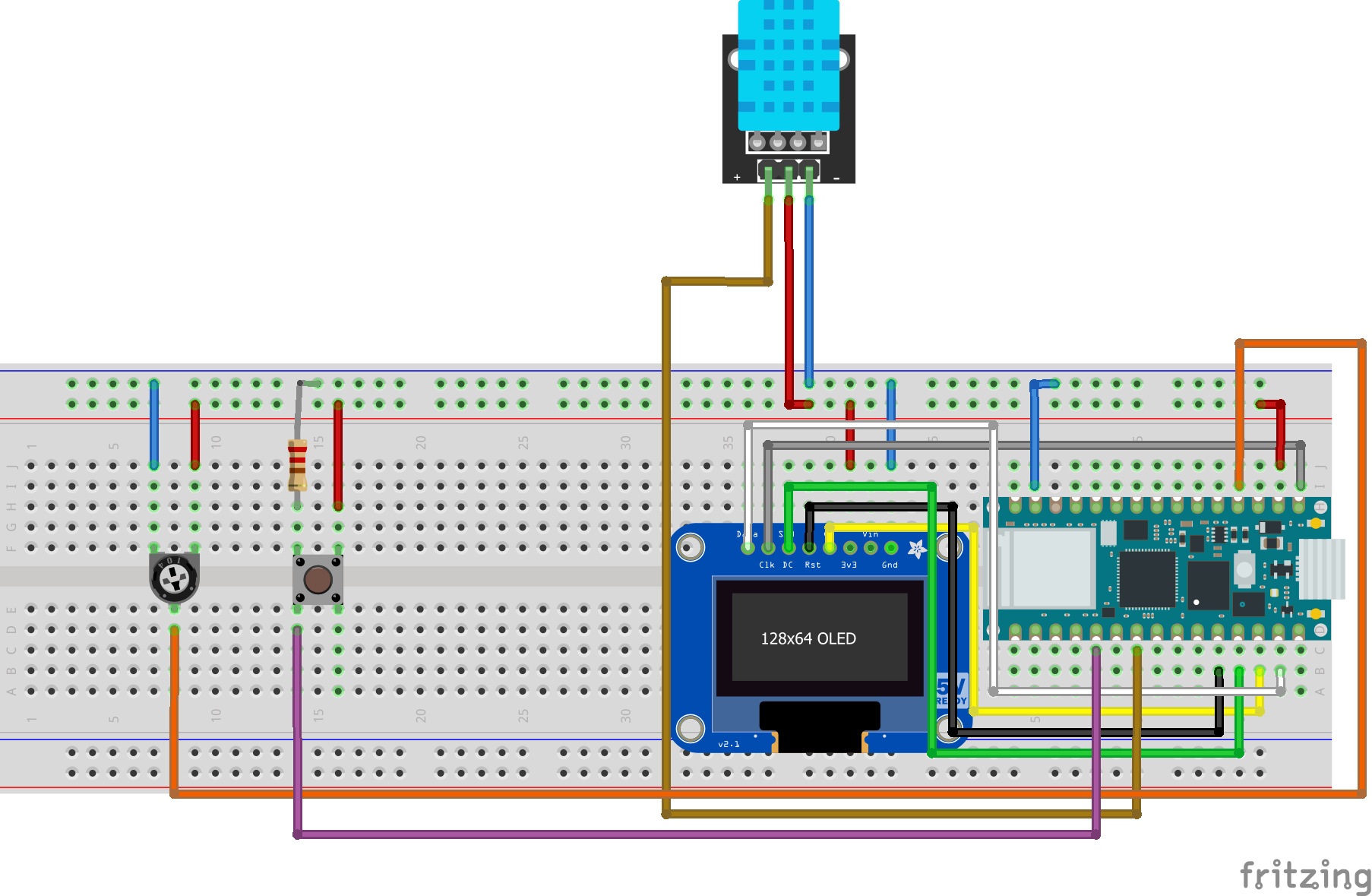
First, take the DHT sensor and connect the following pins to the Arduino
- Data(The pin on the left) to D4
- VCC(The pin in the middle) to +3v3
- GND(The pin on the right) to GND
Next, bring out the OLED display
- RES to D8
- D/C to D9
- CS to D10
- CLK to D13
- DIN to D11
- GND to GND VCC to +3v3
Now we can connect the potentiometer
- The single pin to A0
- The first double pin on the Left to +3v3
- The second double pin on the right to GND
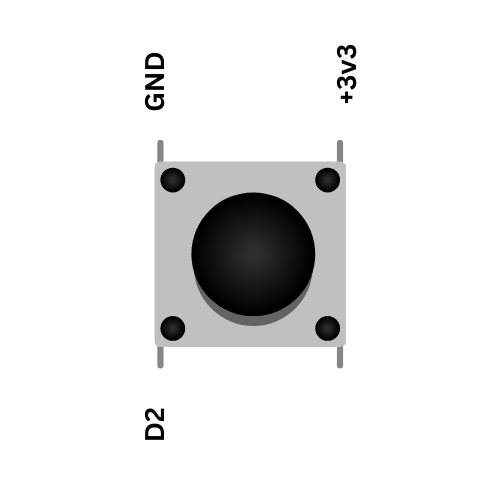
Finally, connect the button as shown in the following image.
How the WeatherBot works
The home screen of the weather shows the current temperature in Celsius and WeatherBot. The next screen you can go to by turning the potentiometer shows the current temperature and humidity. The final screen shows recommendations on what you should wear for the day. The screen displays current alerts such as Rain or Snow when pressing and holding the button.
EXPANDED TECHNICAL DETAILS
Fetching the Forecast (API Integration)
The robot requires an internet connection via the **ESP8266 or ESP32**.
- The Request: The ESP makes an HTTP GET request to a service like `OpenWeatherMap.org` API.
- The Result: The server returns a JSON string containing the forecast.
- The Parse: The `Arduino_JSON` library searches for the keyword `"weather": "Rain"`.
Executing the Animatronics
Once the ESP parses the weather state, it drives servo motors to execute physical actions:
- `If (condition == "Rain")`: The Arduino triggers Servo 1. A mechanical arm raises a 3D-printed umbrella over the robot's head. LEDs flash blue.
- `If (condition == "Clear")`: Servo 1 lowers the umbrella. Servo 2 drops a pair of sunglasses over the robot's eyes!
- `If (condition == "Wind")`: A DC motor spins a tiny fan blade on the robot's chest.
Advanced Hardware Needed
- ESP8266 NodeMCU: To pull the internet API data.
- Multiple Micro Servos (SG90): The actuators.
- Small DC Motor: For wind effects.
- NeoPixels: For environmental lighting.
- A creative chassis: Cardboard, Lego, or 3D printed parts.