The project is intended to demonstrate Pod IoT security solution – SAFE2 applet which may be used to obtain securely and in the authenticated way the configuration data from a cloud server.
The SAFE2 applet is based on the expansion of the GSMA IoT SAFE idea. The applet is intended for the simplest and constrained IoT devices to provide bi-directional secure data exchange with a server.
The solution is suitable to improve communication security level of already deployed projects, where the free hardware resources are not available to implement cryptographic protocols.
SAFE2
The SAFE2 applet in the SIM contains an implementation of the TLS1.3 protocol in Pre Shared Key mode. The SIM not only contains the protocols logic but also stores the unique Pre Shared Key (PSK). The SIM is able to proceed PSK updates via OTA commands in secure manner.
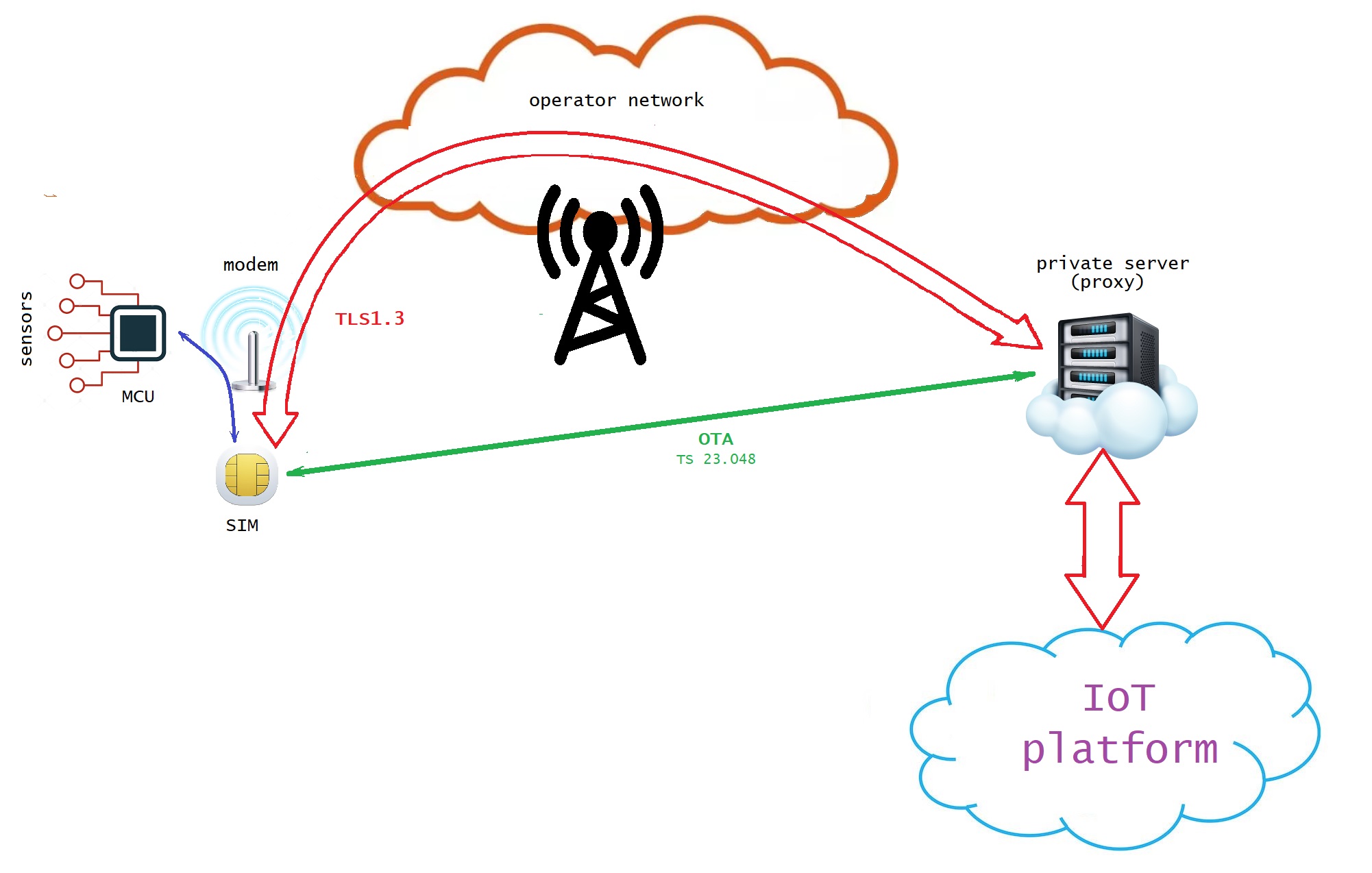
The SIM stores an url, endpoint and port number to access the server (IoT platform).
The SIM is responsible for all the protocol steps including domain name resolving and for repeating attempts until the request will be delivered to the server.
To get configuration data from a server via SAFE2 applet, the Device Application shall send specific commands to the SIM by means of Modem Middleware - AT commands for generic SIM access, namely “AT+CSIM”.
First of all the supplementary logical channel must be open (to not interfere with the GSM session between the modem and the SIM in the base channel). Then the applet must be selected in the new logical channel and a specific command shall be send to the applet to initiate the HTTP GET request to the server. Each GET request contains the ICCID of the SIM (unique identifier of the SIM card) and the DeviceID which shall be provided by the Device Application in advance. The SIM will establish TLS 1.3 session and pass the request in encrypted and authenticated way to the proxy. The proxy will forward the request from the SIM to the server and the response from the server to the SIM. The Device Application shall poll the status of the request and collect the data when they will be available. The supplementary logical channel shall be closed at the end for reuse.
Configuration data
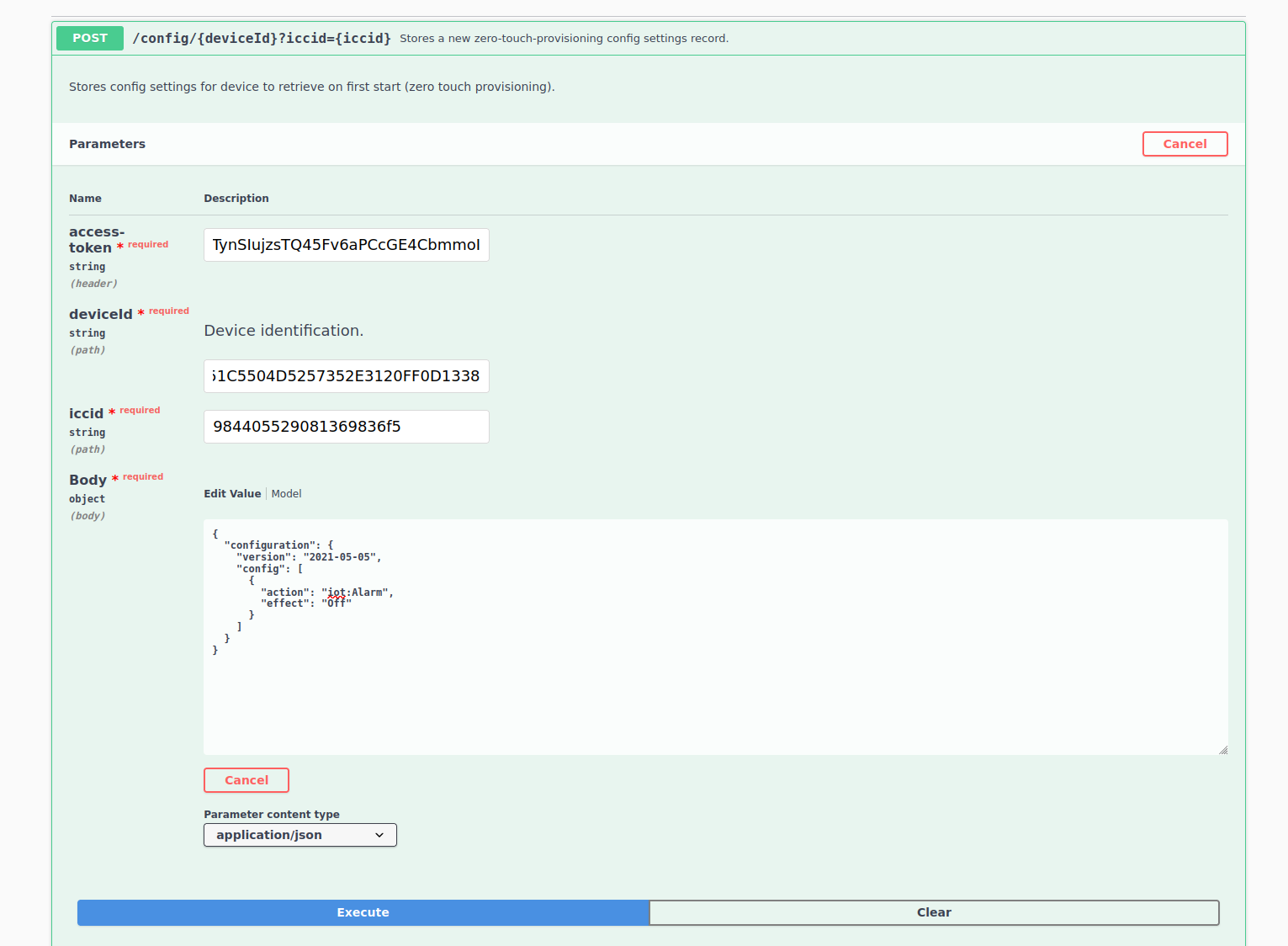
The configuration data shall be setup by means of Luner IoT Suite.
To create configuration the access token shall be obtained via the credentials provided.
Device ID is the unique identifier of the Arduino MKR GSM 1400 board. The scetch contains the code to extract Device ID and provide it to the SAFE2 applet.
The ICCID is the unique identifier of the SIM card used.
The "Body" contains the configuration which will be delivered in clear to the device from the SIM. The Body shall be less than 255 characters.
The Device Application shall be able to parse the configuration data provided.
Execution Log
The log provided below shows 2 configuration events. After starting of the device (23:36:58.376), the modem returned registration status "Registered in roaming" (23:37:05.412-23:37:14.656).
23:36:55.420 -> MKR AT
23:36:55.420 -> B58D51C5504D5257352E3120FF0D1338
23:36:55.420 -> at
23:36:55.818 -> at
23:36:56.216 -> at
23:36:56.615 -> at
23:36:57.015 -> at
23:36:57.413 -> at
23:36:57.811 -> at
23:36:58.210 -> at
23:36:58.309 -> AT
23:36:58.376 -> OK
23:36:59.205 -> at+creg?
23:36:59.238 -> 0:0
23:36:59.238 -> cntr: 0
23:37:00.766 -> at+creg?
23:37:00.799 -> 0:0
23:37:00.799 -> cntr: 0
23:37:02.292 -> at+creg?
23:37:02.325 -> 0:0
23:37:02.325 -> cntr: 0
23:37:03.818 -> at+creg?
23:37:03.885 -> 0:0
23:37:03.885 -> cntr: 0
23:37:05.379 -> at+creg?
23:37:05.412 -> 0:5
23:37:05.412 -> cntr: 1
23:37:06.915 -> at+creg?
23:37:06.948 -> 0:5
23:37:06.948 -> cntr: 2
23:37:08.443 -> at+creg?
23:37:08.510 -> 0:5
23:37:08.510 -> cntr: 3
23:37:10.004 -> at+creg?
23:37:10.038 -> 0:5
23:37:10.038 -> cntr: 4
23:37:11.532 -> at+creg?
23:37:11.566 -> 0:5
23:37:11.566 -> cntr: 5
23:37:13.094 -> at+creg?
23:37:13.127 -> 0:5
23:37:13.127 -> cntr: 6
23:37:14.622 -> at+creg?
23:37:14.656 -> 0:5
23:37:14.656 -> cntr: 7
23:37:15.651 -> setup finished
The Device ID B58D51C5504D5257352E3120FF0D1338 was submitted to the SIM (23:37:16.017) and the Device Application sent a request for configuration data (23:37:17.346).
23:37:15.751 -> at+csim=10,"0070000001"
23:37:15.751 -> +CSIM: 6,"019000"
23:37:15.751 ->
23:37:15.751 -> OK
23:37:15.884 -> at+csim=34,"01A4040C0CF0706F646773616665320101"
23:37:15.884 -> +CSIM: 4,"9000"
23:37:15.884 ->
23:37:15.884 -> OK
23:37:16.017 -> at+csim=42,"01DA02C010B58D51C5504D5257352E3120FF0D1338"
23:37:16.017 -> +CSIM: 4,"9000"
23:37:16.017 ->
23:37:16.017 -> OK
23:37:16.083 -> at+csim=10,"0070800100"
23:37:16.083 -> +CSIM: 4,"9000"
23:37:16.083 ->
23:37:16.083 -> OK
23:37:16.083 -> Set Device ID: OK
23:37:16.183 -> at+csim=10,"0070000001"
23:37:16.183 -> +CSIM: 6,"019000"
23:37:16.183 ->
23:37:16.183 -> OK
23:37:16.316 -> at+csim=34,"01A4040C0CF0706F646773616665320101"
23:37:16.316 -> +CSIM: 4,"9000"
23:37:16.316 ->
23:37:16.316 -> OK
23:37:17.346 -> at+csim=10,"01CA000000"
23:37:17.346 -> +CSIM: 516,"6467736166653
Than the Device Application was polling the status of the SAFE2 applet each 15 seconds (23:37:32.429, 23:37:47.512, 23:38:17.672).
23:37:32.429 -> at+csim=10,"01CC020000"
23:37:32.429 -> +CSIM: 12,"000100009000"
23:37:32.429 ->
23:37:32.429 -> OK
23:37:32.429 -> receiving state: 1
23:37:47.512 -> at+csim=10,"01CC020000"
23:37:47.512 -> +CSIM: 12,"000100009000"
23:37:47.512 ->
23:37:47.512 -> OK
23:37:47.512 -> receiving state: 1
23:38:02.594 -> at+csim=10,"01CC020000"
23:38:02.594 -> +CSIM: 12,"000100009000"
23:38:02.594 ->
23:38:02.594 -> OK
23:38:02.594 -> receiving state: 1
23:38:17.672 -> at+csim=10,"01CC020000"
23:38:17.672 -> +CSIM: 12,"000700009000"
23:38:17.672 ->
23:38:17.672 -> OK
23:38:17.672 -> receiving state: 7
As soon as the status became "Data Available" the Device Application requested the data (23:38:17.938), got them back (23:38:17.938) and decoded the JSON data. The configuration was applied, i.e. the LED was switched ON.
23:38:17.938 -> at+csim=10,"01CA010000"
23:38:17.938 -> +CSIM: 184,"7B22636F6E66696775726174696F6E223A7B2276657273696F6E223A22323032312D30352D3035222C22636F6E666967223A5B7B22616374696F6E223A22696F743A416C61726D222C22656666656374223A224F6E227D5D7D7D9000"
23:38:17.938 ->
23:38:17.938 -> OK
23:38:17.938 -> received:90
23:38:17.938 -> {"configuration":{"version":"2021-05-05","config":[{"action":"iot:Alarm","effect":"On"}]}}
23:38:17.938 -> configuration version: 2021-05-05
23:38:17.938 -> iot:Alarm configured as ON
After closing of the supplementary logical channel (23:38:18.004) Device Application started waiting and in 5 minutes (23:43:17.836) initiated the next loop. During the waiting the configuration was updated at the server side to switch off the alarm (LED).
23:38:18.004 -> at+csim=10,"0070800100"
23:38:18.004 -> +CSIM: 4,"9000"
23:38:18.004 ->
23:38:18.004 -> OK
23:38:18.004 -> waiting.....
23:43:17.836 -> at+csim=10,"0070000001"
23:43:17.836 -> +CSIM: 6,"019000"
23:43:17.836 ->
23:43:17.836 -> OK
23:43:17.970 -> at+csim=34,"01A4040C0CF0706F646773616665320101"
23:43:17.970 -> +CSIM: 4,"9000"
23:43:17.970 ->
23:43:17.970 -> OK
The Device Application again sent a request for configuration data (23:43:19.034) and after the first poll (23:43:34.102) obtained a response "Data available". The request was processed faster during the second loop as the url was already resolved and cashed by the SAFE2 applet.
The Device Application got the configuration data at 23:43:34.368.
This time the configuration contained "effect":"Off" and the LED was switched off.
At the end of getting the configuration data the supplementary logical channel was closed and the next waiting started at 23:43:34.435.
23:43:19.034 -> at+csim=10,"01CA000000"
23:43:19.034 -> +CSIM: 516,"6467736166653
23:43:34.102 -> at+csim=10,"01CC020000"
23:43:34.102 -> +CSIM: 12,"000700009000"
23:43:34.102 ->
23:43:34.102 -> OK
23:43:34.102 -> receiving state: 7
23:43:34.368 -> at+csim=10,"01CA010000"
23:43:34.368 -> +CSIM: 186,"7B22636F6E66696775726174696F6E223A7B2276657273696F6E223A22323032312D30352D3035222C22636F6E666967223A5B7B22616374696F6E223A22696F743A416C61726D222C22656666656374223A224F6666227D5D7D7D9000"
23:43:34.368 ->
23:43:34.368 -> OK
23:43:34.368 -> received:91
23:43:34.368 -> {"configuration":{"version":"2021-05-05","config":[{"action":"iot:Alarm","effect":"Off"}]}}
23:43:34.368 -> configuration version: 2021-05-05
23:43:34.368 -> iot:Alarm configured as OFF
23:43:34.435 -> at+csim=10,"0070800100"
23:43:34.435 -> +CSIM: 4,"9000"
23:43:34.435 ->
23:43:34.435 -> OK
23:43:34.435 -> waiting
EXPANDED TECHNICAL DETAILS
Enterprise-Grade IoT Security Hub
This advanced project demonstrates Zero Touch Provisioning (ZTP) for IoT devices, allowing them to securely self-configure using high-level TLS 1.3 encryption.
- Luner IoT Suite Authentication: The Arduino (WiFi/Ethernet enabled) uses the Luner Suite to authenticate with a central server. The ZTP process ensures that the device receives its unique certificates and configurations without any manual user setup.
- Hardware-Accelerated Encryption: (Advanced version) Utilizes the Arduino's cryptographic co-processors (if available) to handle the heavy math of the TLS 1.3 handshake, ensuring a secure and fast connection to the corporate server.
Performance
- Encrypted Field Deployment: Allows Arduinos to be shipped directly to remote locations; as soon as they are powered on and connected to the web, they securely download their operational firmware over the encrypted TLS tunnel.