Arduino App with RT-Thread
Introduction
คำว่า "app" ในบทความนี้หมายถึงไฟล์ไบนารีที่คอมไพล์ไว้ล่วงหน้า ซึ่งสามารถรันได้โดยตรงบนบอร์ด Arduino โดยไม่ต้องใช้ Arduino IDE
และเนื่องจากเป็นไฟล์ "app" จึงสามารถแจกจ่ายผ่าน SD card, Ethernet, WiFi หรือวิธีการอื่นๆ ที่เหมาะสมได้
แผนภาพในหัวข้อเรื่องแสดงบอร์ด MKR ZERO กำลังรัน Arduino app, RTT-QRCode.
คุณสนใจไหม?
(บทความนี้อ้างอิงจาก Arduino RT-Thread library v0.6.0)
### Dynamic Moduleในสถาปัตยกรรมของ RT-Thread นั้น "app" เรียกว่า dynamic module ซึ่งสร้างขึ้นเป็น dynamic shared library ที่มีนามสกุล ".mo" หรือ ".so". (RT-Thread คืออะไร? => Multitasking on Arduino)
RT-Thread มี API สำหรับเข้าถึง dynamic module และที่น่าสนใจยิ่งกว่าคือ MSH (tiny shell ขนาดเล็ก) สามารถรันไฟล์ ".mo" ได้โดยตรง (รายละเอียดอยู่ในส่วนถัดไป)
ดูเหมือนว่า dynamic linker ดั้งเดิมของ RT-Thread จะทำงานได้ไม่ดีกับ ARM Cortex-M ดังนั้นผมจึงแก้ไขโค้ดสำหรับ Arduino RT-Thread library
### MSHModule SHell (MSH) เป็นคุณสมบัติใหม่ที่เปิดใช้งานโดยค่าเริ่มต้น (ตั้งแต่ v0.5.1 เป็นต้นไป) ซึ่งสร้างขึ้นบน FinSH (FinSH คืออะไร? => Multitasking on Arduino)
เนื่องจาก Arduino app รันด้วย MSH เรามาทำความเข้าใจโดยสรุปกัน
เมื่อเทียบกับ FinSH แล้ว MSH จะสอดคล้องกับพฤติกรรมการใช้งานของ Unix shell มากกว่า:
- การออกคำสั่งใน FinSH
led(0, 1)
copy("datalog.txt", "copy.txt")
- การออกคำสั่งใน MSH
led 0 1
cp datalog.txt copy.txt
อย่างไรก็ตาม MSH ไม่รองรับ shell variables เหมือนกับที่ FinSH มีให้
ข้อจำกัดอีกประการคือ prototype ของคำสั่ง MSH ที่ผู้ใช้กำหนดไว้จะตายตัว:
int my_msh_cmd(int argc, char **argv)
เมื่อ MSH รันคำสั่งของผู้ใช้ พารามิเตอร์ argc จะเป็น จำนวนอาร์กิวเมนต์บวกหนึ่ง และ argv จะเป็น รายการอาร์กิวเมนต์ (รายการแรกคือชื่อคำสั่ง) อย่างที่คุณอาจเดาได้ พารามิเตอร์ทั้งหมดสามารถเป็นได้แค่ชนิด char array เท่านั้น
ต่อไปนี้คือตัวอย่าง "led" ในรูปแบบคำสั่ง MSH
int led(int argc, char **argv) {
  // argc - the number of arguments
  // argv[0] - command name, e.g. "led"
  // argv[n] - nth argument in the type of char array

  rt_uint32_t id;
  rt_uint32_t state;

  if (argc != 3) {
    rt_kprintf("Usage: led  \n");
    return 1;
  }
  rt_kprintf("led%s=%s\n", argv[1], argv[2]);

  // convert arguments to their specific types
  sscanf(argv[1], "%u", &id);
  sscanf(argv[2], "%u", &state);
  if (id != 0) {
    rt_kprintf("Error: Invalid led ID\n");
    return 1;
  }

  if (state) {
    digitalWrite(LED_BUILTIN, HIGH);
  } else {
    digitalWrite(LED_BUILTIN, LOW);
  }

  return 0;
}
อันดับแรก ให้เปิดใช้งาน CONFIG_USING_MODULE ในไฟล์ "rtconfig.h" เนื่องจากถูกปิดใช้งานโดยค่าเริ่มต้น
สร้างไฟล์ Executable
มาเปิดตัวอย่าง "HelloMo" ใน Arduino IDE แล้วกด "Verify" (ตัวอย่างนี้มีอยู่ในส่วน "Code" ด้านล่างด้วย) ตอนนี้โค้ดถูกสร้างเป็นไฟล์ executable ไฟล์เดียว ซึ่งรวม sketch และ libraries เราอาจใช้เครื่องมือ GCC readelf (ที่มีให้พร้อม Arduino IDE) เพื่อตรวจสอบ
{path_to_gcc_tools}\\arm-none-eabi-readelf -h {path_to_output}\\HelloMo.ino.elf
ELF Header:
 Magic:   7f 45 4c 46 01 01 01 00 00 00 00 00 00 00 00 00
 Class:                             ELF32
 Data:                              2's complement, little endian
 Version:                           1 (current)
 OS/ABI:                            UNIX - System V
 ABI Version:                       0
 Type:                              EXEC (Executable file)
 Machine:                           ARM
 Version:                           0x1
 Entry point address:               0xf7fd
 Start of program headers:          52 (bytes into file)
 Start of section headers:          798052 (bytes into file)
 Flags:                             0x5000002, has entry point, Version5 EABI
 Size of this header:               52 (bytes)
 Size of program headers:           32 (bytes)
 Number of program headers:         2
 Size of section headers:           40 (bytes)
 Number of section headers:         18
 Section header string table index: 15
หากคุณไม่แน่ใจเกี่ยวกับตำแหน่งของเครื่องมือ GCC และผลลัพธ์การคอมไพล์ โปรดเปิดใช้งานตัวเลือกต่อไปนี้ใน File-> Preferences
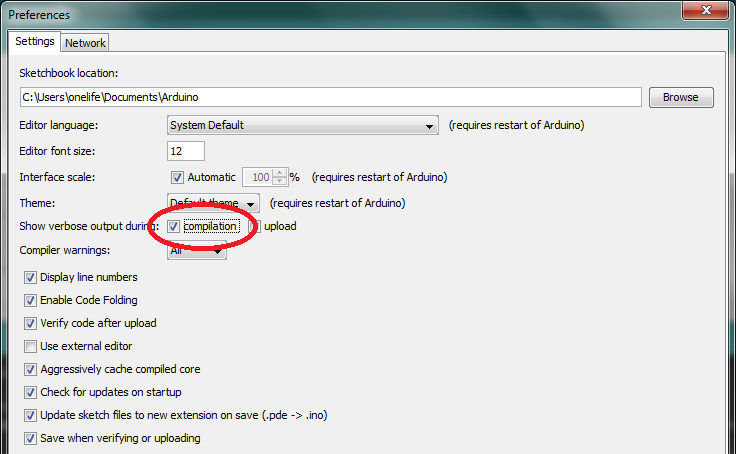
เมื่อคลิก "Verify" อีกครั้ง คุณจะเห็นข้อมูลในหน้าต่าง output:
...
Compiling sketch...
"C:\\Users\\onelife\\AppData\\Local\\Arduino15\\packages\\arduino\\tools\\arm-none-eabi-gcc\\4.8.3-2014q1/bin/arm-none-eabi-gcc" -mcpu=cortex-m0plus -mthumb -c -g -Os -Wall -Wextra -std=gnu11 -ffunction-sections -fdata-sections -nostdlib --param max-inline-insns-single=500 -MMD -DF_CPU=48000000L -DARDUINO=10809 -DARDUINO_SAMD_MKRZERO -DARDUINO_ARCH_SAMD -DUSE_ARDUINO_MKR_PIN_LAYOUT -D__SAMD21G18A__ -DUSB_VID=0x2341 -DUSB_PID=0x804f -DUSBCON "-DUSB_MANUFACTURER=\"Arduino LLC\"" "-DUSB_PRODUCT=\"Arduino MKRZero\"" "-IC:\\Users\\onelife\\AppData\\Local\\Arduino15\\packages\\arduino\\tools\\CMSIS\\4.5.0/CMSIS/Include/" "-IC:\\Users\\onelife\\AppData\\Local\\Arduino15\\packages\\arduino\\tools\\CMSIS-Atmel\\1.1.0/CMSIS/Device/ATMEL/" "-IC:\\Users\\onelife\\AppData\\Local\\Arduino15\\packages\\arduino\\hardware\\samd\\1.6.21\\cores\\arduino" "-IC:\\Users\\onelife\\AppData\\Local\\Arduino15\\packages\\arduino\\hardware\\samd\\1.6.21\\variants\\mkrzero" "-IC:\\Users\\onelife\\Documents\\Arduino\\libraries\\RT-Thread\\src" "-IC:\\Users\\onelife\\AppData\\Local\\Arduino15\\packages\\arduino\\hardware\\samd\\1.6.21\\libraries\\SPI