e-structure UNO
ระบบ ε-structure UNO (ภาพที่ 1, 2 และ 3) นำเสนอตัวเองในฐานะข้อเสนอระบบทดลองสำหรับ Structural Health Monitoring (SHM) โดยใช้แพลตฟอร์ม Arduino® เพื่อวัดปริมาณต่อไปนี้: strain, displacement, force และ temperature
ระบบนี้มี hardware ที่เข้ากันได้กับบอร์ด Arduino® รุ่น UNO R3 รวมถึง software สำหรับอุปกรณ์มือถือ (smartphones และ tablets) ที่ใช้ระบบปฏิบัติการ Android® ซึ่งพัฒนาขึ้นผ่านแพลตฟอร์ม MIT App Inventor
เวอร์ชันนี้เข้ากันได้กับ sensors / transducers ต่อไปนี้:
· Temperature sensor DS18B20®.
การพัฒนาระบบทดลองเวอร์ชันอื่น (ก่อนหน้า ε-structure UNO) เกิดขึ้นในระหว่างการทำวิจัยระดับปริญญาโทสาขาวิทยาศาสตร์ของนักพัฒนา ด้วยเหตุนี้ ข้อมูลเพิ่มเติมสามารถหาได้จากการอ้างอิง วิทยานิพนธ์.
คุณสามารถดาวน์โหลด คู่มือพื้นฐานสำหรับการสร้างและการใช้งาน ε-structure UNO ได้ที่ link www.e-structure.org ปัจจุบันมีเวอร์ชันภาษาอังกฤษและโปรตุเกส
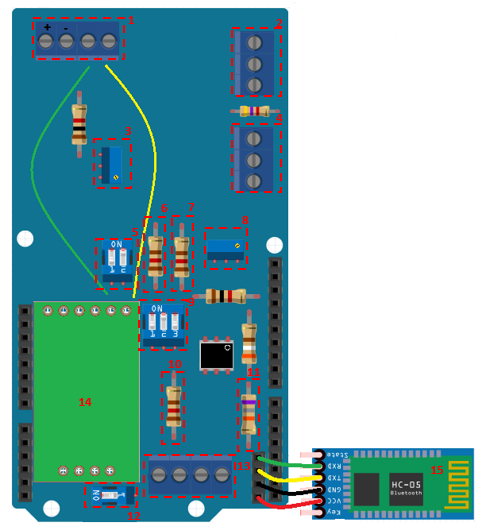
การใช้งานระบบ ε-structure UNO ต้องใช้ทั้ง hardware ที่เชื่อมต่อกับ Arduino® UNO และ sensors ที่เข้ากันได้ รวมถึงการทำงานของ software ซึ่งทั้งหมดจะอธิบายไว้ด้านล่าง ส่วนประกอบ hardware ที่เกี่ยวข้องจะแสดงรายการด้านล่างตามลำดับหมายเลขในภาพที่ 1:
1. Terminal สำหรับเชื่อมต่อกับ load cell;
2. Terminal สำหรับเชื่อมต่อกับ displacement transducer;
3. Potentiometer สำหรับปรับค่าที่อ่านได้จาก load cell;
4. Terminal สำหรับเชื่อมต่อกับ temperature sensor;
5. Switch สำหรับตั้งค่าการเชื่อมต่อประเภท ¼ bridge¹, ½ bridge¹ และ complete bridge¹;
6. Resistor² แบบถอดได้ (120Ω, หรือ 350 Ω หรือ 1000 Ω, ขึ้นอยู่กับการใช้งาน);
7. Resistor² (100Ω หรือ 120Ω - มีค่าเท่ากับข้อ 10) แบบ fixed;
8. Potentiometer สำหรับปรับค่าที่อ่านได้จาก strain gauge;
9. Switch สำหรับตั้งค่าการเชื่อมต่อประเภท ¼ bridge¹, ½ bridge¹ และ complete bridge¹;
10. Resistor² (100Ω หรือ 120Ω - มีค่าเท่ากับข้อ 7) แบบ fixed;
11. Resistor Shunt (68, 1kΩ, หรือเปลี่ยนเป็นความต้านทานที่ต้องการได้) แบบถอดได้;
12. Switch สำหรับตั้งค่าการเชื่อมต่อประเภท ¼ bridge¹, ½ bridge¹ และ complete bridge¹;
13. Terminal สำหรับเชื่อมต่อกับ strain gauge;
14. HX711 module แบบถอดได้;
15. Bluetooth module HC-05 แบบถอดได้
¹ วงจร Wheatstone Bridge;
²Tolerance min. 0.1% และ TCR min. ±10 ppm/°C.
รายการวัสดุและส่วนประกอบพร้อมข้อมูลโดยละเอียดสามารถหาได้จากคู่มือที่ดาวน์โหลดได้ที่ www.e-structure.org
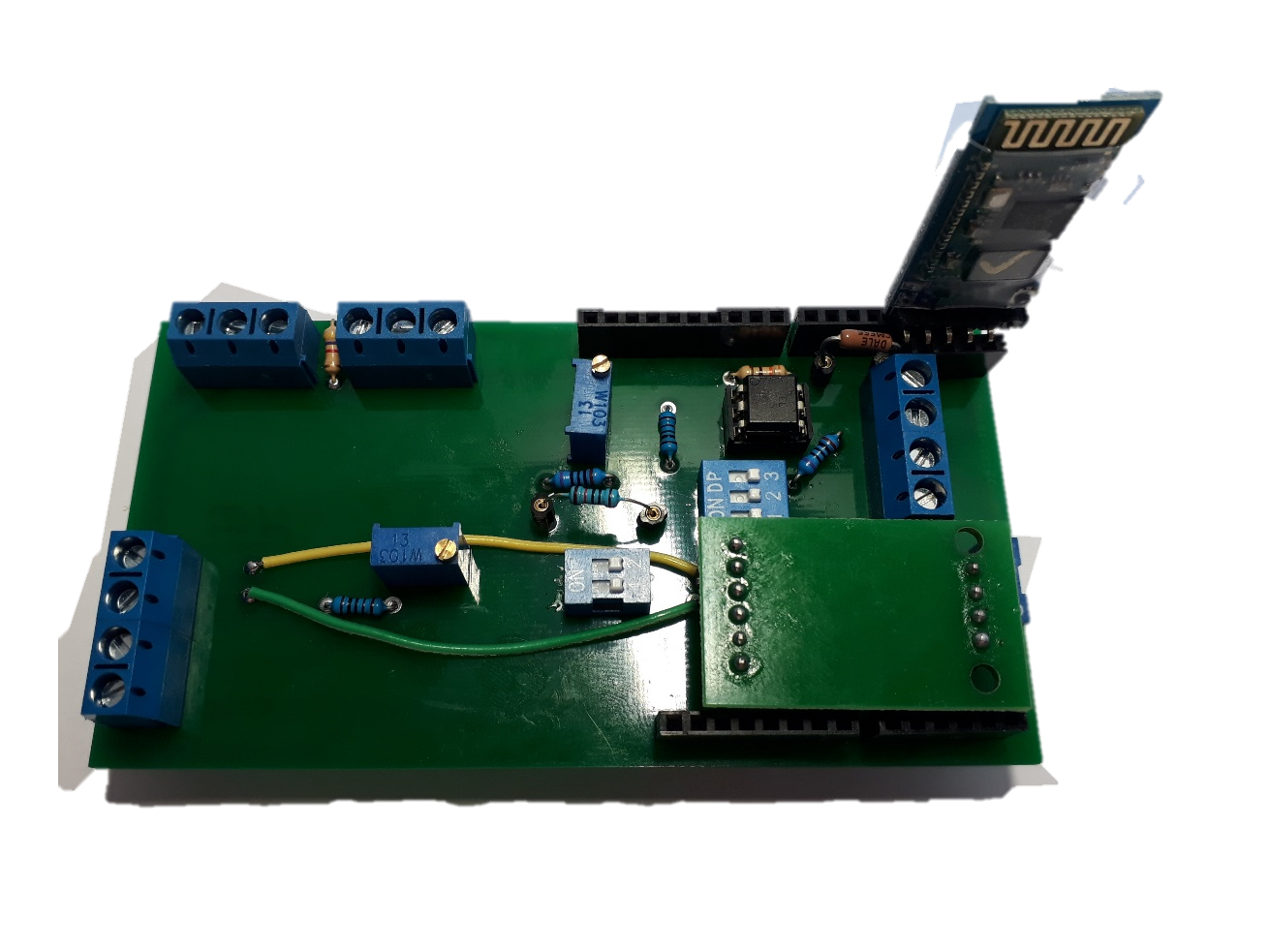
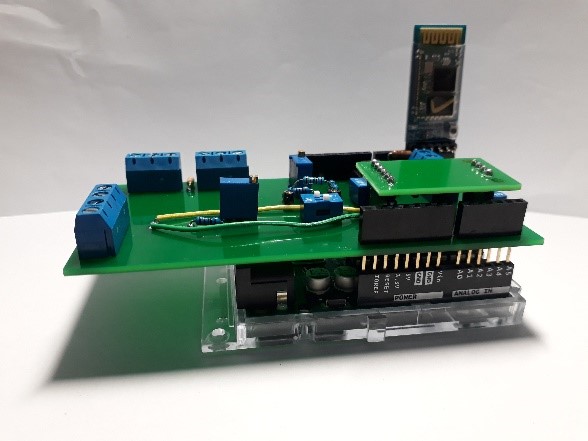
วิดีโอนี้อธิบายถึง hardware ของ ε-structure UNO
การพัฒนา Software สำหรับมือถือ
software ของระบบ ε-structure UNO ได้รับการพัฒนาผ่านแพลตฟอร์ม MIT App Inventor Beta 2 (http://ai2.appinventor.mit.edu หรือ http://appinventor.mit.edu) ซึ่งมีให้ใช้งานทั้งในรูปแบบ executable file (apk) เมื่อร้องขอจากผู้พัฒนา และไฟล์ที่แก้ไขได้ (aia) ใน MIT App Inventor Gallery (ภาพที่ 4) ในการเข้าถึง Gallery ให้สร้างบัญชี Gmail® ที่ถูกต้องและเชื่อมต่อกับ browser ของคุณ ซึ่งควรเป็น Google® Chrome
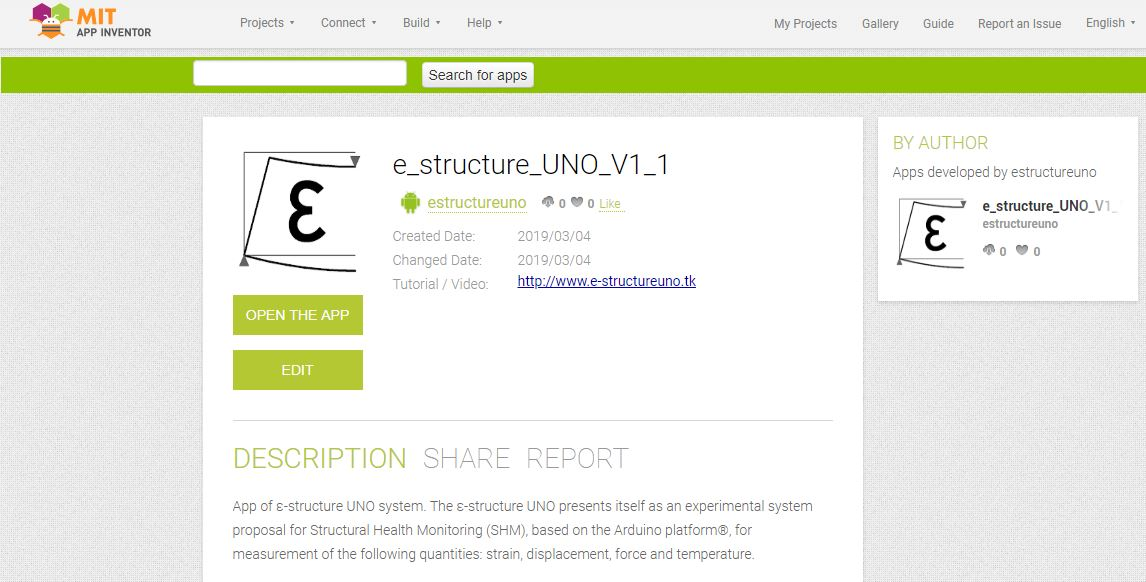
ในการค้นหา App code คุณจะต้องเข้าถึง link ต่อไปนี้: http://ai2.appinventor.mit.edu/?galleryId=5191132288516096 และดูวิดีโอต่อไปนี้
วิดีโอนี้อธิบายการสร้าง App file และการกำหนดค่า Firebase server
องค์ประกอบของ user interface มีรายละเอียดด้านล่างตามหมายเลขในภาพที่ 5
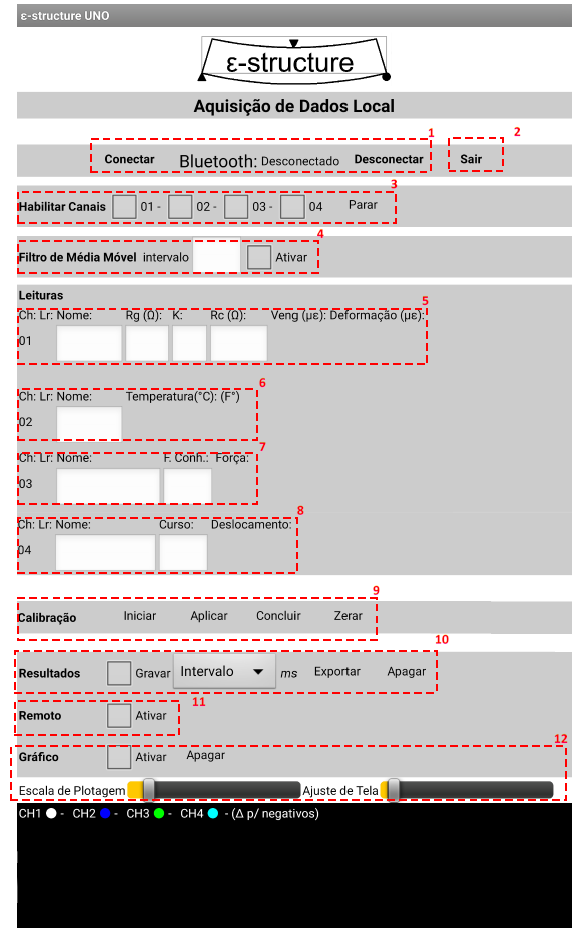
1. ปุ่ม Connect (Conectado) และ Disconnect (Disconectado) ช่วยให้คุณสามารถโต้ตอบกับ Bluetooth® module รวมถึงตรวจสอบสถานะการเชื่อมต่อ (connected หรือ disconnected) ได้;
2. ปุ่ม Exit (Sair) ช่วยให้คุณออกจากหน้าจอ Local Acquisition ซึ่งจะสิ้นสุดการเก็บข้อมูลและบันทึกข้อมูลลงในหน่วยความจำของอุปกรณ์ หากเลือกตัวเลือก Record (Gravar) (รายการที่ 12 - Results);
3. เลือก channels ที่จะสามารถอ่านได้โดยใช้ CheckBox แต่ละอัน ปุ่ม Stop (Sair) จะปิดการเก็บข้อมูล;
4. คุณสามารถใช้ Moving Average Filter ก่อนได้ โดยป้อนช่วงค่าเฉลี่ย (numeric value) จากนั้นเปิดใช้งานคุณสมบัตินี้โดยใช้ CheckBox คุณสมบัติ Moving Average Filter นี้ไม่มีในไฟล์ "aia" ที่มีอยู่ใน MIT App Inventor Gallery เนื่องจากต้องอาศัยการติดตั้ง extension ภายนอกที่ไม่รองรับโดย Gallery
5. Ch หมายถึง channel ในกรณีนี้คือ Channel 01 ซึ่งเป็น re