ประเภทของ 7 Segment Display
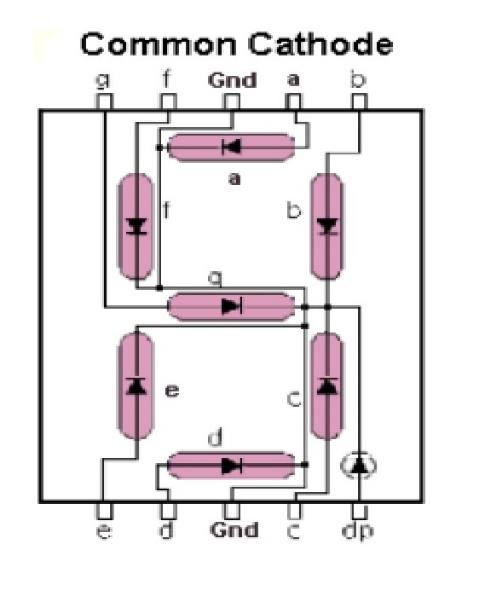
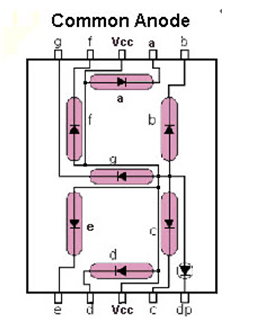
7-segment display แบบ LED มีสองประเภท ได้แก่ Common Cathode (CC) และ Common Anode (CA).
1.Common Cathode
ใน 7 segment display แบบ Common Cathode การเชื่อมต่อแคโทดทั้งหมดของ LED segment จะเชื่อมต่อเข้าด้วยกันกับ logic 0 หรือ ground เราใช้ logic 1 ผ่าน current limiting resistor เพื่อให้เกิด forward bias ที่ขั้ว anode ของแต่ละ segment ตั้งแต่ a ถึง g.
2.Common Anode
ในขณะที่ 7 segment display แบบ Common Anode การเชื่อมต่อ anode ทั้งหมดของ LED segment จะเชื่อมต่อเข้าด้วยกันกับ logic 1 เราใช้ logic 0 ผ่าน current limiting resistor ไปยังแคโทดของ segment เฉพาะแต่ละตัว ตั้งแต่ a ถึง g.
ขั้นตอนในการทำโปรเจกต์นี้:
1. รวบรวมส่วนประกอบต่างๆ เช่น Arduino Uno/ Nano, 7 segment display (Common Anode / Common Cathode), Breadboard, Jumper wires.
2. สำหรับการเชื่อมต่อแบบ Common Cathode:
ดูแผนภาพการเชื่อมต่อของ Common Cathode
3. สำหรับการเชื่อมต่อแบบ Common Anode:
ดูแผนภาพการเชื่อมต่อของ Common Anode
4. อัปโหลดโค้ดที่เกี่ยวข้อง.
คุณได้เรียนรู้วิธีการเชื่อมต่อ 7 segment display.
เยี่ยมชมเว็บไซต์ของฉันจากลิงก์ด้านล่างสำหรับโปรเจกต์เพิ่มเติม:
https://electronicsisfun08.blogspot.com/
รายละเอียดทางเทคนิคเพิ่มเติม
พื้นฐานการแสดงผลตัวเลข
คู่มือฉบับสมบูรณ์นี้ให้พิมพ์เขียวทางเทคนิคสำหรับการเชื่อมต่อ 7-segment display ทั้งแบบหลักเดียวและหลายหลักเข้ากับ Arduino.
- การวิเคราะห์ Direct Drive เทียบกับ Multiplexing: อธิบายความแตกต่างระหว่างการกำหนดค่า "Common Anode" และ "Common Cathode" โปรเจกต์นี้แสดงให้เห็นถึงการใช้ current-limiting resistor (เช่น 220Ω) ในแต่ละ segment เพื่อป้องกัน LED เสียหาย.
- เมทริกซ์การปรับ Pin ให้เหมาะสม: แสดงวิธีการใช้ 74HC595 Shift Register เพื่อควบคุม 7-segment display ทั้งหมดโดยใช้เพียง 3 data pin ซึ่งจำเป็นสำหรับโปรเจกต์ที่ต้องการ sensors อื่นๆ จำนวนมาก.
ศูนย์รวมซอฟต์แวร์
- Bitmask Rendering Kernel: มีไลบรารีโค้ดที่แมปตัวเลข 0-9 ไปยัง 8-bit segment byte ทำให้ผู้ใช้สามารถแสดงจำนวนเต็มใดๆ ได้ด้วยการเรียกใช้ฟังก์ชันเพียงครั้งเดียว.